EasyManua.ls Logo

Casio CFX-9800G - Page 72

Casio CFX-9800G
206 pages
Print Icon
To Next Page IconTo Next Page
To Previous Page IconTo Previous Page
Loading...
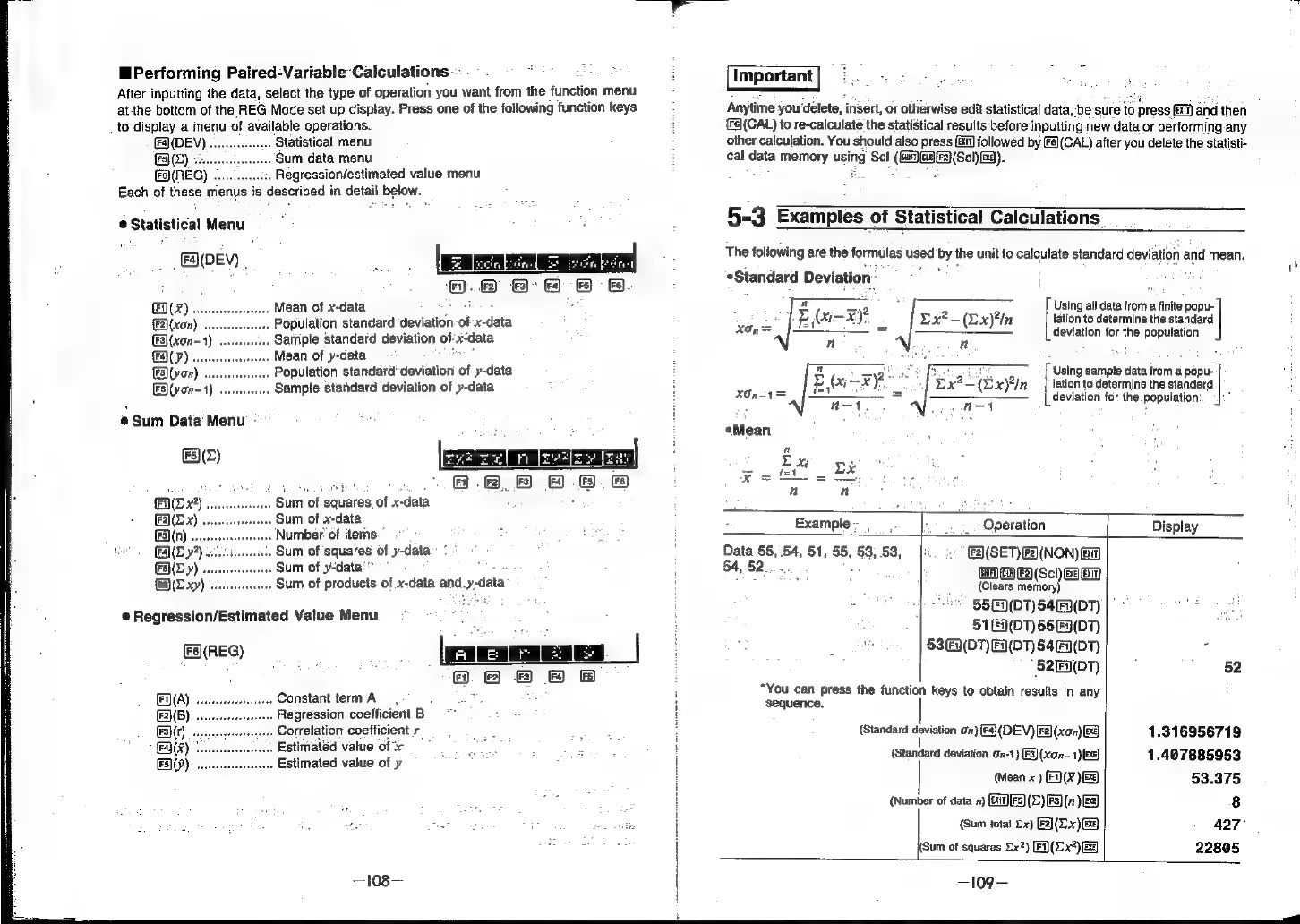
Performing
Paired-Variable
Calculations
-
-
After
inputting
the
data,
select
the
type
of
operation
you
want
from
the
function
menu
atthe
bottom
of
the
REG
Mode
set
up
display.
Press
one
of
the
following
function
keys
to
display
a
menu
of
available
operations.
(F4](DEV)
Statistical
menu
FS}(Z)
«:
‘Sum
data
menu
(FS)(REG)
.....
;.
Regression/estimated
value
menu
Each
of
these
menus
is
described
in
detail
below.
©
Statistical
Menu
(4\(DEV)
|
Mean
of
x-data
Population
standard’
deviation.
of
x-
data
Sarfiple
standard
deviation
of:
x=
“data
Mean
of
y-data
Population
standarddeviation
of
y-data
ES\(yon-1)
Sample
standard
deviation
of
y-data
@
Sum
Data
Menu’:
EE)
HEX)
Sum
of
squares
of
x-data
E(x).
Sum
of
x-data
(F3)(n)
.
Number
of
items
(AL
y*)
Sum
of
squares
of
y-data
Ly)
.
Sum
of
y-data’”
Fa)(X
xy)
Sum
of
products
of
x-data
and.y-data
@
Regression/Estimated
Value
Menu
3)
&)
fs)
(Fs)(REG)
j
&
&
Fa}(A)
Constant
term
A
F2)(B)
.
Regression
coefficient
B
F3}{r)
.
Correlation
coefficient
r__
.
Estimated
value
of
3x
.
Estimated
value
of
y
Fa}(%)
F5)(9)
—l08—
fe.
Anytime
you
‘delete,
ander,
or
otherwise
edit
statistical
data,
‘be
sure
to
press|
xi
Fs](CAL)
to
re-calculate
the
statistical
results
before
inputting
new
data
or
performing
any
other
calculation.
You
should
also
press
11]
followed
by
é](CAL)
after
you
delete
the
statisti-
cal
data
memory
using
Scl
(GH)GRF}(Scl)
Ea).
5-3
Examples
of
Statistical
Calculations.
The
following
are
the
formulas
used
'by
the
unit
to
calculate
standard
deviation
and
mean.
*Standard
Deviation
:
'
a
=e
Using
all
data
from
a
finite
popu-
BE
(xi-
xy.
Dx?-(Lx)n
lation
to
determine
the
standard
XOn=
=
deviation
for
the
population
n n
Using
sample
data
from
a
popu-
lation
to
determine
the
standard
deviation
for
the.population
ep
a
E
(ix)
a
ae
REA:
n-1
Mean
n
n
Example-
,
Operation
Display
Data
55,54,
51,
55,
53,
53,
F2)(SET)F2)(NON)
fa)
54,
52...
+.
:
GAGA
FA(Scl)
SEEM
a:
(Clears
memory)
55€&)(DT)
54)
(DT)
51()(D7)
55((0T)
Hi
53((DT)
F(T)
549
(DT)
-
52()(DT)
52
“You
can
press
the
function
keys
to
obtain
results
in
any
sequence.
(Standard
deviation
on)
[Fa]
(DEV)
F2)(xon)
G3
1.316956719
(Standard
deviation
on-1)
F3)(xon-
1)
&@)
1.407885953
(Mean
+)
F(x
)&3)
53.375
(Number
of
data
7)
(B1[F5)()F3)
(7)
BS)
8
{Sum
total
2x)
F2)(Lx)
Ge)
427°
(Sum
of
squares
£x?)
(Fi)(L.x)
Ba)
22805
—109—