EasyManua.ls Logo

Casio CFX-9800G - Page 94

Casio CFX-9800G
206 pages
Print Icon
To Next Page IconTo Next Page
To Previous Page IconTo Previous Page
Loading...
Chapier
8
|[|[Graph
5
=
This
chapter
explains
everything
you
need
to
know
to
fully
use
the
versatile
graphing
capa-
bilities
of
the
unit.
8-1
About
the
Graphing
Function
The
large
63x95
dot
display
of
the
unit
provides
you
with
the
capability
to
graph
the
following:
Rectangular
coordinates
Polar
coordinates
Parametrics
Inequalities
Integrations
Probability
distributions
Single-variable
statistics
Paired-variable
statistics
_
These
graphs
can
be
produced
using
menue
input
or
by
programs.
You
should
enter
the
COMP,
SD,
REG,
MAT,
TABLE,
GRAPH
or
DYNA
Mode
6
pe
pectoem
the
operations
described
in
this
section.
Note
that
the
same
manual!
procedures
described
here.can:
be:used.inside-programs
to.
draw
graphs.
For
details,
see
page
316.
Specifying
the
Range
ofa
‘Graph
i
aaeS
Before
you
draw
a
graph,
you
must
first
use
the
Range
Parameter
Screen
‘to
specify
the
range
parameters
of
the
graph.
.
Gage
its,
Ja
ene
ee
i
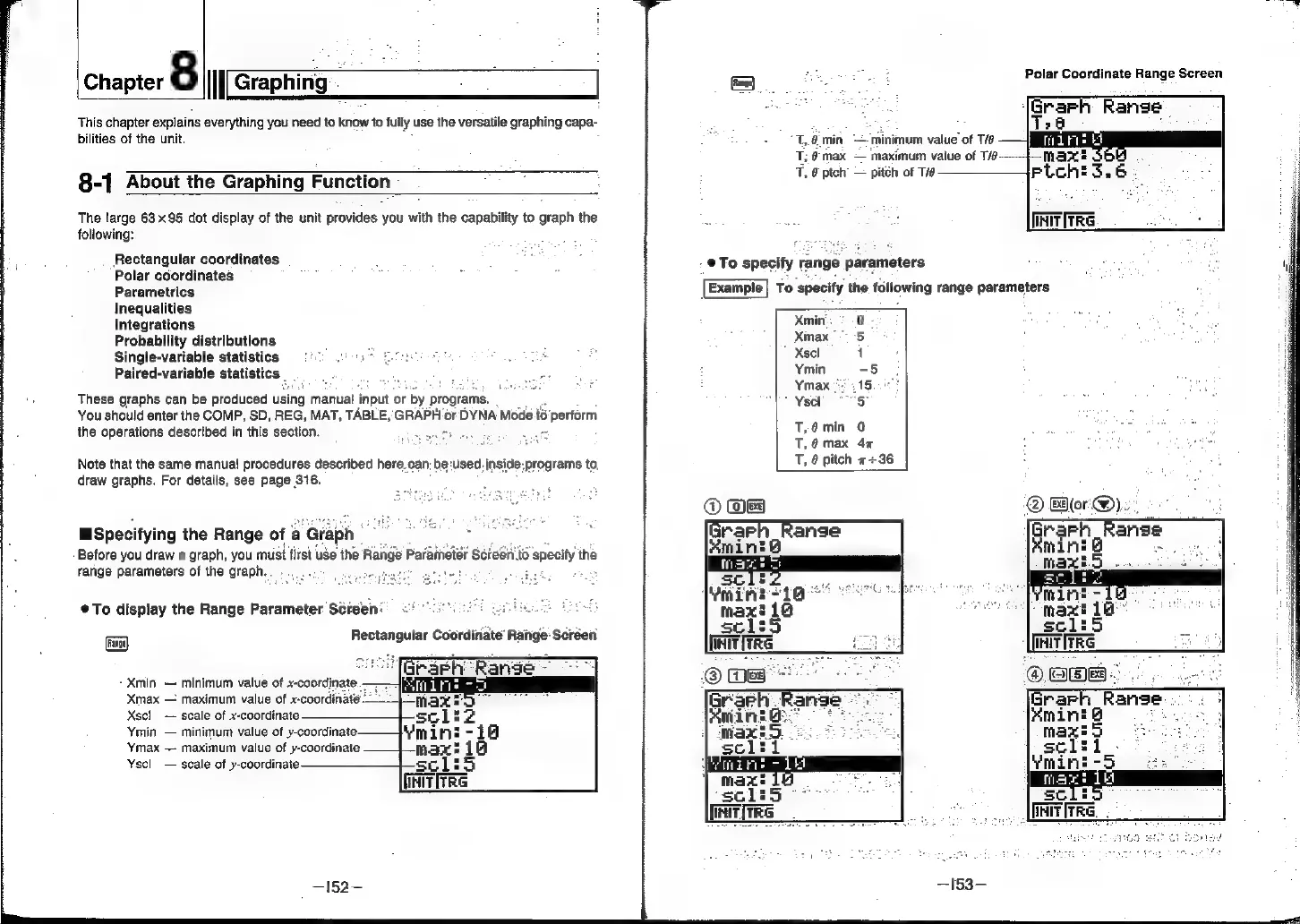
To
display
the
Range
Parameter.
Séreen’
Coe
unis!
Rectangular
Coordinate’
Range
Screen
Xmin
minimum
value
of
x-coordinate.
Xmax
maximum
value
of
x-coordinaté
Xscl_
scale
of
x-coordinate
Ymin
minimum
value
of
y-coordinate.
Ymax
maximum
value
of
y-coordinate
Yscl
scale
of
y-coordinate
set:
[nITTRG
Polar
Coordinate
Range
Screen
:
areen
Range
T,.4.min
—-minimum
value
of
T/e
T;
@max
maximum
value
of
T/é
T,
8
ptch
pitch
of
Tie
.
@To
specify
range
parameters
Example
To
specify
the
following
range
parameters
Xmin
to)
Xmax
5
Xsel
1
Ymin
-5
Ymax
215
Yscl
7S
T,@min
0
.
a
T,@max
47
a :
T,
6
pitch
++36