EasyManua.ls Logo

Casio CFX-9800G - Page 95

Casio CFX-9800G
206 pages
Print Icon
To Next Page IconTo Next Page
To Previous Page IconTo Previous Page
Loading...
©
Bor
©)
Grarh
Range
T28
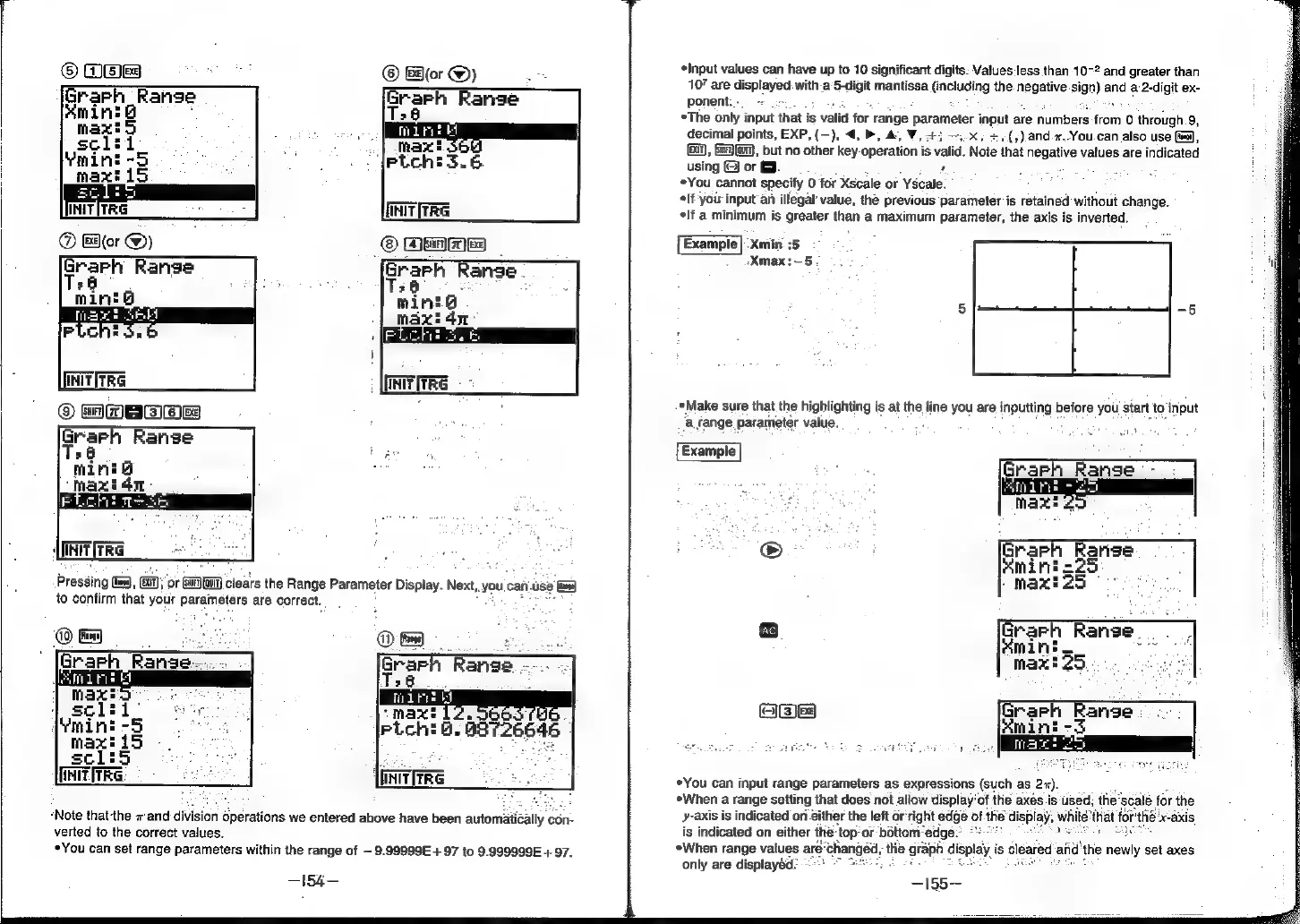
Pressing
ee),
a
5
OF
(su
(quIT)
clears
the
Range
Parameter
Display.
Next,
you.
can.use
i=)
to
confirm
that
your
paremeure
are
correct.
faxs
iS
sclis
UNITITRG:
“Note
thatthe
7
and
division
operations
we
entered
above
have been
automati
ally
con-
verted
to
the
correct
values.
You
can
set
range
parameters
within
the
range
of
9.99999E
+
97
to
9.999999E
+97.
-154—
Input
values
can
have
up
to
10
significant
digits:
Values:less
than
10-2
and
greater
than
10”
are
displayed:
with-a’5-digit
mantissa
(including
the.
negate
sign)
and
a:2-digit
ex-
ponent.-
>
2
*The
only
input
that
i
is
valid
for
range
parometer
input
are
numbers
from
0
through
9,
decimal
points,
EXP,
(—),
4,
»,
&,
V,
+3
—.x,
+.(,).and.2.You.can
also
use
(ea),
(Gi),
SQM,
but
no
other
key-
operation
is
Valid.
Note
that
negative
values
are
indicated
usingOho
3.
a
hes
*You
cannot
specify
0
for
Xscale
or
Yscale.
°
car
ae
*lf
you
input
an
illegal
value,
the
previous
parameter
is
retained
without
change.
*lf
a
minimum
is
greater
than
a
maximum
parameter,
the
axis
is
inverted.
{
Example
|
:Xmin.:5
Xmax:—5
*Make
sure
that
the
highlighting
is
at
the
line
you
are
inputting
before
you
start
to'input
a
fange
parameter
value.
. :
£
max’
25
Grarh
Ranse_
Kmini
max!
25.
.
reyes)
Grarh
Range
.
amin
-3
SET
MES
Be
oe
git
*You
can
input
range
parameters
as
expressions
(such
as
(2x).
eWhen
a
range
setting
that
does
not
allow
display'of
the
axés
is‘used;
the’
‘scale
for
the
y-axis
is
indicated
on
éither
the
left
orright
edge
of
the
display,
Axi
is
indicated
on
either
the:
‘top:
or
bottom:
“edge-
«When
range
values
are’
only
are
displayed?"