EasyManua.ls Logo

Casio CPS-300 - Page 4

Casio CPS-300
9 pages
Print Icon
To Next Page IconTo Next Page
To Previous Page IconTo Previous Page
Loading...
bowel
age
a
Ee]
St
Fy
<a
rate
Pepe
eo
on
ay:
-
5
+
=
ie
are
BA!
Paces:
We,
Ale
2
eS fe
aie
aes
ves
a
atte
facps>
Eos
wih
Sed
Sp,
t=
Pell
al
os
Rat
apt
ris
Heth
wal
gett
og
ENO,
Mt
er
rte
eae.
.
pe
LL
asrtat
yy:
22
*
Col
%
a
»
~
.
~
ems
eo
Ee
*
aesthiadle
ebay
mie
:
:
.
Ti
ee
le
TUNE
OAMPER
PEDAL
LINE
OUT
PMONES
MIDI
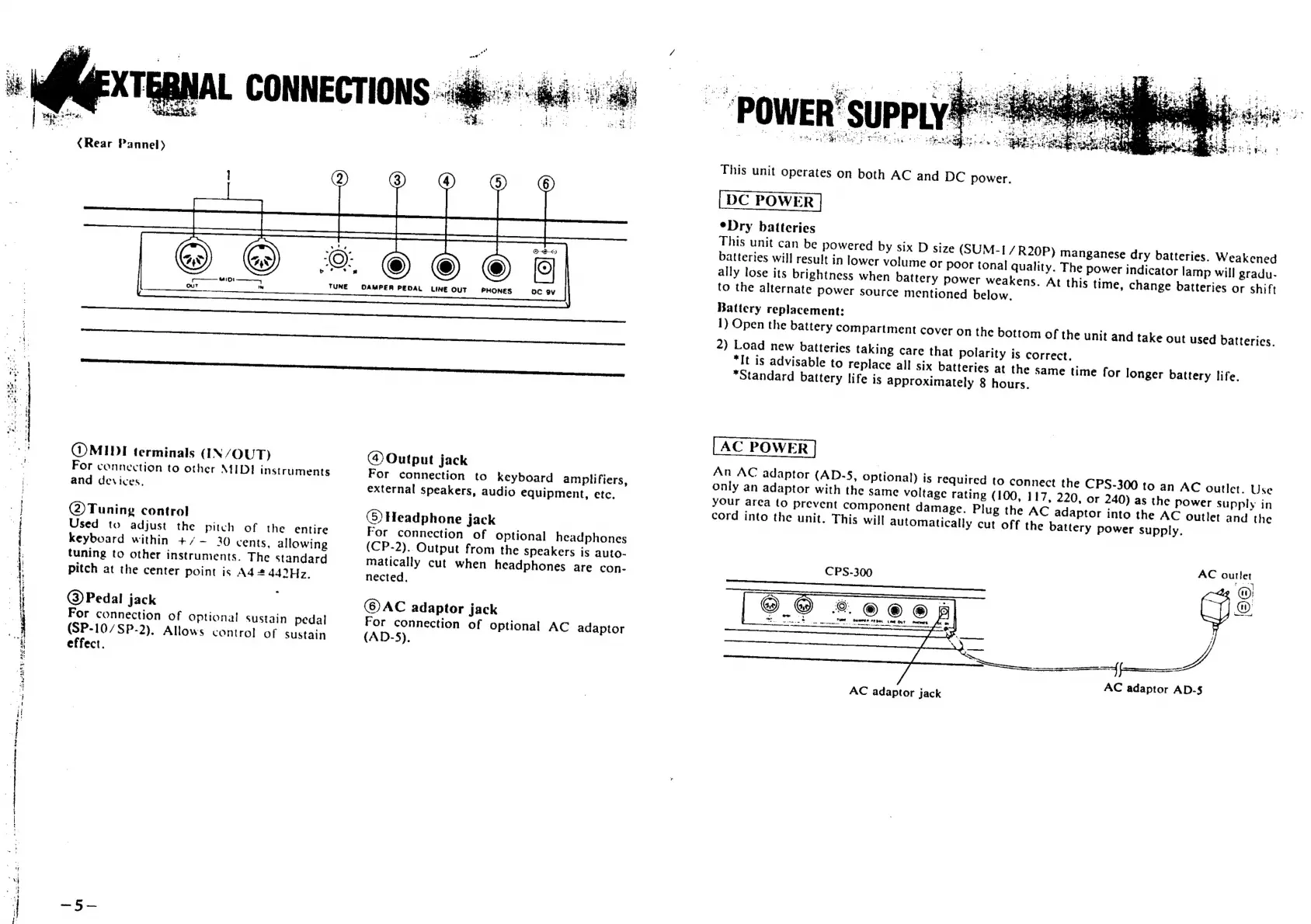
terminals
(IN/OUT)
For
connection
to
other
MIDI
instruments
and
devices.
(2)Tuning
control
Used
to
adjust
the
pitch
of
the
entire
keyboard
within
+/-
20
cents,
allowing
tuning
to
other
instruments.
The
standard
pitch
at
the
center
point
is
A4
#
442°H7z,
@)Pedal
jack
For
connection
of
optional
sustain
pedal
(SP-10/SP-2).
Allows
control
of
Sustain
effect.
@
Output
jack
For
connection
to
keyboard
amplifiers,
external
speakers,
audio
equipment,
etc.
(5)
Headphone
jack
For
connection
of
optional
headphones
(CP-2).
Output
from
the
speakers
is
auto-
matically
cut
when
headphones
are
con-
nected.
©)AC
adaptor
jack
For
connection
of
optional
AC
adaptor
(AD-5).
This
unit
operates
on
both
AC
and
DC
power.
*Dry
batteries
Battery
replacement:
1)
Open
the
battery
compartment
cover
on
the
bottom
of
the
unit
and
take
out
used
batteries.
2)
Load
new
batteries
taking
care
that
polarity
is
correct,
*It
is
advisable
to
replace
all
six
batteries
at
the
Same
time
for
longer
battery
life.
*Standard
battery
life
is
approximately
8
hours.
An
AC
adaptor
(AD-5,
optional)
is
required
to
connect
the
CPS-300
to
an
AC
outlet.
Use
only
an
adaptor
with
the
same
voltage
rating
(100,
1
17,
220,
or
240)
as
the
power
supply
in
your
area
to
prevent
component
damage.
Plug
the
AC
adaptor
into
the
AC
outlet
and
the
cord
into
the
unit.
This
will
automatically
cut
off
the
battery
power
supply.
|
1s
ri
5
tae
CPS-300
AC
outlet
@
SSS
ND:
oe
Ms
vet
COMES
ore,
int
OUT
mete
ore
Fe
nS
a
ernc)
a
Se
nipcincmittllnicianssl
AC
adaptor
AD-$
AC
adaptor
jack

Related product manuals