EasyManua.ls Logo

Casio CPS-300 - Page 5

Casio CPS-300
9 pages
Print Icon
To Next Page IconTo Next Page
To Previous Page IconTo Previous Page
Loading...
Fa
tae
TS
ee.
{
'
i
i
'
|
powee
SUPPLY
Be
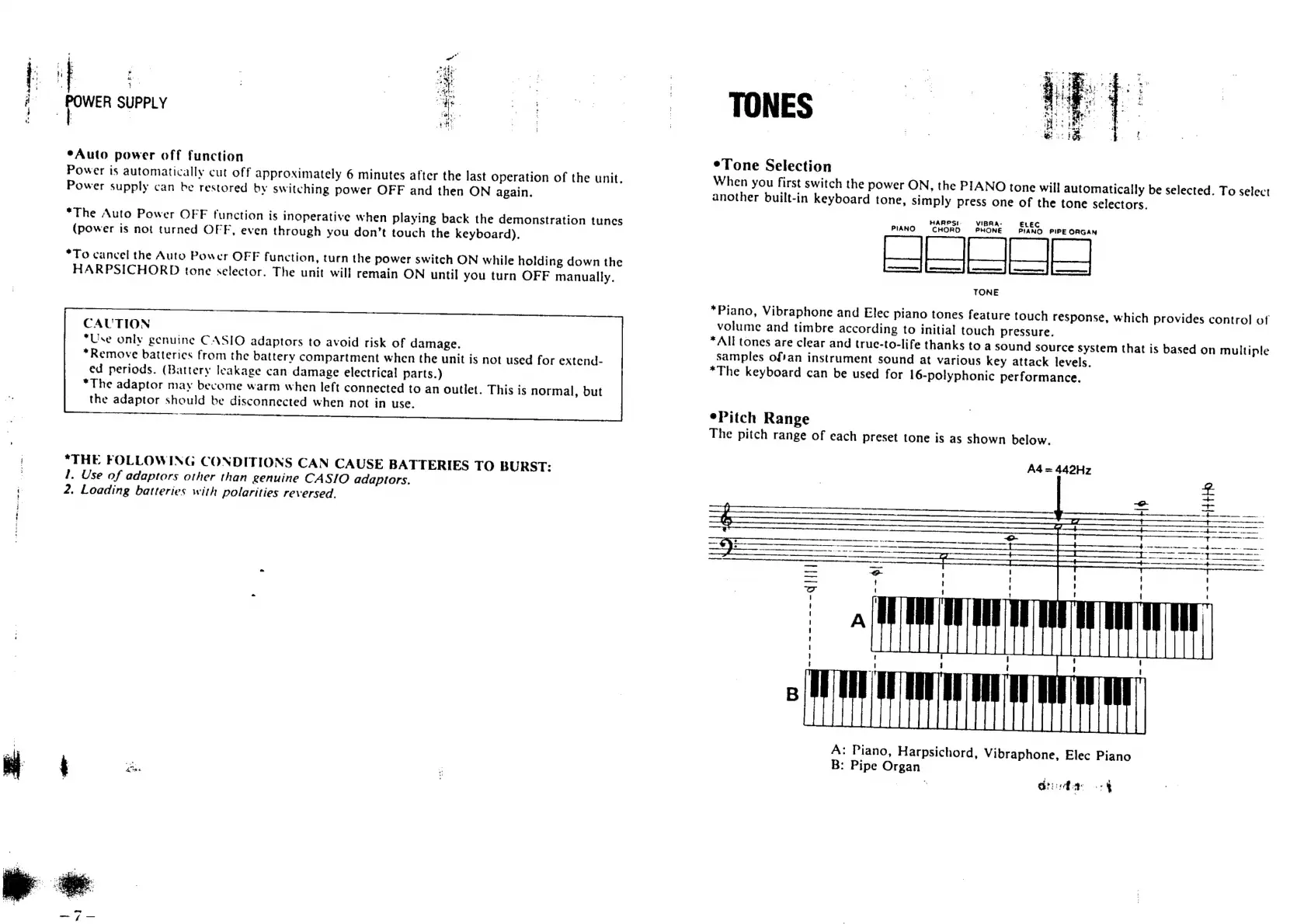
*Auto
power
off
function
Power
is
automatically
cut
off
approximately
6
minutes
after
the
last
operation
of
the
unit.
Power
supply
can
be
restored
by
switching
power
OFF
and
then
ON
again.
*The
Auto
Power
OFF
function
is
inoperative
when
playing
back
the
demonstration
tunes
(power
is
not
turned
OFF,
even
through
you
don’t
touch
the
keyboard).
*To
cancel
the
Auto
Power
OFF
function,
turn
the
power
switch
ON
while
holding
down
the
HARPSICHORD
tone
selector.
The
unit
will
remain
ON
until
you
turn
OFF
manually.
CAUTION
*Use
only
genuine
CASIO
adaptors
to
avoid
risk
of
damage.
“Remove
batterics
from
the
battery
compartment
when
the
unit
is
not
used
for
extend-
ed
periods.
(Battery
leakage
can
damage
electrical!
parts.)
“The
adaptor
may
become
warm
when
left
connected
to
an
outlet.
This
is
normal,
but
the
adaptor
should
be
disconnected
when
not
in
use.
*THE
FOLLOWING
CONDITIONS
CAN
CAUSE
BATTERIES
TO
BURST:
1.
Use
of
adaptors
other
than
genuine
CASIO
adaptors.
2.
Loading
batteries
with
polarities
reversed.
TONES
*Tone
Selection
When
you
first
switch
the
power
ON,
the
PIANO
tone
will
automatically
be
selected.
To
select
another
built-in
keyboard
tone,
simply
press
one
of
the
tone
selectors.
HARPS!-
VIBRA-
ELEC
PIANO
CHORD
PHONE
PIANO
PIPE
ORGAN
St
TONE
*Piano,
Vibraphone
and
Elec
piano
tones
feature
touch
response,
which
provides
control
of
volume
and
timbre
according
to
initial
touch
pressure.
*All
tones
are
clear
and
true-to-life
thanks
to
a
sound
source
system
that
is
based
on
multiple
samples
of'an
instrument
sound
at
various
key
attack
levels.
*The
keyboard
can
be
used
for
16-polyphonic
performance.
*Pitch
Range
The
pitch
range
of
each
preset
tone
is
as
shown
below.
A4
=
442Hz
Shida
batt
A:
Piano,
Harpsichord,
Vibraphone,
Elec
Piano
B:
Pipe
Organ
~--------]]]|
Ghd
ra
|

Related product manuals