EasyManua.ls Logo

Casio CPS-300 - Page 6

Casio CPS-300
9 pages
Print Icon
To Next Page IconTo Next Page
To Previous Page IconTo Previous Page
Loading...
ee
te
SAE
Level
atl
ee
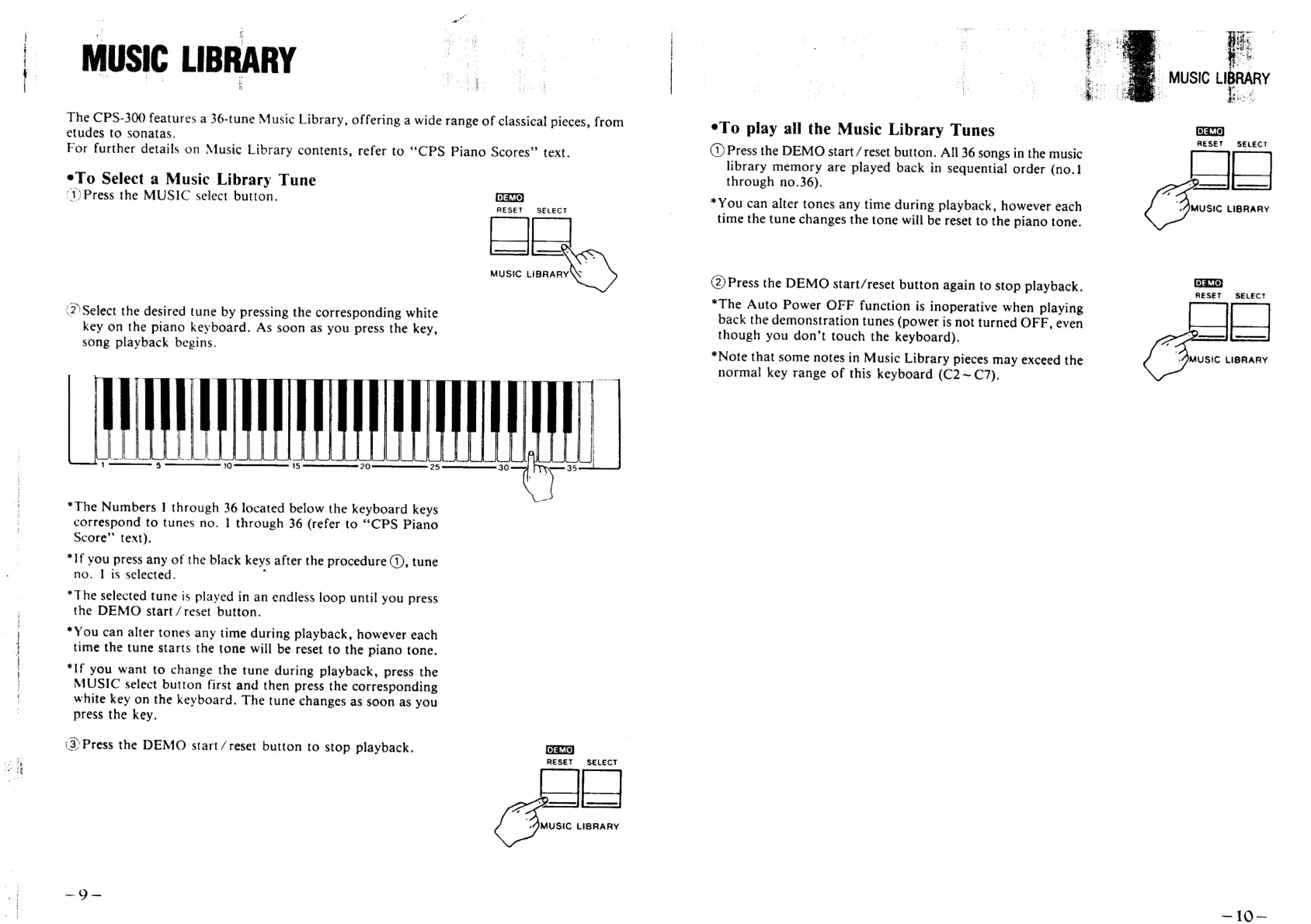
MUSIC
LIBRARY
The
CPS-300
features
a
36-tune
Music
Library, offering
a
wide
range
of
classical
pieces,
from
etudes
to
sonatas.
For
further
details
on
Music
Library
contents,
refer
to
“CPS
Piano
Scores”
text.
¢To
Select
a
Music
Library
Tune
‘1)Press
the
MUSIC
select
button.
(2)
Select
the
desired
tune
by
pressing
the
corresponding
white
key
on
the
piano
keyboard.
As
soon
as
you
press
the
key,
song
playback
begins.
*The
Numbers
1
through
36
located
below
the
keyboard
keys
correspond
to
tunes
no.
|
through
36
(refer
to
““CPS
Piano
Score’’
text).
*If
you
press
any
of
the
black
keys
after
the
procedure
(1),
tune
no.
|
is
selected.
:
*The
selected
tune
is
played
in
an
endless
loop
until
you
press
the
DEMO
start
/reset
button.
*You
can
alter
tones
any
time
during
playback,
however
each
time
the
tune
starts
the
tone
will
be
reset
to
the
piano
tone.
*If
you
want
to
change
the
tune
during
playback,
press
the
MUSIC
select
button
first
and
then
press
the
corresponding
white
key
on
the
keyboard.
The
tune
changes
as
soon
as
you
press
the
key.
(3
Press
the
DEMO
start/reset
button
to
stop
playback.
DEMO}
RESET
SELECT
|
MUSIC
saan
Oa)
RESET
SELECT
MUSIC
LIBRARY
te
eTo
play
all
the
Music
Library
Tunes
(1)
Press
the
DEMO
start
/
reset
button.
All
36
songs
in
the
music
library
memory
are
played
back
in
sequential
order
(no.1
through
no.36).
*You
can
alter
tones
any
time
during
playback,
however
each
time
the
tune
changes
the
tone
wiil
be
reset
to
the
piano
tone.
(2)
Press
the
DEMO
start/reset
button
again
to
stop
playback.
*The
Auto
Power
OFF
function
is
inoperative
when
playing
back
the
demonstration
tunes
(power
is
not
turned
OFF,
even
though
you
don’t
touch
the
keyboard).
*Note
that
some
notes
in
Music
Library
pieces
may
exceed
the
normal
key
range
of
this
keyboard
(C2~(C7).
:
oe
Boye
_
ae:
woe
i,
ca
2
ae
ee
eo
,
+
i
Sele
Se
er
ea
.
As:
vs
AR.
7"
i
MUSIC
LIBRAR
'
>
DEMO,
RESET
SELECT
MUSIC
LIBRARY
RESET
SELECT
==
MUSIC
LIBRARY
210%

Related product manuals