EasyManua.ls Logo

Casio CPS-300 - Page 7

Casio CPS-300
9 pages
Print Icon
To Next Page IconTo Next Page
To Previous Page IconTo Previous Page
Loading...
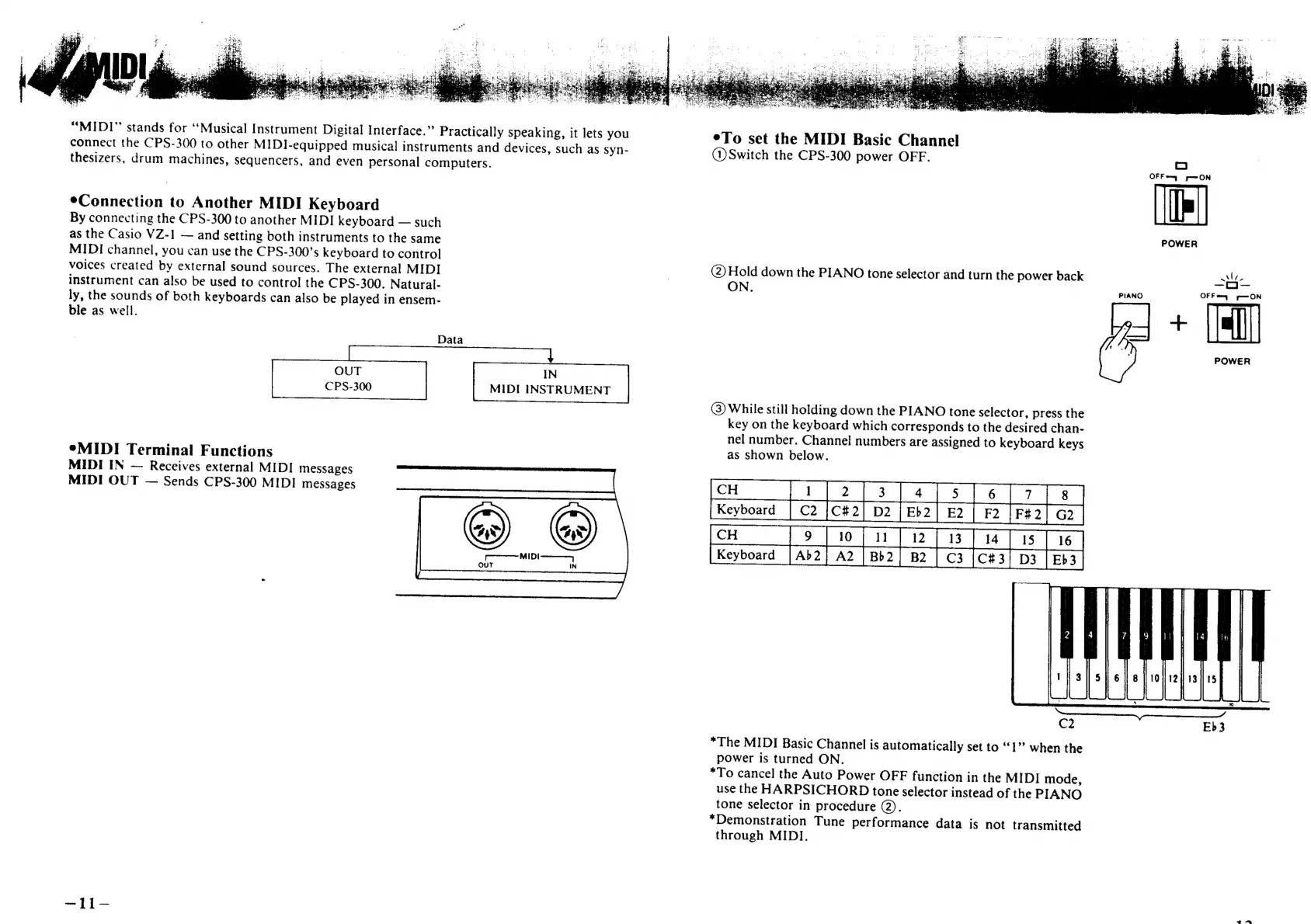
“MIDI”
stands
for
‘Musical
Instrument
Digital
Interface.”’
Practically
speaking,
it
lets
you
connect
the
CPS-300
to
other
MIDI-equipped
musical
instruments
and
devices,
such
as
syn-
thesizers,
drum
machines,
sequencers,
and
even
personal
computers.
eConnection
to
Another
MIDI
Keyboard
By
connecting
the
CPS-300
to
another
MIDI
keyboard
such
as
the
Casio
VZ-1
and
setting
both
instruments
to
the
same
MIDI
channel,
you
can
use
the
CPS-300’s
keyboard
to
control
voices
created
by
external
sound
sources.
The
external
MIDI
instrument
can
also
be
used
to
control
the
CPS-300.
Natural-
ly,
the
sounds
of
both
keyboards
can
also
be
played
in
ensem-
ble
as
well.
Data
IN
MIDI
INSTRUMENT
®*MIDI
Terminal
Functions
MIDI
IN
Receives
external
MIDI
messages
MIDI
OUT
Sends
CPS-300
MIDI
messages
ae
ee
eTo
set
the
MIDI
Basic
Channel
(1)
Switch
the
CPS-300
power
OFF.
=
POWER
(2)
Hold
down
the
PIANO
tone
selector
and
turn
the
power
back
ON,
PIANO
OF
Fey
p—ON
Ale,
POWER
(3)
While
still
holding
down
the
PIANO
tone
selector,
press
the
key
on
the
keyboard
which
corresponds
to
the
desired
chan-
nel
number.
Channel
numbers
are
assigned
to
keyboard
keys
as
shown
below.
|
|
IL
$s
C2
Eb3
*The
MIDI
Basic
Channel
is
automatically
set
to
‘1’?
when
the
power
is
turned
ON.
*To
cancel
the
Auto
Power
OFF
function
in
the
MIDI
mode,
use
the
HARPSICHORD
tone
selector
instead
of
the
PIANO
tone
selector
in
procedure
@).
*Demonstration
Tune
performance
data
is
not
transmitted
through
MIDI.

Related product manuals