EasyManua.ls Logo

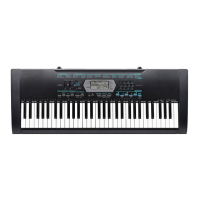
Casio CTK-2400 - User Manual

Casio CTK-2400
47 pages
Print Icon
To Next Page IconTo Next Page
Loading...
EN/ES
CTK2400-ES-1A
GUÍA DEL USUARIO
Guarde toda información para tener como referencia futura.
Precauciones de seguridad
Antes de intentar usar el teclado digital, asegúrese de
leer las “Precauciones de seguridad” separadas.
USER’S GUIDE
Please keep all information for future reference.
Safety Precautions
Before trying to use the Digital Keyboard, be sure to
read the separate “Safety Precautions”.
CTK
-
2090
CTK
-2400
EnglishEspañol

Questions and Answers

  • M
    Maria PayneSep 2, 2025
    Why does the pitch of the notes not match other instruments on my Casio CTK-2400?
    • W
      William TaylorSep 2, 2025
      If the pitch of the notes on your Casio Electronic Keyboard doesn't match other instruments or sounds strange, check and adjust the transpose and tuning settings. If problems persist, turn the power off and then back on to initialize all settings.
  • R
    Rebecca MezaAug 31, 2025
    What to do if nothing happens when I start an Auto Accompaniment on Casio CTK-2400 Electronic Keyboard?
    • A
      Alexander LopezAug 31, 2025
      If nothing happens when you start an Auto Accompaniment on your Casio Electronic Keyboard, and you're using rhythms 140, or 142 to 150, try playing a chord on the keyboard. Also, check and adjust the accompaniment volume setting. If problems persist, turn the power off and then back on to initialize all settings.
  • J
    Janet PalmerAug 29, 2025
    What to do if notes keep sounding, without stopping, on Casio CTK-2400?
    • S
      Suzanne JuarezAug 30, 2025
      If notes keep sounding without stopping on your Casio Electronic Keyboard, try turning the power off and then back on to initialize all settings. If that doesn't work, replace the batteries with new ones or switch over to AC adapter power.
  • M
    miasullivanAug 27, 2025
    What to do if the display keeps going out or is flashing on Casio Electronic Keyboard?
    • J
      James MckayAug 28, 2025
      If the display of your Casio Electronic Keyboard keeps going out or is flashing, try replacing the batteries with new ones or switch to AC adapter power.
  • L
    Laura FisherAug 26, 2025
    Why does my Casio CTK-2400 suddenly power down after a few minutes?
    • E
      Emily BairdAug 26, 2025
      If your Casio Electronic Keyboard suddenly powers down after a few minutes, it's likely due to the Auto Power Off feature being triggered.
  • P
    pamela60Aug 25, 2025
    What to do if nothing happens when I press any key on my Casio Electronic Keyboard?
    • J
      Justin AcostaAug 25, 2025
      If nothing happens when you press any key on your Casio Electronic Keyboard, first adjust the main volume. If that doesn't work, check if something is plugged into the PHONES/OUTPUT jack. As a last resort, turn the power off and then back on to initialize all settings.
  • M
    Michelle BellAug 22, 2025
    What to do if nothing happens when I start playback of a built-in song on Casio CTK-2400 Electronic Keyboard?
    • S
      Sherri MeltonAug 22, 2025
      If nothing happens when you start playback of a built-in song on your Casio Electronic Keyboard, wait a moment after pressing the button for the song to start. Also, check and adjust the song volume. If problems persist, turn the power off and then back on to initialize all settings.

Summary

Getting Ready to Play

Power Supply Options

Details on using AC adaptor or batteries for powering the digital keyboard.

Installing Batteries

Step-by-step guide for correctly inserting AA batteries.

Playing the Digital Keyboard

Powering On and Basic Play

Steps to turn on the keyboard and adjust volume for playing.

Controlling the Keyboard Sounds

Selecting Instrument Sounds

How to choose from various musical instrument tones available on the keyboard.

Sampling a Sound and Playing it on the Keyboard

Sampling Methods: Long & Short

Overview of long and short sampling techniques for recording sounds.

Using Built-in Songs to Master Keyboard Play

Step Up Lesson Overview

Introduction to the Step Up Lesson feature for mastering songs.

Using Auto Accompaniment

Selecting Chord Input Modes

Choosing how chords are recognized for auto-accompaniment.

Connecting External Devices

Connecting to a Computer

Instructions for connecting the keyboard to a computer via USB for MIDI data exchange.

Connecting to Audio Equipment

Guide for connecting the keyboard to audio devices for sound output or input.

Reference

Troubleshooting Common Issues

Solutions for problems related to power, display, sound, and operation.

Casio CTK-2400 Specifications

General IconGeneral
Control typeButtons
Number of pads5
MIDI-keyboard number of keys61 keys
Product colorBlack, White
Sound effectsReverberation
Pitch bend wheelNo
Octave adjustmentYes
Compatible productsGM Compatibility: Level1
Sound effects quantity10
Maximum polyphony (notes)48
Music memory capacity (songs)110
InterfaceUSB
Headphone outputs1
Display typeLCD
Power source typeAC, DC
Weight and Dimensions IconWeight and Dimensions
Depth307 mm
Width946 mm
Height92 mm
Weight3400 g

Related product manuals