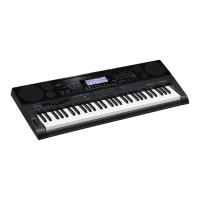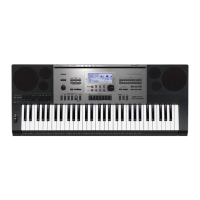
Where to find included items for Casio CTK-7300IN Electronic Keyboard?
- LLeslie JonesSep 13, 2025
If you can’t find something that should have been included with your product, carefully check inside all of the packing materials.
Where to find included items for Casio CTK-7300IN Electronic Keyboard?
If you can’t find something that should have been included with your product, carefully check inside all of the packing materials.
| Tones | 600 |
|---|---|
| Auto Accompaniment | Yes |
| Built-in Songs | 152 |
| Lesson Function | Yes |
| Metronome | Yes |
| Key Transpose | Yes |
| Tuning Control | Yes |
| Amp Output | 2.5W + 2.5W |
| Display | LCD |
| Keyboard | 61 keys |
| Sound Source | AHL |
| Digital Effects | Reverb, Chorus, DSP |
| Speakers | 12 cm x 2 |
| Input/Output Terminals | USB |
| Power Requirements | 12V DC |
| Power Supply | AC adaptor |
| Batteries | 6 AA batteries |
| Maximum Polyphony | 48 notes |
Explains the various areas and indicators of the Digital Keyboard's display screen for user operation.
Details the three operational modes: Rhythm, Card, and Song Sequencer, and how to switch between them.
Describes how to access and navigate specific function menus for modes and operations.
Explains how to save data and configure the keyboard to remember settings or apply defaults.
Covers connecting the AC adaptor or using batteries for powering the Digital Keyboard.
Provides instructions for installing D-size batteries and understanding low battery indications.
Instructions for connecting headphones for private practice and important usage notes.
Explains how to connect an optional pedal for enhanced keyboard play functionality.
Guides on connecting to external audio devices for louder sound and better quality.
Details on connecting external devices or microphones to the keyboard's speakers.
Step-by-step guide on powering on the Digital Keyboard and important notes on power management.
Details the procedure for selecting a single tone applied across the entire keyboard.
Explains how to play two or three different tones simultaneously using layer and split features.
Describes how to adjust the overall keyboard tuning in semitone steps.
Instructions on how to individually change the octave of different parts (UPPER 1, UPPER 2, LOWER).
Covers selecting preset temperaments and fine-tuning individual notes of a scale.
Guides on selecting rhythms and playing chords to activate automatic accompaniment.
Explains the five available chord fingering modes for playing Auto Accompaniment.
Details how to switch and modify different accompaniment patterns like Intro, Normal, and Variation.
Explains how to use one-touch presets for quick access to tone and tempo settings.
Explains the architecture of Chorus and DSP effects, including their interaction with Reverb.
Provides instructions on how to add Reverb, Chorus, or DSP effects to the sounds.
Guides on creating custom Digital Signal Processing (DSP) effects by editing preset DSPs.
Introduces the mixer's capability to control 32 simultaneous parts and how parts are organized.
Details how to navigate the mixer screen and change parameters for master, DSP, and individual parts.
Lists and explains the parameters configurable for MASTER, DSP, and MIC/INST inputs.
Explains the process of creating user tones by editing preset tones and their characteristic parameters.
Step-by-step guide to editing a preset tone and saving it as a new user tone.
Lists and describes all parameters available for editing and customizing tones.
Instructions on selecting and playing drawbar organ tones using sliders for real-time adjustment.
Guides on editing parameters unique to drawbar organ tones and saving them as user tones.
Explains how to use music presets for quick access to Auto Accompaniment, tone, and other settings.
Details how to modify preset chord progressions and create new ones for user presets.
Step-by-step instructions for saving current keyboard setups (tone, rhythm, etc.) to memory.
Guides on retrieving previously saved setups from registration memory for instant recall.
Introduces the EASY REC function for quick keyboard play recording.
Explains how to record to the system track and individual tracks (01-16) for multi-track recording.
Guides on re-recording specific sections of a song to correct errors.
Covers operations for playing back recorded songs, including fast forward, pause, and repeat.
Details various song editing operations like deleting, copying, and renaming songs.
Explains how to create new rhythms by editing existing ones or recording from scratch.
Guides on editing specific parts of existing rhythms to customize them.
Covers detailed editing of recorded events like notes, pitch bends, and modulations.
Outlines the capabilities for recording keyboard play and external audio to memory cards.
Step-by-step instructions for recording audio in rhythm or song sequencer modes.
Guides on playing back recorded audio files, including playback controls and center cancel.
Explains each function menu setting, including tuning, EQ, touch response, and pedal assignments.
Describes the Auto Power Off feature and how to enable or disable it.
Explains how the keyboard remembers settings when turned off and restores them upon restart.
Covers how to register current settings as defaults or reset to factory defaults.
Provides instructions for formatting an SD/SDHC memory card before first use.
Guides on saving user data like rhythms, tones, and songs to a memory card.
Explains how to load data from a memory card back into the Digital Keyboard's memory.
Lists the necessary computer specifications for connecting and exchanging data with the Digital Keyboard.
Explains how to use Data Manager software to transfer data between the keyboard and a computer.
Lists potential display messages, their causes, and required actions for troubleshooting.
Provides solutions for common issues related to power, display, sound, and operation.
Details the technical specifications of the CTK-7300IN keyboard.
Lists important safety and handling precautions for using the product.
Catalog of all preset Digital Signal Processing (DSP) effects available on the keyboard.
Provides chord diagrams and fingering suggestions for various chord types.
Loading...