E-28
Using the Chord Book
Looking Up a Chord Using the
Chord Book
1
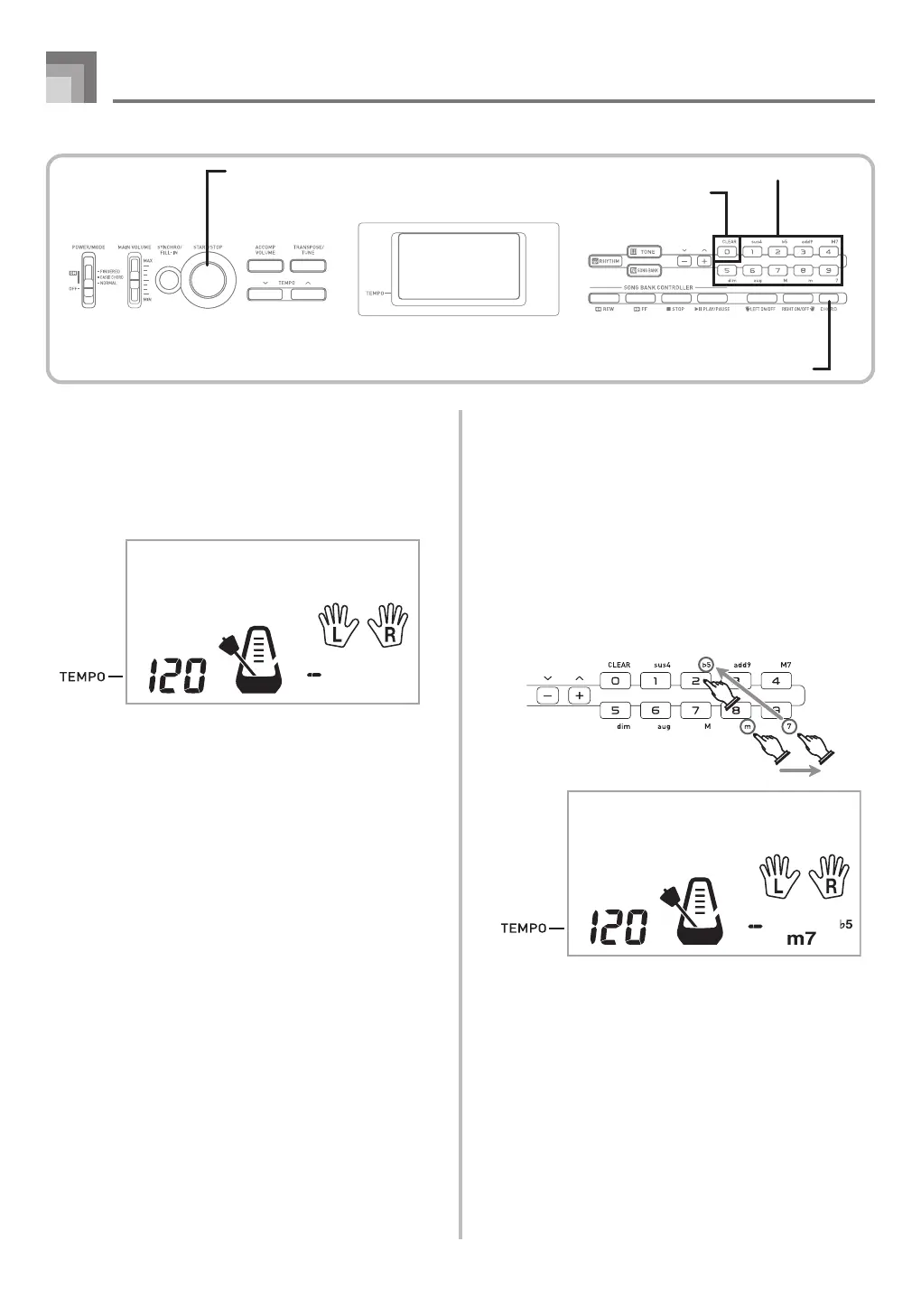
Press the CHORD button to enter the Chord Book
mode.
2
Press the CLEAR button.
• This step is necessary to clear any previously input
chord name.
Cho r d Bk
Cho r d Bk
Chord specification buttons
CLEAR
CHORD
START/STOP
3
If the chord name you plan to input is a non-major
chord, use the chord specification buttons to specify
the chord type.
• Chord types are indicated by the small letters above
the chord specifications buttons.
• Non-major chords include minor, seventh, sustained,
etc. chords.
• See page E-30 for details on the chord specification
buttons.
• Skip step 3 if you want to input a major chord name.
<Example: F
m7-5>
CTK1100_e_27-35.p65 10.3.9, 5:14 PM28


 To Next Page