EasyManua.ls Logo

Casio CZ-5000 - Key Relationships and Operation; Basic Procedure for Sound Synthesis

Casio CZ-5000
27 pages
Print Icon
To Next Page IconTo Next Page
To Previous Page IconTo Previous Page
Loading...
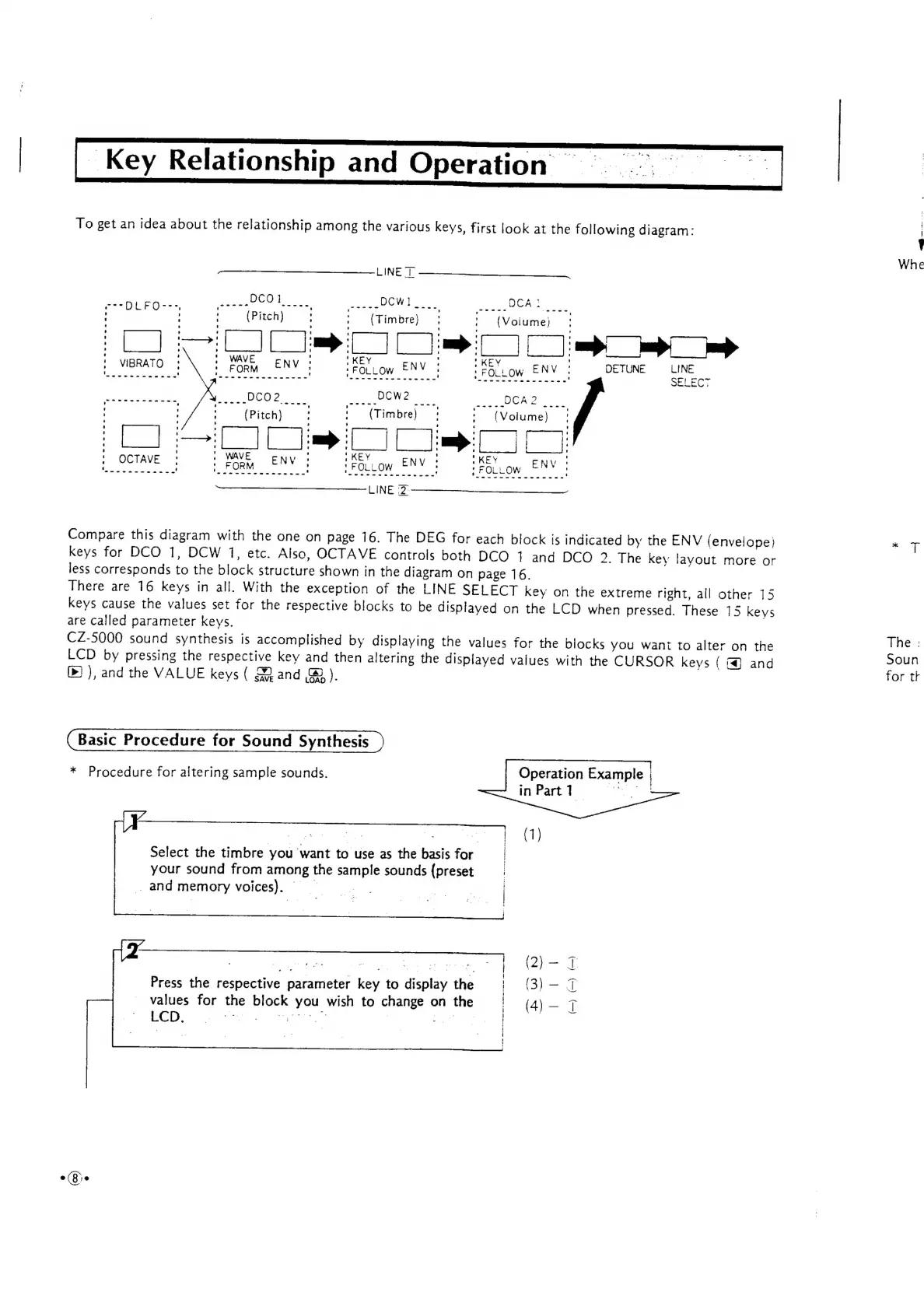
_Key
Relationship
and
Operation
To
get
an
idea
about
the
relationship
among
the
various
keys,
first
look
at
the
following
diagram:
LINE
T
et
ee
DCOl.
pCwl_
CAE...
;
(Pitch)
:
(Timbre)
|
'
(Volume)
|
ent
ne
Se
a
ae
;
V
AT
i
.
WAVE
ENV
;
‘KEY
: *
KEY
'
=
Se
eee
eee
eects
ae
Sees
eee
se
eee
:
SELECT
sSanGa
gets,
Fev
wie
DCO?
<<
2.
DOW?
foenEO
OR
>
oe
in
'
(Pitch)
:
(Timbre):
*
(Volume)!
|
Ce
ak
|
ah:
=
[|
[|
mt
se
ma
|
|
r
;
1
WAVE
,
3
|
KEY
:
"KEY
hoy
ee
arom
EN
rosa
ENV
s
~
Si
Gg
ENN
LINE
2
Compare
this
diagram
with
the
one
on
page
16.
The
DEG
for
each
block
is
indicated
by
the
ENV
(envelope)
keys
for
DCO
1,
DCW
1,
etc.
Also,
OCTAVE
controls
both
DCO
1
and
DCO
2.
The
key
layout
more
or
less
corresponds
to
the
block
structure
shown
in
the
diagram
on
page
16.
There
are
16
keys
in
all.
With
the
exception
of
the
LINE
SELECT
key
on
the
extreme
right,
all
other
15
keys
cause
the
values
set
for
the
respective
blocks
to
be
displayed
on
the
LCD
when
pressed.
These
15
keys
are
called
parameter
keys.
CZ-5000
sound
synthesis
is
accomplished
by
displaying
the
values
for
the
blocks
you
want
to
alter
on
the
LCD
by
pressing
the
respective
key
and
then
altering
the
displayed
vaiues
with
the
CURSOR
keys
{
&@
and
()
),
and
the
VALUE
keys
(
Mand
B®).
Basic
Procedure
for
Sound
Synthesis
*
Procedure
for
altering
sample
sounds.
Operation
Exa
mple
|
inPart?
9°:
Select
the
timbre
you
want
to
use
as
the
basis
for
|
your
sound
from
among
the
sample
sounds
(preset
_
and
memory
voices).
-_
LCD,
;
)
ae
mee
2
:
A
agit
ie
ce
:
;
ce
EES
ah
aR
i
aks
Press
the
respective
parameter
key
to
display
the
ae
eer
values
for
the
block
you
wish
to
change
on
the
{
(4)_
7
On
Whe
The
:
Soun
for
tk

Other manuals for Casio CZ-5000

Related product manuals