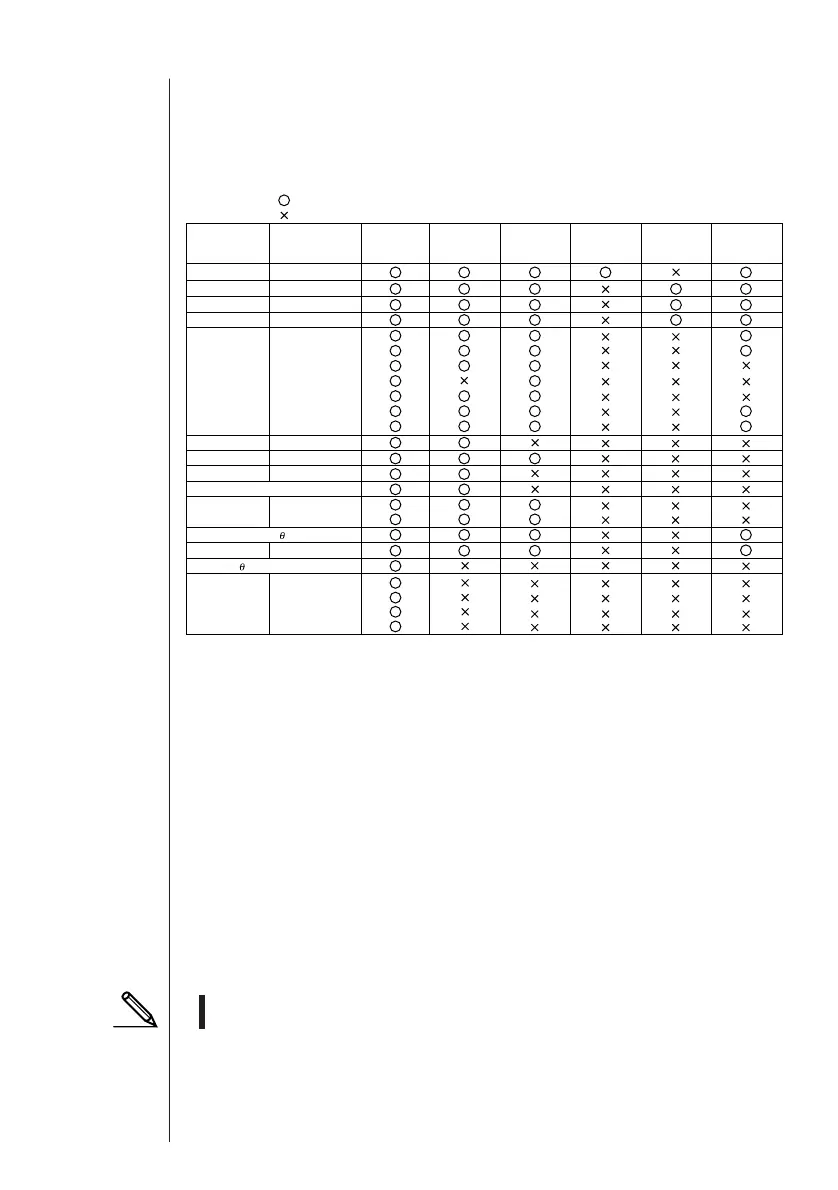
Group Item Display Editing
CSV
Conversion
(A)-(B)
Conversion
CFX-9850/fx-7400
Series *(B)
Program
Matrix
List
List File
Y=Data
Graph Memory
V-Window Mem
Picture
DynaMem
Equation
Alpha Memory(A~Z,r, )
F-Mem n
CAS(A~Z,r, )
Algebra
Data from an older model CASIO Graphic Scientific Calculator is converted to CFX-9850/fx-7400 Series format data.
Program name
MatA~MatZ
List1~List20
File1~File6
Graph Function
Recursion Function
V-Window
RightV-Window
Graph Factor
Table Range
Recursion Range
G-Mem1~G-Mem20
V-Win1~V-Win6
Pict1~Pict20
Simul Equation
Poly Equation
f1~f20
ANS
InputReplay
OutputReplay
Equation
ALGEBRA FX
Series *(A)
YES
NO
(1-6)
(1-6)
(1-6)
(1-6)
…
…
6
u Text files
This type of file consists of two parts: a group and the multiple items stored under it.
Except for graphic data, all items can be displayed on a computer screen, and pro-
grams can be edited on the computer.
Text Files
u Back-up file
This file contains the data produced when you back up all of the data in calculator
memory.
u Graphic files
This type of file contains the data produced when you use the screen capture func-
tion to create a bit pattern of the screen and save the bit pattern to your computer.
Graphic data is saved using one of the two following file formats.
• Windows: Bitmap
• Macintosh: PICT
Graphic data can also be converted to one of the following file formats.
• Windows: TIFF, PCX
• Macintosh: TIFF
• Graphic files saved as one of the above file formats cannot be opened using
Program-Link.



 To Next Page