EasyManua.ls Logo

Casio FR-1011S - Page 3

Casio FR-1011S
14 pages
Print Icon
To Next Page IconTo Next Page
To Previous Page IconTo Previous Page
Loading...
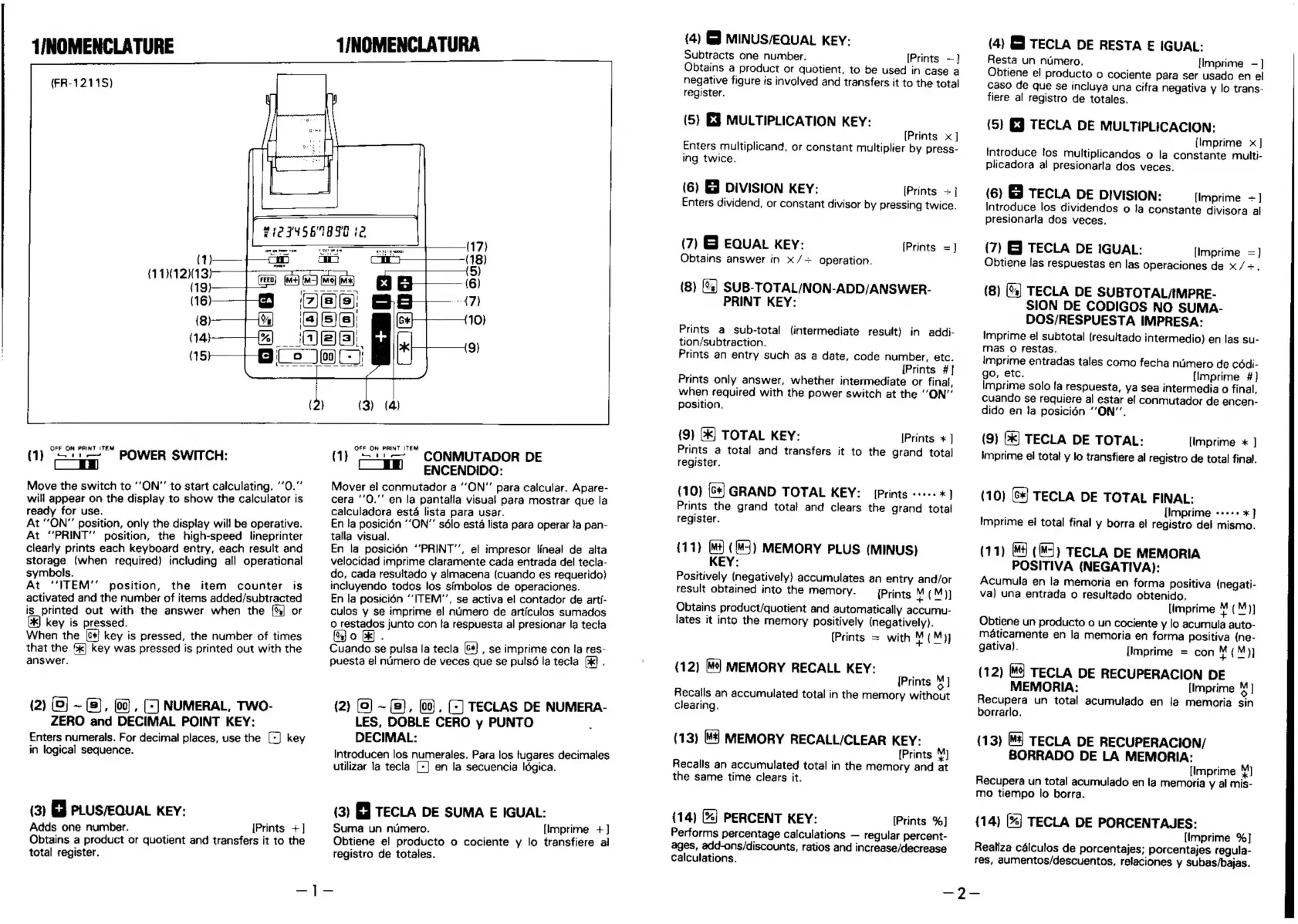
T/NOMENCLATURE
(FR-1211S)
OFF
ON
PRINT
ITEM
—1i-—
POWER
SWITCH:
1
[|
a
Move
the
switch
to
‘‘ON”’
to
start
calculating.
‘’0.”’
will
appear
on
the
display
to
show
the
calculator
is
ready
for
use.
At
“ON”
position,
only
the
display
wil!
be
operative.
At
“PRINT”
position,
the
high-speed
lineprinter
clearly
prints
each
keyboard
entry,
each
result
and
storage
(when
required)
including
all
operational
symbols.
At
‘ITEM’
position,
the
item
counter
is
activated
and
the
number
of
items
added/subtracted
is
printed
out
with
the
answer
when
the
or
key
is
pressed.
When
the
[c+
key
is
pressed,
the
number
of
times
that
the
']
key
was
pressed
is
printed
out
with
the
answer.
(2)
(0]
~
(5),
(00),
(©)
NUMERAL,
Two-
ZERO
and
DECIMAL
POINT
KEY:
Enters
numerals.
For
decimal
places,
use
the
[+]
key
in
logical
sequence.
(3)
GJ
PLUS/EQUAL
KEY:
Adds
one
number.
total
register.
{Prints
+]
Obtains
a
product
or
quotient
and
transfers
it
to
the
T/NOMENCLATURA
OFF
ON
PRINT
ITEM
(1)
“on
CONMUTADOR
DE
ENCENDIDO:
Mover
el
conmutador
a
“ON”
para
calcular.
Apare-
cera
‘’0."’
en
la
pantalla
visual
para
mostrar
que
la
calculadora
esta
lista
para
usar.
En
la
posicién
‘ON’
sélo esta
lista
para
operar
ja
pan-
talla
visual.
En
la
posicién
‘’PRINT’’,
el
impresor
lineal
de
alta
velocidad
imprime
claramente
cada
entrada
del
tecla-
do,
cada
resultado
y
almacena
(cuando
es
requerido)
incluyendo
todos
los
simbolos
de
operaciones.
En
la
posicién
“ITEM”,
se
activa
el
contador
de
arti-
culos
y
imprime
el
numero
de
articulos
sumados
0
restados
junto
con
la
respuesta
al
presionar
la
tecta
9)
:
Cuando
se
pulsa
la
tecla
[6*]
,
se
imprime
con
la
res-
puesta
el
numero
de
veces
que
se
pulsé
la
tecia
[&k)
.
(2)
(0)
~
(8),
(00),
(-]
TECLAS
DE
NUMERA-
LES,
DOBLE
CERO
y
PUNTO
DECIMAL:
Introducen
los
numerales.
Para
los
tugares
decimales
utilizar
la
tecla
[-]
en
la
secuencia
ldgica.
(3)
FJ
TECLA
DE
SUMA
E
IGUAL:
Suma
un
numero.
registro
de
totales.
—|]-—
[Imprime
+
]
Obtiene
el
producto
o
cociente
y
lo
transfiere
ai
(4)
&}
MINUS/EQUAL
KEY:
Subdtracts
one
number.
[Prints
—}
Obtains
a
product
or
quotient,
to
be
used
in
case
a
negative
figure
is
involved
and
transfers
it
to
the
total
register.
(5)
E39
MULTIPLICATION
KEY:
(Prints
x]
Enters
multiplicand,
or
constant
multiplier
by
press-
ing
twice.
(6)
EJ
DIVISION
KEY:
[Prints
+]
Enters
dividend,
or
constant
divisor
by
pressing
twice.
(7)
EQUAL
KEY:
Obtains
answer
in
x/+
operation.
[Prints
=]
(8)
[%]
SUB-TOTAL/NON-ADD/ANSWER-
PRINT
KEY:
Prints
a
sub-total
(intermediate
result)
in
addi-
tion/subtraction.
Prints
an
entry
such
as
a
date,
code
number,
etc.
[Prints
#]
Prints
only
answer,
whether
intermediate
or
final,
when
required
with
the
power
switch
at
the
“ON”
position.
{9}
(K)
TOTAL
KEY:
[Prints
*
]
Prints
a
total
and
transfers
it
to
the
grand
total
register.
(10)
{S*]
GRAND
TOTAL
KEY:
[Prints
«+++
*]
Prints
the
grand
totat
and
clears
the
grand
total
register.
{11}
[M+
({M-])
MEMORY
PLUS
(MINUS)
KEY:
Positively
(negatively}
accumulates
an
entry
and/or
result
obtained
into
the
memory.
[Prints
M
(M)]
Obtains
product/quotient
and
automatically
accumu-
lates
it
into
the
memory
positively
(negatively).
[Prints
=
with
4(M)]
(12)
[¥*]
MEMORY
RECALL
KEY:
[Prints
4
Recalls
an
accumulated
total
in
the
memory
without
clearing.
(13)
[M4]
MEMORY
RECALL/CLEAR
KEY:
{Prints
»)
Recalls
an
accumulated
total
in
the
memory
and
at
the
same
time
clears
it.
(14)
(%]
PERCENT
KEY:
[Prints
%]
Performs
percentage
calculations
regular
percent-
ages,
add-ons/discounts,
ratios
and
increase/decrease
calculations.
(4)
GJ
TECLA
DE
RESTA
E
IGUAL:
Resta
un
numero.
[Imprime
—]
Obtiene
el
producto
o
cociente
para
ser
usado
en
e!
caso
de
que
se
incluya
una
cifra
negativa
y
lo
trans-
fiere
al
registro
de
totales.
(5)
EJ
TECLA
DE
MULTIPLICACION:
(Imprime
x]
Introduce
fos
multiplicandos
o
la
constante
multi-
plicadora
al
presionarla
dos
veces.
(6)
&
TECLA
DE
DIVISION:
[Ilmprime
=]
Introduce
los
dividendos
o
Ja
constante
divisora
al
presionarla
dos
veces.
(7)
EJ
TECLA
DE
IGUAL:
[Imprime
=]
Obtiene
las
respuestas
en
las
operaciones
de
x/~.
(8)
(%]
TECLA
DE
SUBTOTAL/IMPRE-
SION
DE
CODIGOS
NO
SUMA-
DOS/RESPUESTA
IMPRESA:
Imprime
el
subtotal
(resultado
intermedio)
en
las
su-
mas
o
restas.
Imprime
entradas
tales
como
fecha
ntimero
de
cédi-
go,
etc.
[Imprime
#]
Imprime
solo
fa
respuesta,
ya
sea
intermedia
o
final,
cuando
se
requiere
al
estar
ef
conmutador
de
encen-
dido
en
Ja
pasicién
“‘ON”’,
(9)
(*]
TECLA
DE
TOTAL:
[imprime
*
]
imprime
el
total
y
lo
transfiere
al
registro
de
total
final.
(10)
[6+]
TECLA
DE
TOTAL
FINAL:
{Imprime
«++++
*
}
Imprime
ei
total
final
y
borra
el
registro
dei
mismo.
(11)
4
(MJ)
TECLA
DE
MEMORIA
POSITIVA
(NEGATIVA):
Acumula
en
la
memoria
en
forma
positiva
(negati-
va)
una
entrada
o
resultado
obtenido,
[imprime
4
pM
Obtiene
un
producto
o
un
cociente
y
lo
acumula
auto-
maticamente
en
la
memoria
en
forma
positiva
(ne-
gativa).
[Imprime
=
con
¥(M))
(12)
M4]
TECLA
DE
RECUPERACION
DE
MEMORIA:
[Imprime
%]
Recupera
un
total
acumulado
en
Ja
memoria
sin
borrarlo.
(13)
4]
TECLA
DE
RECUPERACION/
BORRADO
DE LA
MEMORIA:
[Imprime
Recupera
un
total
acumulado
en
la
memoria
y
al
mis-
mo
tiempo
lo
borra.
(14)
(%]
TECLA
DE
PORCENTAJES:
[Imprime
%]
Realiza
cdlculos
de
porcentajes;
porcentajes
regula-
res,
aumentos/descuentos,
relaciones
y
subas/bajas.
—?-—

Related product manuals