EasyManua.ls Logo

Casio FR-1011S - Page 4

Casio FR-1011S
14 pages
Print Icon
To Next Page IconTo Next Page
To Previous Page IconTo Previous Page
Loading...
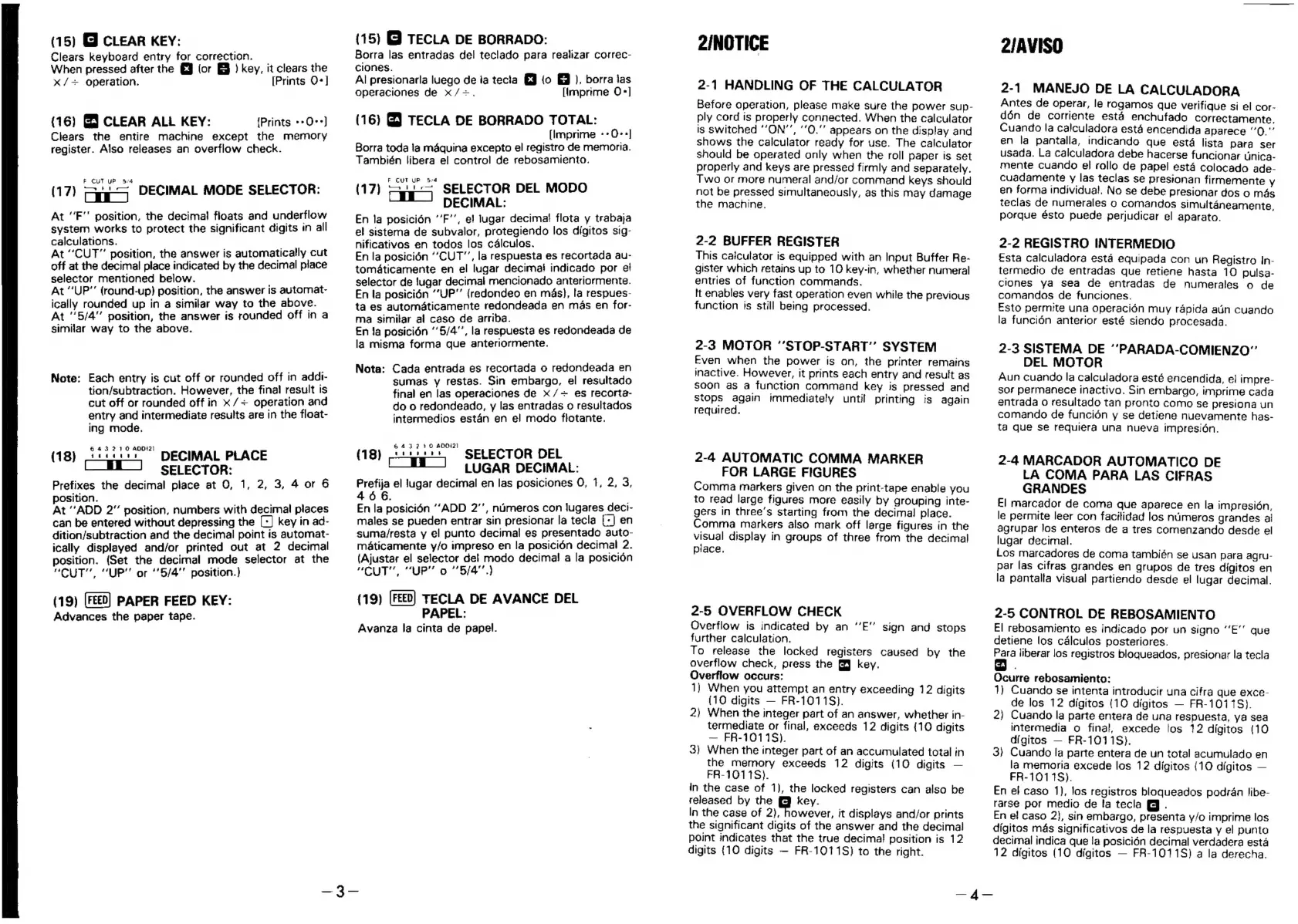
(15)
G
CLEAR
KEY:
Clears
keyboard
entry
for
correction.
When
pressed
after
the
&J
(or
&
)
key,
it
clears
the
x/+
operation.
[Prints
O-]
(16)
G3
CLEAR
ALL
KEY:
(Prints
-+O-*]
Clears
the
entire
machine
except
the
memory
register.
Also
releases
an
overflow
check.
(17)
aa
DECIMAL
MODE
SELECTOR:
At
“F’’
position,
the
decima!
floats
and
underflow
system
works
to
protect
the
significant
digits
in
all
calculations.
At
“CUT”
position,
the
answer
is
automatically
cut
off
at
the
decimal
place
indicated
by
the
decimal
place
selector
mentioned
below.
At
“UP”
(round-up)
position,
the
answer
is
automat-
ically
rounded
up
in
a
similar
way
to
the
above.
At
5/4"
position,
the
answer
is
rounded
off
in
a
similar
way
to
the
above.
Note:
Each
entry
is
cut
off
or
rounded
off
in
addi-
tion/subtraction.
However,
the
fina!
result
is
cut
off
or
rounded
off
in
x
/+
operation
and
entry
and
intermediate
results
are
in
the
float-
ing
mode.
itucas”
DECIMAL
PLACE
[EE
J
SELECTOR:
Prefixes
the
decimal
place
at
O,
1,
2, 3,
4
or
6
position.
.
At
“ADD
2"
position,
numbers
with
decimal
places
can
be
entered
without
depressing
the
(-]
key
in
ad-
dition/subtraction
and
the
decimal
point
is
automat-
ically
displayed
and/or
printed
out
at
2
decimal
position.
(Set
the
decimal
mode
selector
at
the
“CUT”,
“UP’'
or
‘’5/4”'
position.)
(19)
PAPER
FEED
KEY:
Advances
the
paper
tape.
(18)
(15)
@
TECLA
DE
BORRADO:
Borra
las
entradas
del
teclado
para
realizar
correc-
ciones.
Al
presionarla
luego
de
ia
tecla
EJ
(o
&
),
borra
jas
operaciones
de
x/=.
[Imprime
O*]
(16)
G
TECLA
DE
BORRADO
TOTAL:
(Imprime
--O-*]
Borra
toda
la
mdquina
excepto
el
registro
de
memoria.
También
libera
el
control
de
rebosamiento.
F
TURP
§:4
(17)
=u"
SELECTOR
DEL
MODO
DECIMAL:
En
la
posicién
’’F’’,
ef
lugar
decimat
flota
y
trabaja
el
sisterna
de
subvalor,
protegiendo
los
digitos
stg-
nificativos
en
todos
los
c4lculos.
En
la
posicién
“CUT”,
la
respuesta
es
recortada
au-
tomaticarmente
en
el
lugar
decima!
indicado
por
ef
selector
de
jugar
decimal
mencionado
anteriormente.
En
la
posicién
“UP”
(redondeo
en
mas},
la
respues-
ta
es
automaticamente
redondeada
en
mas
en
for-
ma
similar
al
caso
de
arriba.
En
Ja
posicién
‘5/4’,
la
respuesta
es
redondeada
de
la
misma
forma
que
anteriormente.
Nota:
Cada
entrada
es
recortada
o
redondeada
en
sumas
y
restas.
Sin
embargo,
el
resultado
final
en
las
operaciones
de
x
/=
es
recorta-
do
o
redondeado,
y
las
entradas
o
resultados
intermedios
estan
en
el
modo
flotante.
Lithia”
SELECTOR
DEL
(Et
J
LUGAR
DECIMAL:
Prefija
el
jugar
decimal
en
las
posiciones
0,
1,
2,
3,
466.
En
la
posicién
““ADD
2’,
nimeros
con
lugares
dect-
males
se
pueden
entrar
sin
presionar
la
tecla
[-]
en
suma/resta
y
el
punto
decimal
es
presentado
auto-
maticamente
y/o
impreso
en
la
posicién
decimal
2.
(Ajustar
el
selector
del
modo
decima!
a
la
posicién
MU.
“Pp!
O
“*Bi4"
)
(19)
TECLA
DE
AVANCE
DEL
PAPEL:
Avanza
la
cinta
de
papel.
(18)
2INOTICE
2-1
HANDLING
OF
THE
CALCULATOR
Before
operation,
please
make
sure
the
power
sup-
ply
cord
is
properly
connected.
When
the
calculator
is
switched
‘‘ON’’,
‘’0.""
appears
on
the
display
and
shows
the
calculator
ready
for
use.
The
calculator
should
be
operated
only
when
the
roll
paper
is
set
properly
and
keys
are
pressed
firmly
and
separately.
Two
or
more
numeral
and/or
command
keys
should
not
be
pressed
simultaneously,
as
this
may
damage
the
machine.
2-2
BUFFER
REGISTER
This
catculator
is
equipped
with
an
Input
Buffer
Re-
gister
which
retains
up
to
10
key-in,
whether
numeral
entries
of
function
commands.
It
enables
very
fast
operation
even
while
the
previous
function
is
still
being
processed.
2-3
MOTOR
’’STOP-START’’
SYSTEM
Even
when
the
power
is
on,
the
printer
remains
inactive.
However,
it
prints
each
entry
and
result
as
soon
as
a
function
command
key
is
pressed
and
stops
again
immediately
until
printing
is
again
required.
2-4
AUTOMATIC
COMMA
MARKER
FOR
LARGE
FIGURES
Comma
markers
given
on
the
print-tape
enable
you
to
read
large
figures
more
easily
by
grouping
inte-
gers
in
three’s
starting
from
the
decimal
place.
Comma
markers
also
mark
off
large
figures
in
the
visual
display
in
groups
of
three
from
the
decimal
place.
2-5
OVERFLOW
CHECK
Overflow
is
indicated
by
an
‘‘E’’
sign
and
stops
further
calculation.
To
release
the
locked
registers
caused
by
the
overflow
check,
press
the
§
key.
Overflow
occurs:
1)
When
you
attempt
an
entry
exceeding
12
digits
(10
digits
FR-1011S).
2)
When
the
integer
part
of
an
answer,
whether
in-
termediate
or
final,
exceeds
12
digits
{10
digits
FR-10118).
3)
When
the
integer
part
of
an
accumulated
total
in
the
memory
exceeds
12
digits
(10
digits
FR-101
18).
in
the
case
of
1),
the
locked
registers
can
also
be
released
by
the
key.
In
the
case
of
2),
however,
it
displays
and/or
prints
the
significant
digits
of
the
answer
and
the
decimal
point
indicates
that
the
true
decimal!
position
is
12
digits
{10
digits
FR-1011S)
to
the
right.
2/AVISO
2-1
MANEJO
DE
LA
CALCULADORA
Antes
de
operar,
le
rogamos
que
verifique
si
el
cor-
dén
de
corriente
esta
enchufado
correctamente.
Cuando
la
calculadora
esta
encendida
aparece
“0.”’
en
la
pantalla,
indicando
que
esta
lista
Para
ser
usada.
La
calculadora
debe
hacerse
funcionar
unica-
mente
cuando
el
rollo
de
papel
estd
colocado
ade-
cuadamente
y
las
teclas
se
presionan
firmemente
Yy
en
forma
individual.
No
se
debe
presionar
dos
o
més
teclas
de
numerales
o
comandos
simultaneamente,
porque
ésto
puede
perjudicar
el
aparato.
2-2
REGISTRO
INTERMEDIO
Esta
calculadora
esta
equipada
con
un
Registro
In-
termedio
de
entradas
que
retiene
hasta
10
pulsa-
clones
ya
sea
de
entradas
de
numerales
o
de
comandos
de
funciones.
Esto
permite
una
operacién
muy
rapida
atin
cuando
la
funcién
anterior
esté
siendo
procesada.
2-3
SISTEMA
DE
‘’PARADA-COMIENZO”’
DEL
MOTOR
Aun
cuando
la
calculadora
esté
encendida,
el
impre-
sor
permanece
inactivo.
Sin
embargo,
imprime
cada
entrada
o
resultado
tan
pronto
como
se
presiona
un
comando
de
funcién
y
se
detiene
nuevamente
has-
ta
que
se
requiera
una
nueva
impresidén.
2-4
MARCADOR
AUTOMATICO
DE
LA
COMA
PARA
LAS
CIFRAS
GRANDES
E]
marcador
de
coma
que
aparece
en
la
impresi6n,
le
permite
leer
con
facitidad
los
numeros
grandes
al
agrupar
los
enteros
de
a
tres
comenzando
desde
el
lugar
decimal.
Los
marcadores
de
coma
también
se
usan
para
agru-
par
las
cifras
grandes
en
grupos
de
tres
digitos
en
la
pantalla
visual
partiendo
desde
el
lugar
decimal.
2-5
CONTROL
DE
REBOSAMIENTO
El
rebosamiento
es
indicado
por
un
signo
‘‘E’’
que
detiene
los
calculos
posteriores.
Para
liberar
los
registros
bloqueados,
presionar
la
tecla
Ocurre
rebosamiento:
1)
Cuando
se
intenta
introducir
una
cifra
que
exce-
de
los
12
digitos
(10
digitos
FR-1011S).
2}
Cuando
la
parte
entera
de
una
respuesta,
ya
sea
intermedia
o
final,
excede
los
12
digitos
(10
digitos
FR-1011S).
3}
Cuando
la
parte
entera
de
un
total
acumulado
en
la
memoria
excede
los
12
digitos
(10
digitos
FR-1011S).
En
el
caso
1),
los
registros
bloqueados
podran
libe-
arse
por
medio
de
la
tecla
@
.
En
ef
caso
2},
sin
embargo,
presenta
y/o
imprime
los
digitos
mas
significativos
de
la
respuesta
y
el
punto
decimal
indica
que
!a
posicién
decimal
verdadera
esta
12
digitos
(10
digitos
FR-1011S)
a
la
derecha.
—4-—

Related product manuals