EasyManua.ls Logo

Casio FX-795P - RESTORE# {searched character string [, {Line number} {# program area number}]}

Casio FX-795P
133 pages
Print Icon
To Next Page IconTo Next Page
To Previous Page IconTo Previous Page
Loading...
CHAPTER
7
Command
Reference
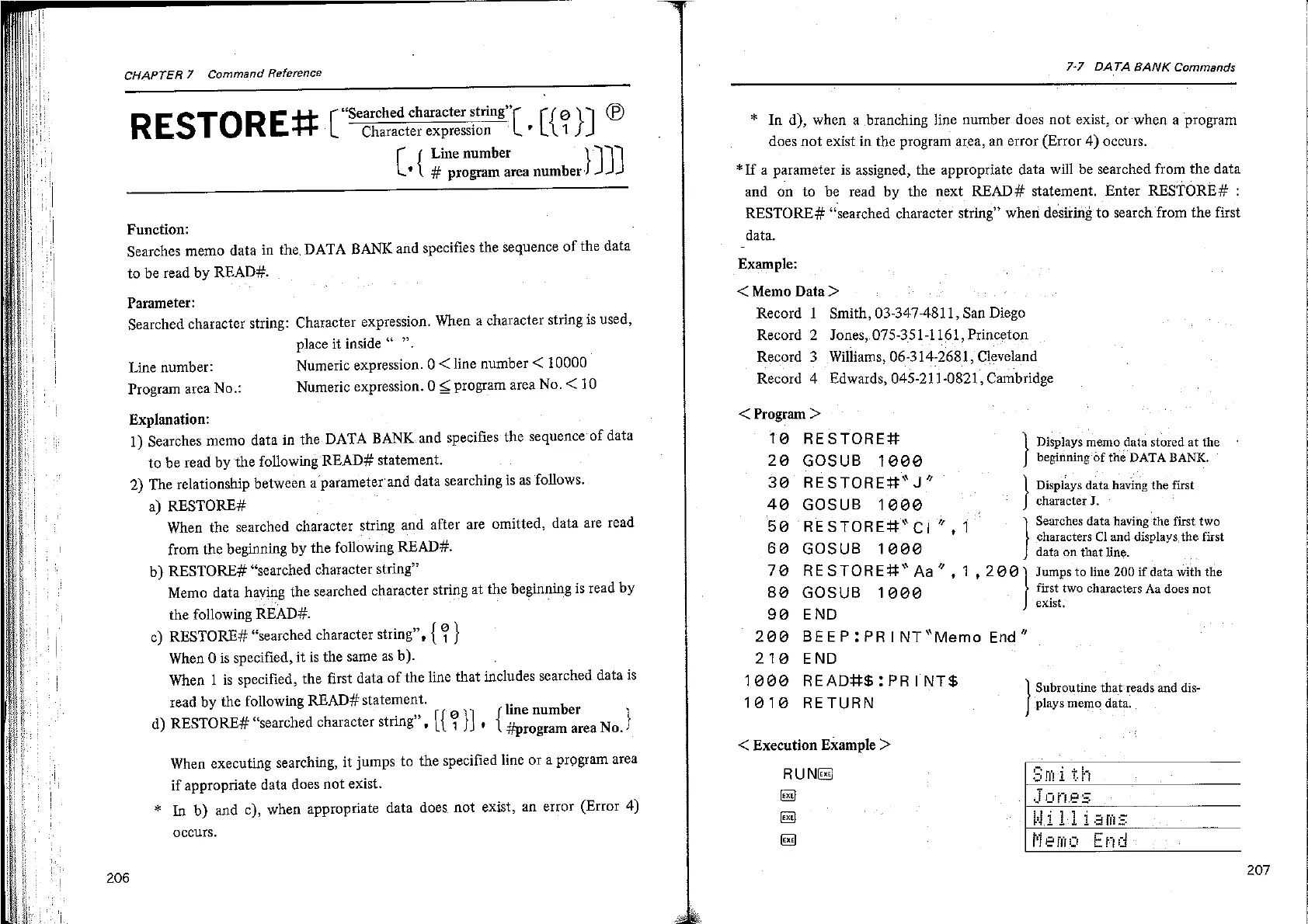
RESTORE#
(“tiscramecr
L-(2)]
©
(.
{
Line
number
yy
#
program
area
number
Function:
Searches
memo
data
in
the.
DATA
BANK
and
specifies
the
sequence
of
the
data
to
be
read
by
READ#.
Parameter:
Searched
character
string:
Character
expression.
When
a
character
string
is
used,
place
it
inside
”.
Numeric
expression.
0
<
line
number
<
10000
Numeric
expression.
0
<
program
area
No.
<
10
Line
number:
Program
area
No.:
Explanation:
1)
Searches
memo
data
in
the
DATA
BANK.and
specifies
the
sequence
of
data
to
be
read
by
the
following
READ#
statement.
2)
The
relationship
between
a
parameter'and
data
searching
is
as
follows.
a}
RESTORE#
When
the
searched
character
string
and
after
are
omitted,
data
are
read
from
the
beginning
by
the
following
READ#.
b)
RESTORE#
“searched
character
string”
Memo
data
having
the
searched
character
string
at
the
beginning
is
tread
by
the
following
READ#.
c)
RESTORE#
“searched
character
string”,
{
2
}
When
0
is
specified,
it is
the
same
as
b).
When
1
is
specified,
the
first
data
of
the
line
that
includes
searched
data
is
read
by
the
following
READ#
statement.
d)
RESTORE#
“searched
character
string”,
{f
@
}
*
[line
number
|
#program
area
No.
When
executing
searching,
it
jumps
to
the
specified
line
or
a
program
area
if
appropriate
data
does
not
exist.
*
In
b)
and
c),
when
appropriate
data
does
not
exist,
an
error
(Error
4)
occurs.
206
7-7
DATA
BANK
Commands
*
In
d),
when
a
branching
line
number
does
not
exist,
or
when
a
program
does
not
exist
in
the
program
area,
an
error
(Error
4)
occurs.
*If
a
parameter
is
assigned,
the
appropriate
data
will
be
searched
from
the
data
and
on
to
be
read
by
the
next
READ#
statement.
Enter
RESTORE#
:
RESTORE#
“searched
character
string”
when
desiring
to
search
from
the
first
data.
Example:
<
Memo
Data
>
Record
1
Smith,
03-347-4811,
San
Diego
Record
2
Jones,.075-351-1161,
Princeton
Record
3.
Williams,
06-314-2681,
Cleveland
Record
4
Edwards,
045-211-0821,
Cambridge
<
Program
>
T@
RESTORE?
28
GOSUB
1800
}
30
RESTORE#*
J”
4@
GOSUB
12000
;
|
5@
RESTOREH*
ci”
1
|
Searches
data
having
‘the
first
two
Displays
memo
data
stored
at
the
beginning
'of
the
DATA
BANK.
Displays
data
having
the
first
character
J.
6@
GOSUB
18000
characters
Cl
and
displays.
the
first
data
on
that
line.
78
RESTORE#*
Aa”
,
1,
2@@)
Jumps
to
line
200
if
data
with
the
82
GOSUB
1000
first
two
characters
Aa
does
not
9@
END
exist,
200
BEEP:PRINT
“Memo
End”
21@ END
19000
READHS:PRINT$S
Subroutine
that'reads
and
dis-
plays
memo
data.
18016
RETURN
<
Execution
Example
>
RUNG
Exe}
exe}
ex
207

Related product manuals