EasyManua.ls Logo

Casio FX-795P - 4-6 Binary, Decimal and Hexadecimal Operations; Arithmetic operation, logical operation, twos complement, logical shift and base conversion

Casio FX-795P
133 pages
Print Icon
To Next Page IconTo Next Page
To Previous Page IconTo Previous Page
Loading...
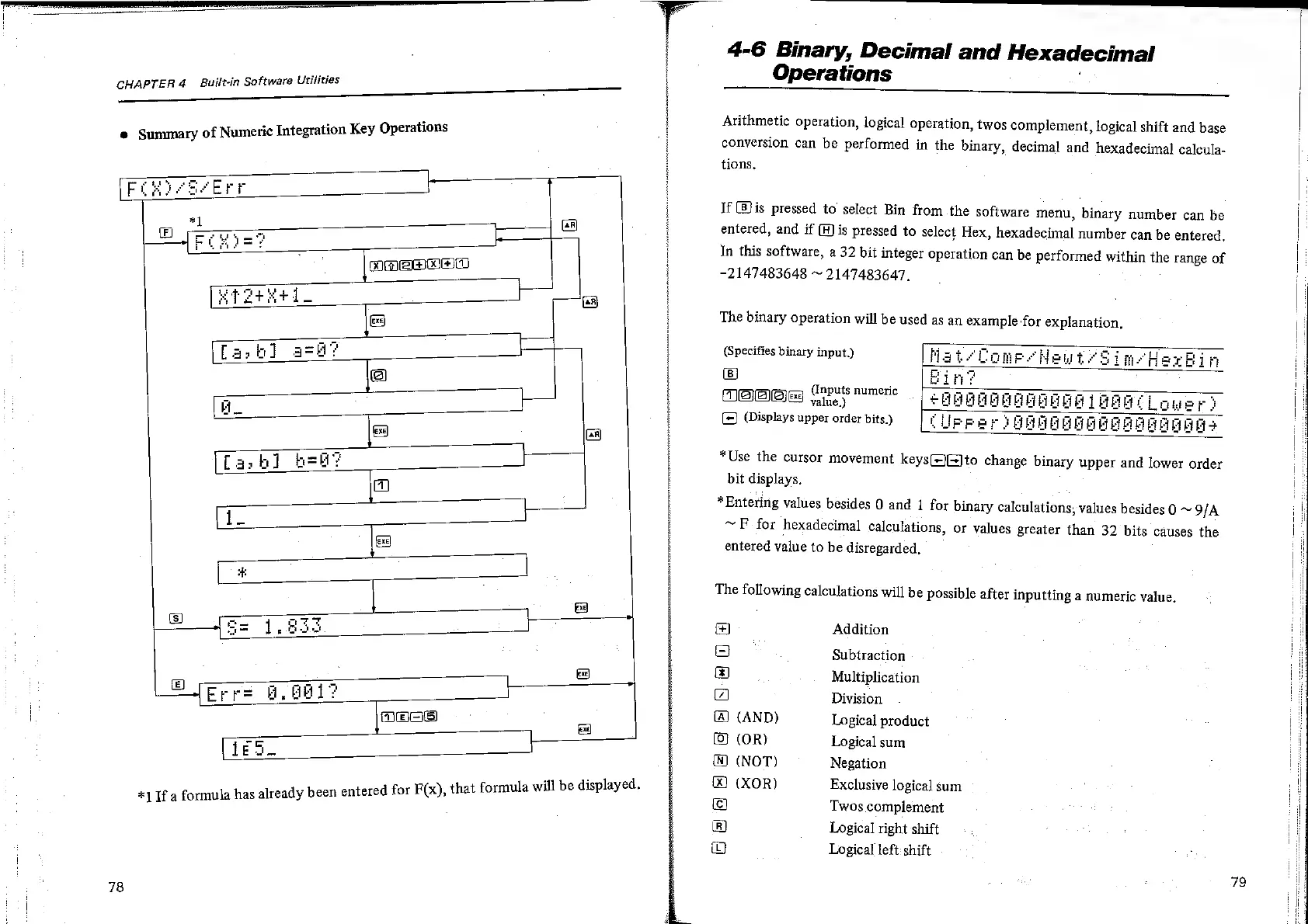
CHAPTER
4
Built-in
Software
Utilities
e
Summary
of
Numeric
Integration
Key
Operations
78
*]
If
a
formula
has
already
been
entered
for
F(x),
that
formula
w:
Ci)
.
Ea
ea
LEN
eS
Caan)
¢
Rtetetd.
ee
|
La,
bl]
ash?
@
L
AL
ex)
a)
z
[ash]
bel?
7
Zs
1_
ea
£
Bo
pS
©
fee
1.833
&
|
©
seeps
8,
Bed?
oo
36
|e
a
Le
ill
be
displayed.
<<
Operations
4-6
Binary,
Decimal
and
Hexadecimal
=
eS
Arithmetic
operation,
logical
operation,
twos
complement,
logical
shift
and
base
conversion
can
be
performed
in
the
binary,
decimal
and
hexadecimal
calcula-
tions.
If
Bis
pressed
to
select
Bin
from
the
software
menu,
binary
number
can
be
entered,
and
if
(A)
is
pressed
to
select
Hex,
hexadecimal
number
can
be
entered,
In
this
software,
a
32
bit
integer
operation
can
be
performed
within
the
range
of
-2
47483648
~
2147483647,
The
binary
operation
will
be
used
as
an
example
for
explanation,
(Specifies
binary
input.)
(Bj
4
NEN
ater
(nputs
numeric
=
*Use
the
cursor
movement
keys
value.)
(Displays
upper
order
bits.)
bit
displays.
==
to
change
binary
upper
and
lower
order
*Entering
values
besides
0
and
1
for
binary
calculations,
values
besides
0
~
9/A
~F
for
hexadecimal
calculations,
or
values
greater
than
32
bits
causes
the
entered
value
to
be
disregarded,
The
following
calculations
will
be
possible
after
inputting
a
numeric
value.
HeERBGSRAwOHA
Addition
Subtraction
Multiplication
Division
(AND)
Logical
product
(OR)
Logical
sum
(NOT)
Negation
(XOR)
Twos
complement
Logical
right
shift
Logical
left:
shift
Exclusive
logical
sum
79

Related product manuals