EasyManua.ls Logo

Casio fx-83GT PLUS - Page 12

Casio fx-83GT PLUS
32 pages
Print Icon
To Next Page IconTo Next Page
To Previous Page IconTo Previous Page
Loading...
Return
to
initial
display
format
(Norm
1):
0,
1428571429
Conditions
for
Displaying
a
Calculation
Result
as
a
Recurring
Decimal
If
a
calculation
result
satisfies
the
following
conditions,
pressing
will
display
it
as
a
recurring
decimal
value.
¢
The
total
number
of
digits
used
in
the
mixed
fraction
(including
integer,
numerator,
denominator,
and
separator
symbol)
must
be
no
more
than
10.
Note:
For
information
about
switching
the
display
format
of
a
calculation
result
when
OFF
is
selected
for
the
Rdec
setting
on
the
setup
menu,
see
“Toggling
Calculation
Results”.
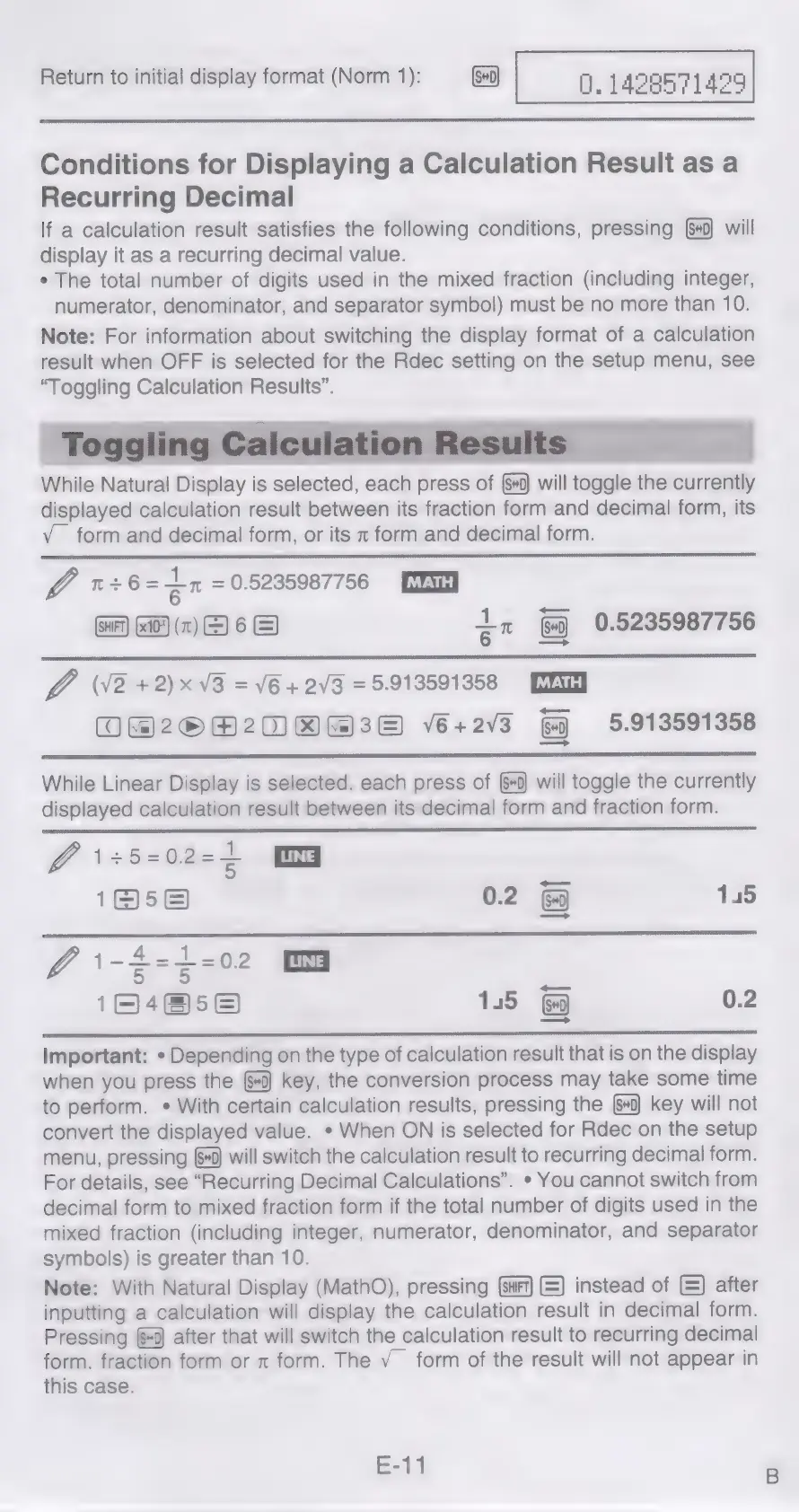
While
Natural
Display
is
selected,
each
press
of
will
toggle
the
currently
displayed
calculation
result
between
its
fraction
form
and
decimal
form,
its
Vv
form
and
decimal
form,
or
its
x
form
and
decimal
form.
fp
1+6=
an
=
0.5235987756
(HF)
GAD}
(x)
E)
6
&)
qn
0.5235987756
Lo
V2
+2)x
V3
=
V6
+
2V3
=
5.913591358
O@20R20
80838
v6+2v3
5.913591358
While
Linear
Display
is
selected,
each
press
of
(+0)
will
toggle
the
currently
displayed
calculation
result
between
its
decimal
form
and
fraction
form.
~
5
1@5e
0.2
&
145
@i\-2-1-02
OG
164658
145
&&
0.2
Important:
*
Depending
on
the
type
of
calculation
result
that
is
on
the
display
when
you
press
the
(#0)
key,
the
conversion
process
may
take
some
time
to
perform.
»
With
certain
calculation
results,
pressing
the
key
will
not
convert
the
displayed
value.
*
When
ON
is
selected
for
Rdec
on
the
setup
menu,
pressing
+0)
will
switch
the
calculation
result
to
recurring
decimal
form.
For
details,
see
“Recurring
Decimal
Calculations”.
*
You
cannot
switch
from
decimal
form
to
mixed
fraction
form
if
the
total
number
of
digits
used
in
the
mixed
fraction
(including
integer,
numerator,
denominator,
and
separator
symbols)
is
greater
than
10.
Note:
With
Natural
Display
(MathO),
pressing
=)
instead
of
©)
after
inputting
a
calculation
will
display
the
calculation
result
in
decimal
form.
Pressing
(0
after
that
will
switch
the
calculation
result
to
recurring
decimal
form,
fraction
form
or
x
form.
The
V_
form
of
the
result
will
not
appear
in
this
case.
E-11

Related product manuals