EasyManua.ls Logo

Casio fx-83GT PLUS - Page 13

Casio fx-83GT PLUS
32 pages
Print Icon
To Next Page IconTo Next Page
To Previous Page IconTo Previous Page
Loading...
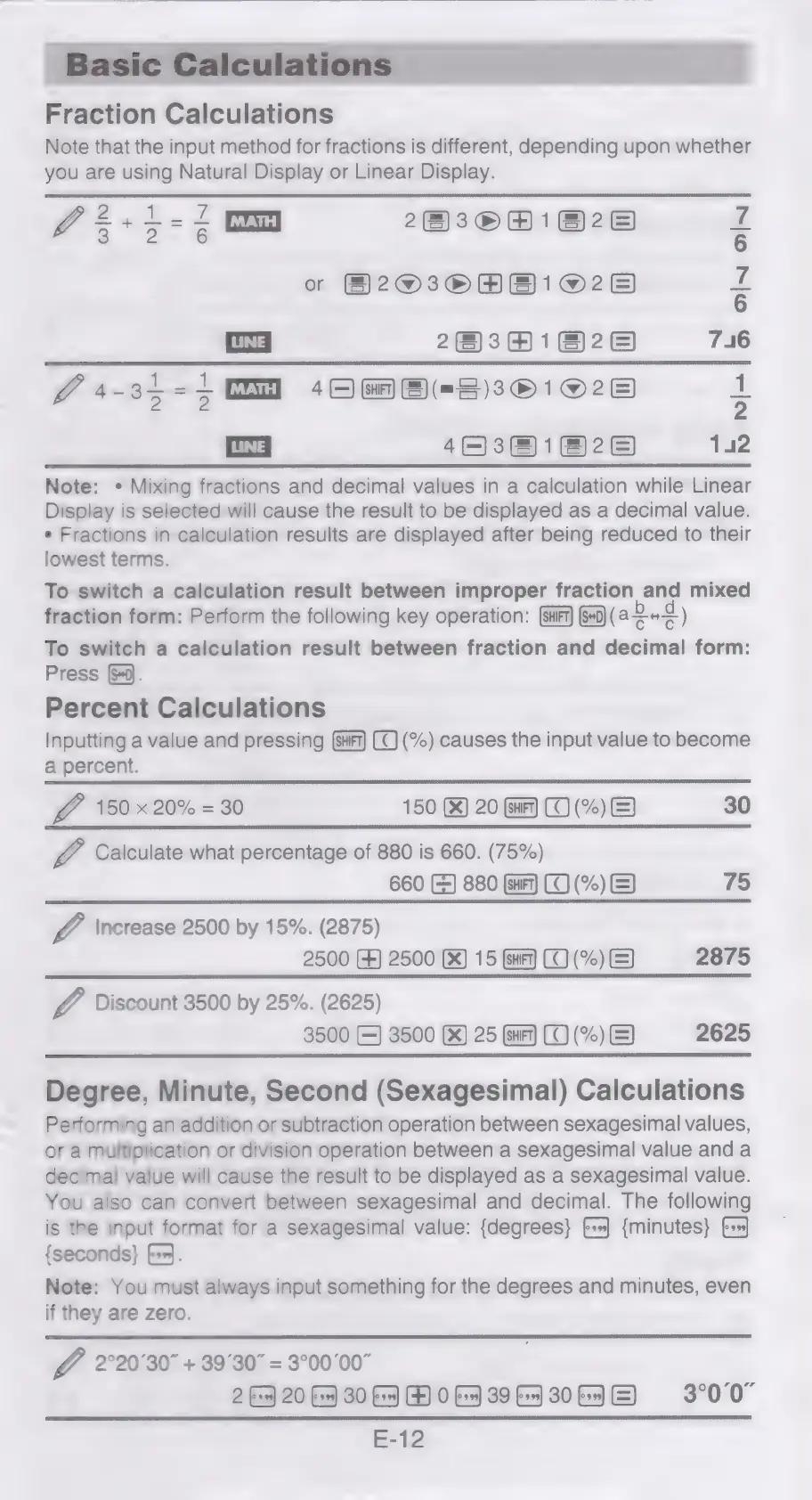
Fraction
Calculations
Note
that
the
input
method
for
fractions
is
different,
depending
upon
whether
you
are
using
Natural
Display
or
Linear
Display.
Z2+i-1
im
2830081828
Hf
o
2030081028
zg
22301828
746
24-35-10
10M
8(=8)381028
}
LINE
|
46381828
142
Note:
*
Mixing
fractions
and
decimal
values
in
a
calculation
while
Linear
Display
is
selected
will
cause
the
result
to
be
displayed
as
a
decimal
value.
¢
Fractions
in
calculation
results
are
displayed
after
being
reduced
to
their
lowest
terms.
To
switch
a
calculation
result
between
improper
fraction
and
mixed
fraction
form:
Perform
the
following
key
operation:
@F
@9(a242)
To
switch
a
calculation
result
between
fraction
and
decimal
form:
Press
Sj.
Percent
Calculations
Inputting
a
value
and
pressing
(%)
causes
the
input
value
to
become
a
percent.
J
150
x
20%
=
30
150
(%)
20
Gar)
(TO
(%)
&)
30
V4
Calculate
what
percentage
of
880
is
660.
(75%)
660
(&)
880
(sat)
(CO
(%)
(=)
J
\ncrease
2500
by
15%.
(2875)
2500
FF)
2500
(X)
15
(ar)
(0
(%)
&)
2875
J
Discount
3500
by
25%.
(2625)
3500
(=)
3500
(X)
25
(sar)
(0
(%)
&)
2625
Degree,
Minute,
Second
(Sexagesimal)
Calculations
Performing
an
addition
or
subtraction
operation
between
sexagesimal
values,
or
a
multiplication
or
division
operation
between
a
sexagesimal
value
and
a
decimal
value
will
cause
the
result
to
be
displayed
as
a
sexagesimal
value.
You
also
can
convert
between
sexagesimal
and
decimal.
The
following
is
the
input
format
for
a
sexagesimal
value:
{degrees}
6+]
{minutes}
{seconds}
f+}.
Note:
You
must
always
input
something
for
the
degrees
and
minutes,
even
if
they
are
zero.
G6
2
20°30"
+
39°30"
=
3°00'00"
2
>
20
Gs]
30
Ba]
FOG
39653064
E)
3°00"
E-12

Related product manuals