EasyManua.ls Logo

Casio fx-83GT PLUS - Page 14

Casio fx-83GT PLUS
32 pages
Print Icon
To Next Page IconTo Next Page
To Previous Page IconTo Previous Page
Loading...
Vi
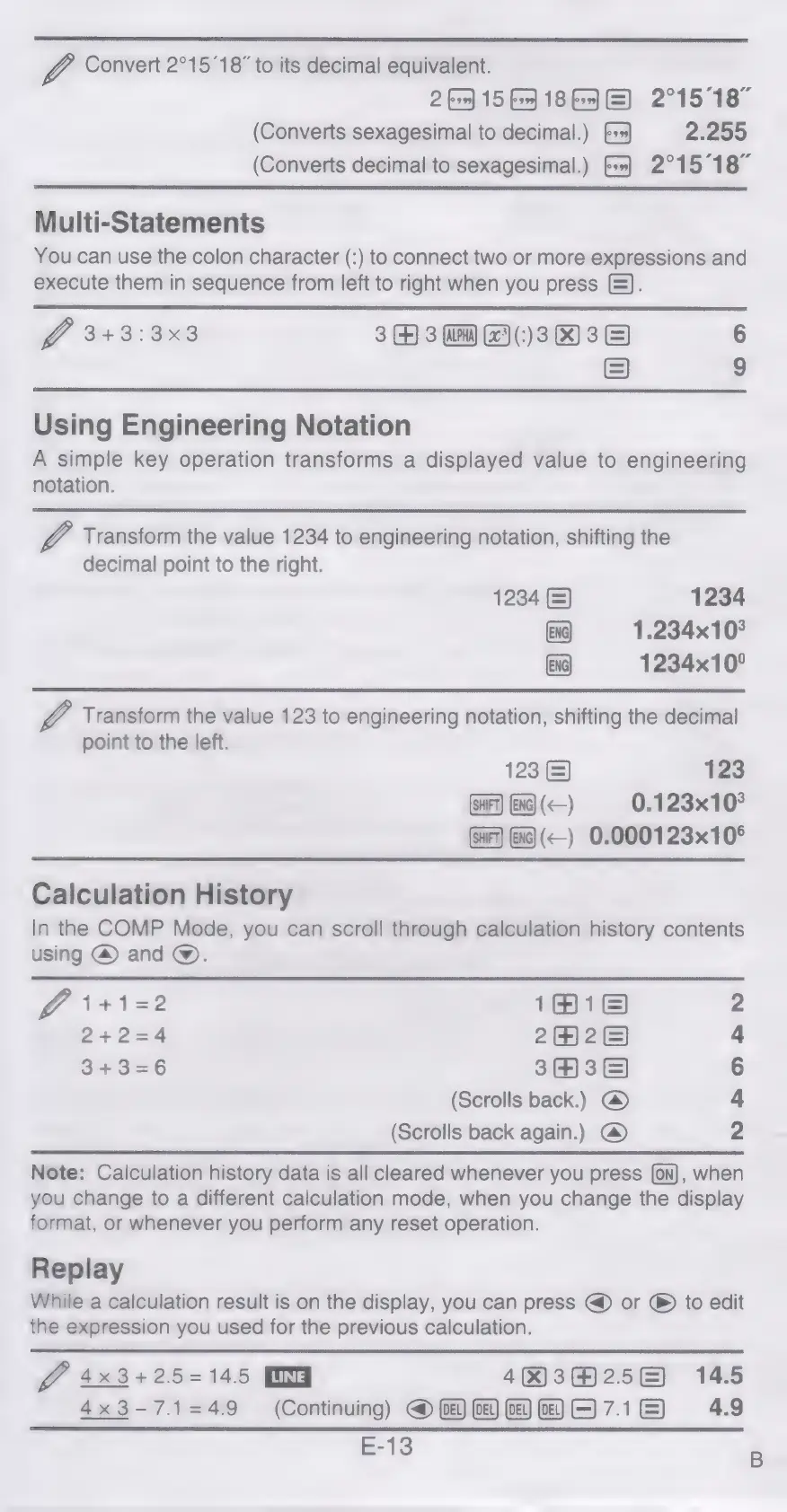
Convert
2°15'18”
to
its
decimal
equivalent.
2
>)
156)
18
F)
(GE)
2°15°18"
(Converts
sexagesimal
to
decimal.)
[++
2.255
(Converts
decimal
to
sexagesimal.)
(=]
2°15°187
Multi-Statements
You
can
use
the
colon
character
(:)
to
connect
two
or
more
expressions
and
execute
them
in
sequence
from
left
to
right
when
you
press
).
GO
3+3:3x3
33
(3038)
=)
on
Using
Engineering
Notation
A
simple
key
operation
transforms
a
displayed
value
to
engineering
notation.
Vi
Transform
the
value
1234
to
engineering
notation,
shifting
the
decimal
point
to
the
right.
1234
(=)
1234
XG)
1.234x10°
xg)
1234x10°
V4
Transform
the
value
123
to
engineering
notation,
shifting
the
decimal
point
to
the
left.
1232)
123
Ena)
()
0.123x10°
fi
(<)
0.000123x10°
Calculation
History
In
the
COMP
Mode,
you
can
scroll
through
calculation
history
contents
using
@
and
@.
fe
1+1=2
161)
242=4
2422)
3+3=6
343)
(Scrolls
back.)
@
(Scrolls
back
again.)
@
No
Oo
&
NY
Note:
Calculation
history
data
is
all
cleared
whenever
you
press
(on),
when
you
change
to
a
different
calculation
mode,
when
you
change
the
display
format,
or
whenever
you
perform
any
reset
operation.
Replay
While
a
calculation
result
is
on
the
display,
you
can
press
@
or
®
to
edit
the
expression
you
used
for
the
previous
calculation.
OZ
4x3+25=145
DG
4H)3H256)
14.5
4x3-7.1=49
(Continuing)
@
MOE)
71E)
4.9
E-13

Related product manuals