EasyManua.ls Logo

Casio fx-83GT PLUS - Page 22

Casio fx-83GT PLUS
32 pages
Print Icon
To Next Page IconTo Next Page
To Previous Page IconTo Previous Page
Loading...
(SuiFT)
(wove)
(SETUP)
@
(3)
(STAT)
(2)
(OFF)
(one)
(SETUP)
(6)
(Fix)
(3)
(2)
(STAT)
(2)
(A+BX)
20
&)
110
&)
200F)
200]
©
®&
3150
(=)
7310
(=)
8800
E)
9310)
G)
(STAT)
&)
(Reg)
B)
(1
&)
0.923
(4)
(STAT)
G)
(Type)
@)
(In
X)
(4)
(STAT)
()
(Reg)
8)
()
&)
0.998
(Ac)
(sur)
(1)
(STAT)
(5)
(Reg)
@)
(A)
&)
-aoo7.
964
(suet)
(1)
(STAT)
(5)
(Reg)
(2)
(B)
&)
2307.
5392
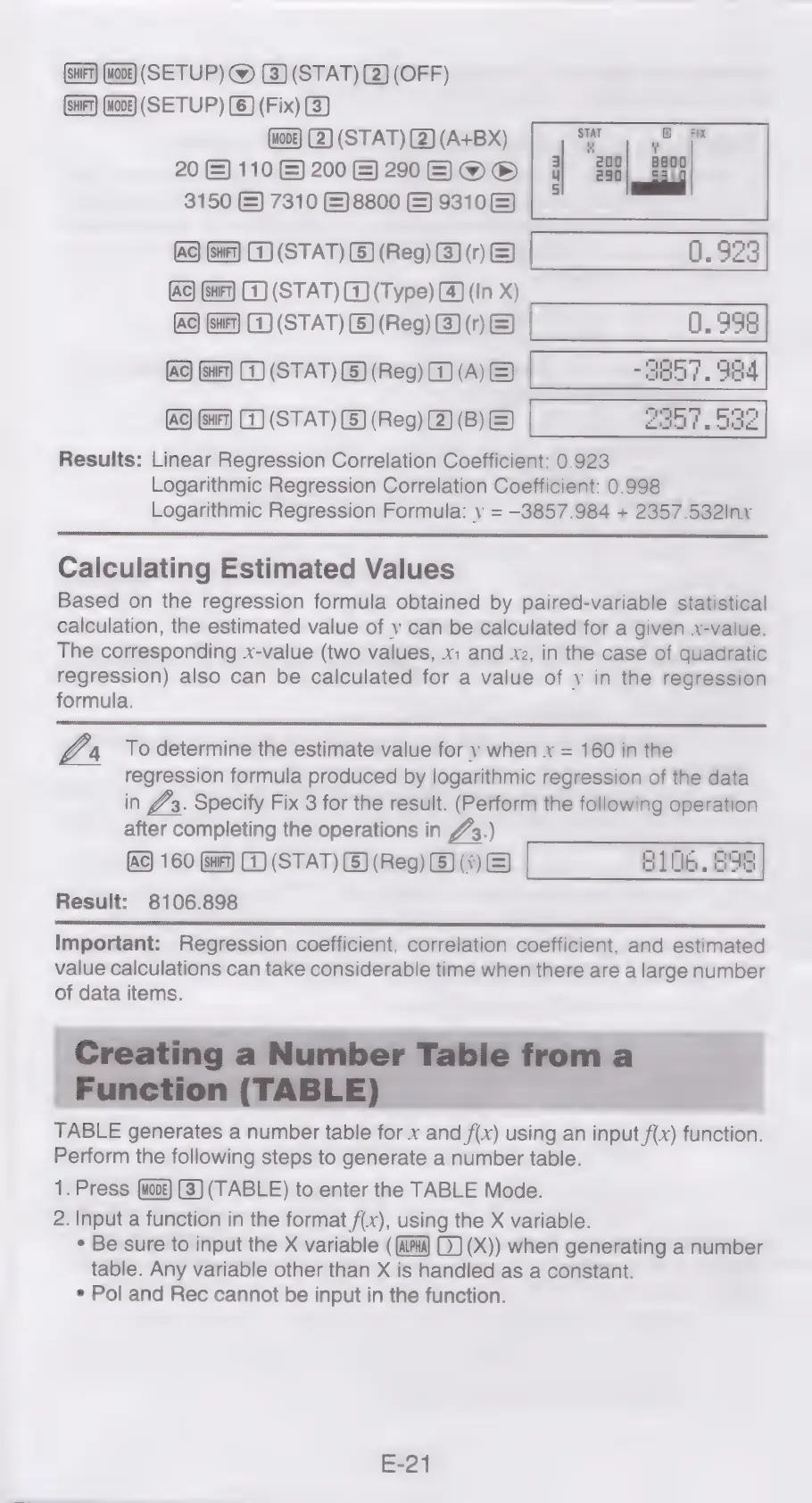
Results:
Linear
Regression
Correlation
Coefficient:
0.923
Logarithmic
Regression
Correlation
Coefficient:
0.998
Logarithmic
Regression
Formula:
y
=
—3857.984
+
2357.532Inx
Calculating
Estimated
Values
Based
on
the
regression
formula
obtained
by
paired-variable
statistical
calculation,
the
estimated
value
of
y
can
be
calculated
for
a
given
x-value.
The
corresponding
x-value
(two
values,
x:
and
xz,
in
the
case
of
quadratic
regression)
also
can
be
calculated
for
a
value
of
y
in
the
regression
formula.
VA
To
determine
the
estimate
value
for
y
when
x
=
160
in
the
regression
formula
produced
by
logarithmic
regression
of
the
data
in
#3.
Specify
Fix
3
for
the
result.
(Perform
the
following
operation
after
completing
the
operations
in
723)
160
(sur)
1)
(STAT)
(5)
(Reg)
&)
(5)
&)
9106.898
Result:
8106.898
Important:
Regression
coefficient,
correlation
coefficient,
and
estimated
value
calculations
can
take
considerable
time
when
there
are
a
large
number
of
data
items.
TABLE
generates
a
number
table
for
x
and
f(x)
using
an
input
f(x)
function.
Perform
the
following
steps
to
generate
a
number
table.
1.
Press
(3)
(TABLE)
to
enter
the
TABLE
Mode.
2.
Input
a
function
in
the
format
f(x),
using
the
X
variable.
*
Be
sure
to
input
the
X
variable
(
(Px)
0)
(X))
when
generating
a
number
table.
Any
variable
other
than
X
is
handled
as
a
constant.
¢
Pol
and
Rec
cannot
be
input
in
the
function.
E-21

Related product manuals