EasyManua.ls Logo

Casio fx-83GT PLUS - Page 23

Casio fx-83GT PLUS
32 pages
Print Icon
To Next Page IconTo Next Page
To Previous Page IconTo Previous Page
Loading...
3.
In
response
to
the
prompts
that
appear,
input
the
values
you
want
to
use,
pressing
()
after
each
one.
For
this
prompt:
|
Input
this:
Start?
Input
the
lower
limit
of
X
(Default
=
1).
End?
Input
the
upper
limit
of
X
(Default
=
5).
Note:
Make
sure
that
the
End
value
is
always
greater
than
the
Start
value.
Step?
Input
the
increment
step
(Default
=
1).
Note:
The
Step
specifies
by
how
much
the
Start
value
should
be
sequentially
incremented
as
the
number
table
is
generated.
If
you
specify
Start
=
1
and
Step
=
1,
X
sequentially
will
be
assigned
the
values
1,
2,
3,
4,
and
so
on
to
generate
the
number
table
until
the
End
value
is
reached.
*
Inputting
the
Step
value
and
pressing
)
generates
and
displays
the
number
table
in
accordance
with
the
parameters
you
specified.
*
Pressing
(ac)
while
the
number
table
screen
is
displayed
will
return
to
the
function
input
screen
in
step
2.
V4
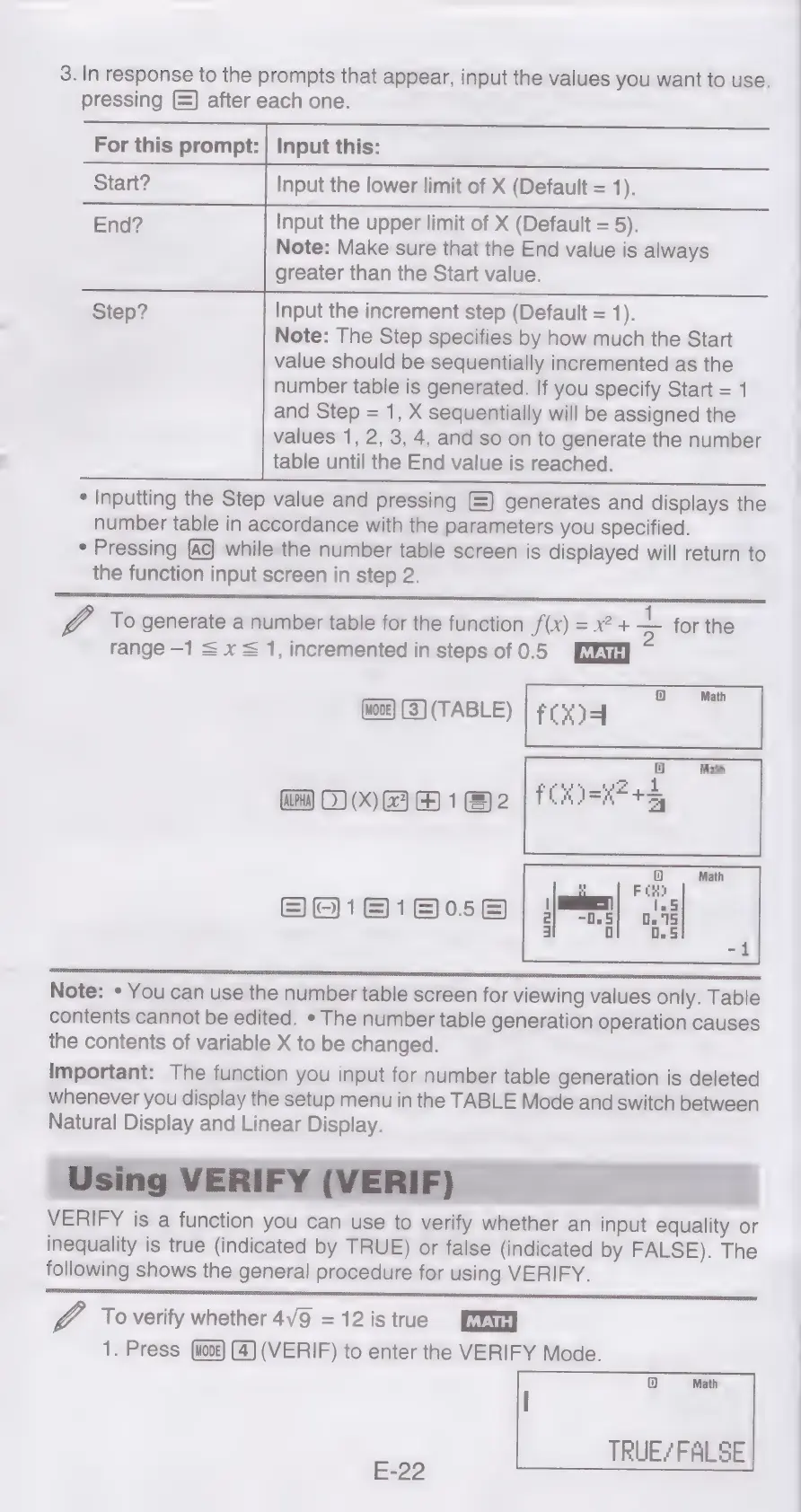
To
generate
a
number
table
for
the
function
f(x)
=
x2
+
Z.
for
the
range
—1
=
x
=
1,
incremented
in
steps
of
0.5
1D]
Math
(woos)
(3}
(TABLE)
|
#0944
Math
iD}
Oy
0)
(X)
GH
1
2
|
HEKI=KF+S
BO1818058
eestor
Note:
*
You
can
use
the
number
table
screen
for
viewing
values
only.
Table
contents
cannot
be
edited.
*
The
number
table
generation
operation
causes
the
contents
of
variable
X
to
be
changed.
Important:
The
function
you
input
for
number
table
generation
is
deleted
whenever
you
display
the
setup
menu
in
the
TABLE
Mode
and
switch
between
Natural
Display
and
Linear
Display.
VERIFY
is
a
function
you
can
use
to
verify
whether
an
input
equality
or
inequality
is
true
(indicated
by
TRUE)
or
false
(indicated
by
FALSE).
The
following
shows
the
general
procedure
for
using
VERIFY.
V4
To
verify
whether
4V9
=
12
is
true
1.
Press
(4)
(VERIF)
to
enter
the
VERIFY
Mode.
TRUE/FALSE
E-22

Related product manuals