EasyManua.ls Logo

Casio fx-83GT PLUS - Page 27

Casio fx-83GT PLUS
32 pages
Print Icon
To Next Page IconTo Next Page
To Previous Page IconTo Previous Page
Loading...
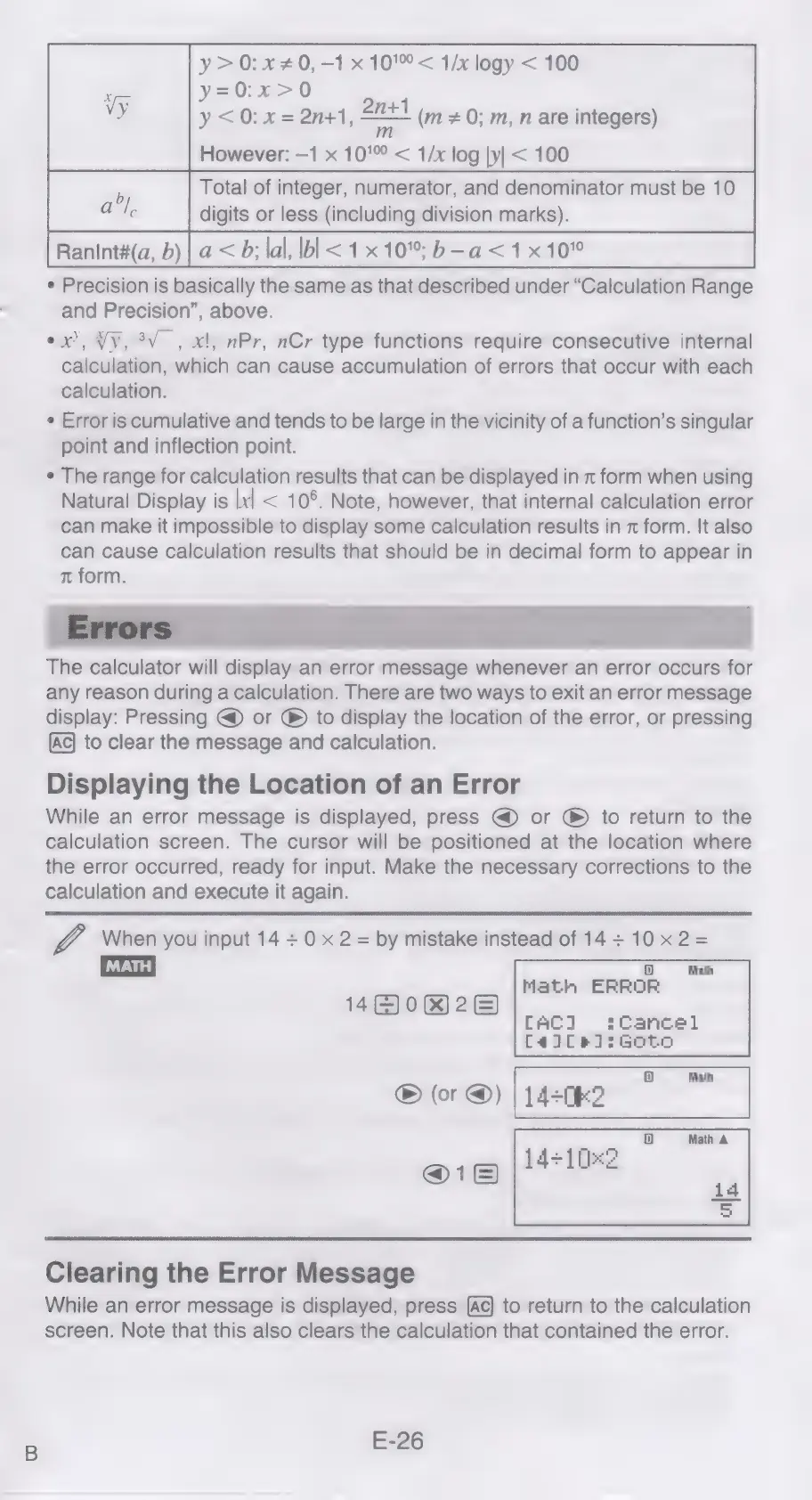
y>0:x#0,-1
x
10'<
1/x
logy
<
100
y=0:x>0
y
<0:
x
=
2n+1,
2n+1
m
However:
—1
x
10’
<
1/x
log
|y|
<
100
b
Total
of
integer,
numerator,
and
denominator
must
be
10
al
digits
or
less
(including
division
marks).
Ranint#(a,
b)
|
a
<
b;
lal,
bl
<1
x
10";
b-a<1x
10°
*
Precision
is
basically
the
same
as
that
described
under
“Calculation
Range
and
Precision”,
above.
ex,
Vy,
3V_,
x!,
nPr,
nCr
type
functions
require
consecutive
internal
calculation,
which
can
cause
accumulation
of
errors
that
occur
with
each
calculation.
¢
Error
is
cumulative
and
tends
to
be
large
in
the
vicinity
of
a
function’s
singular
point
and
inflection
point.
¢
The
range
for
calculation
results
that
can
be
displayed
in
x
form
when
using
Natural
Display
is
|x|
<
10°.
Note,
however,
that
internal
calculation
error
can
make
it
impossible
to
display
some
calculation
results
in
x
form.
It
also
can
cause
calculation
results
that
should
be
in
decimal
form
to
appear
in
m
form.
(m
#
0;
m,
n
are
integers)
any
reason
during
a
calculation.
There
are
two
ways
to
exit
an
error
message
display:
Pressing
@
or
®
to
display
the
location
of
the
error,
or
pressing
(Ac)
to
clear
the
message
and
calculation.
Displaying
the
Location
of
an
Error
While
an
error
message
is
displayed,
press
@
or
®
to
return
to
the
calculation
screen.
The
cursor
will
be
positioned
at
the
location
where
the
error
occurred,
ready
for
input.
Make
the
necessary
corrections
to
the
calculation
and
execute
it
again.
When
you
input
14
+
0
x
2
=
by
mistake
instead
of
14+10x2=
Math
ED)
Math
ERROR
480&%)2)
CAC]
:Cancel
Ca]Cel]:Goto
Math
®
(or
@)
|1420k2
@1
Clearing
the
Error
Message
While
an
error
message
is
displayed,
press
to
return
to
the
calculation
screen.
Note
that
this
also
clears
the
calculation
that
contained
the
error.
E-26

Related product manuals