EasyManua.ls Logo

Casio fx-83GT PLUS - Page 30

Casio fx-83GT PLUS
32 pages
Print Icon
To Next Page IconTo Next Page
To Previous Page IconTo Previous Page
Loading...
@
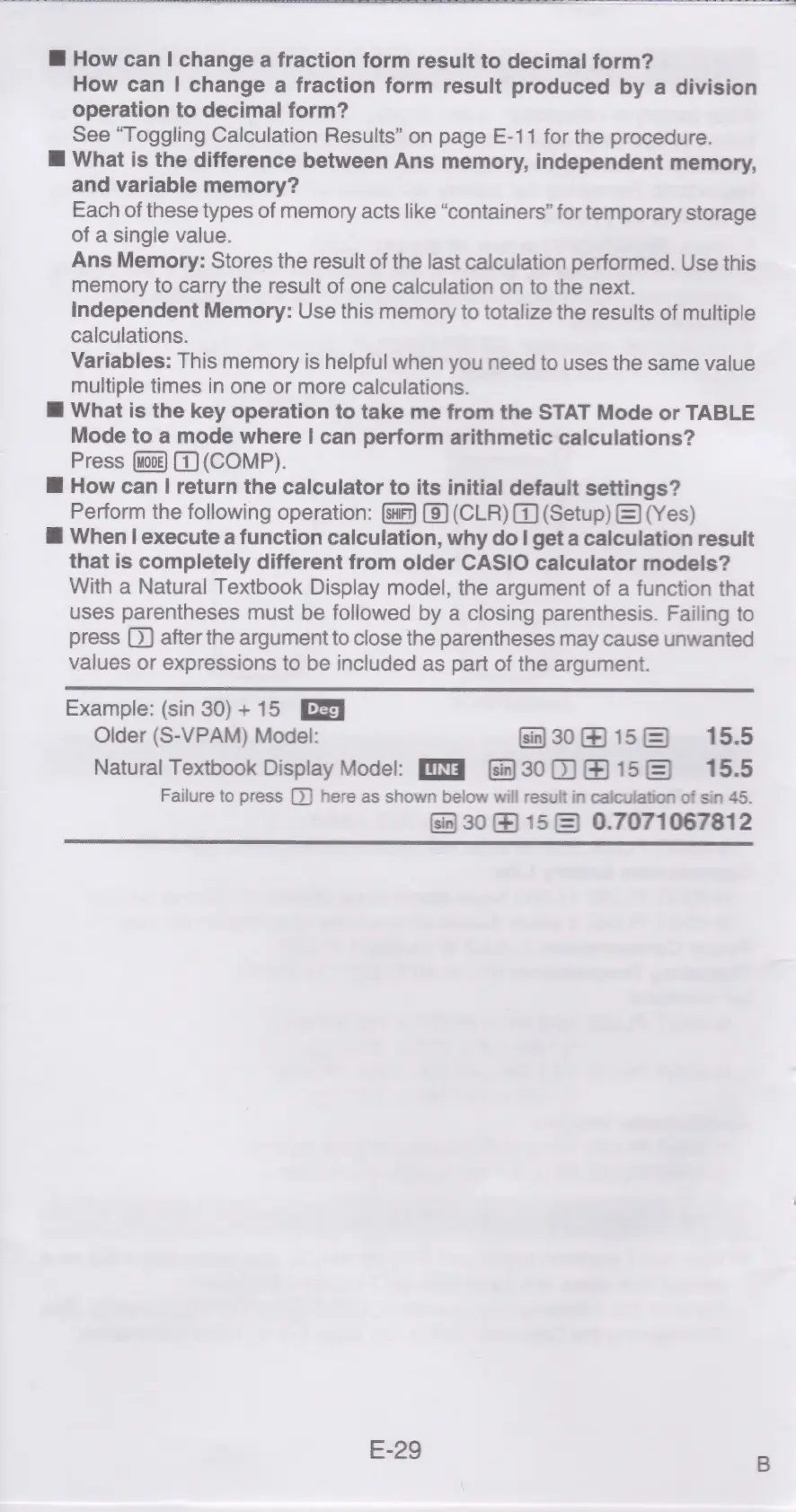
How
can
|
change
a
fraction
form
result
to
decimal
form?
How
can
|
change
a
fraction
form
result
produced
by
a
division
operation
to
decimal
form?
See
“Toggling
Calculation
Results”
on
page
E-11
for
the
procedure.
@
What
is
the
difference
between
Ans
memory,
independent
memory,
and
variable
memory?
Each
of
these
types
of
memory
acts
like
“containers”
for
temporary
storage
of
a
single
value.
Ans
Memory:
Stores
the
result
of
the
last
calculation
performed.
Use
this
memory
to
carry
the
result
of
one
calculation
on
to
the
next.
Independent
Memory:
Use
this
memory
to
totalize
the
results
of
multiple
calculations.
Variables:
This
memory
is
helpful
when
you
need
to
uses
the
same
value
multiple
times
in
one
or
more
calculations.
@
What
is
the
key
operation
to
take
me
from
the
STAT
Mode
or
TABLE
Mode
to
a
mode
where
|
can
perform
arithmetic
calculations?
Press
(1)
(COMP).
@
How
can
|
return
the
calculator
to
its
initial
default
settings?
Perform
the
following
operation:
(9)
(CLR)
G)
(Setup)
&)
(Yes)
@
When
|
execute
a
function
calculation,
why
do
|
get
a
calculation
result
that
is
completely
different
from
older
CASIO
calculator
models?
With
a
Natural
Textbook
Display
model,
the
argument
of
a
function
that
uses
parentheses
must
be
followed
by
a
closing
parenthesis.
Failing
to
press
after
the
argument
to
close
the
parentheses
may
cause
unwanted
values
or
expressions
to
be
included
as
part
of
the
argument.
Example:
(sin
30)+15
[Ey
Older
(S-VPAM)
Model:
30156
15.5
Natural
Textbook
Display
Model:
PIG
300)
His)
15.5
Failure
to
press
here
as
shown
below
will
result
in
calculation
of
sin
45.
30
&)
15
&)
0.7071067812
E-29

Related product manuals