EasyManua.ls Logo

Casio fx-83GT PLUS - Page 29

Casio fx-83GT PLUS
32 pages
Print Icon
To Next Page IconTo Next Page
To Previous Page IconTo Previous Page
Loading...
A
low
battery
is
indicated
by
a
dim
display,
even
if
contrast
is
adjusted,
or
by
failure
of
figures
to
appear
on
the
display
immediately
after
you
turn
on
the
calculator.
If
this
happens,
replace
the
battery
with
a
new
one.
Important:
Removing
the
battery
will
cause
all
of
the
calculator’s
memory
contents
to
be
deleted.
1.
Press
(sHiF)
(ac)
(OFF)
to
turn
off
the
calculator.
2.
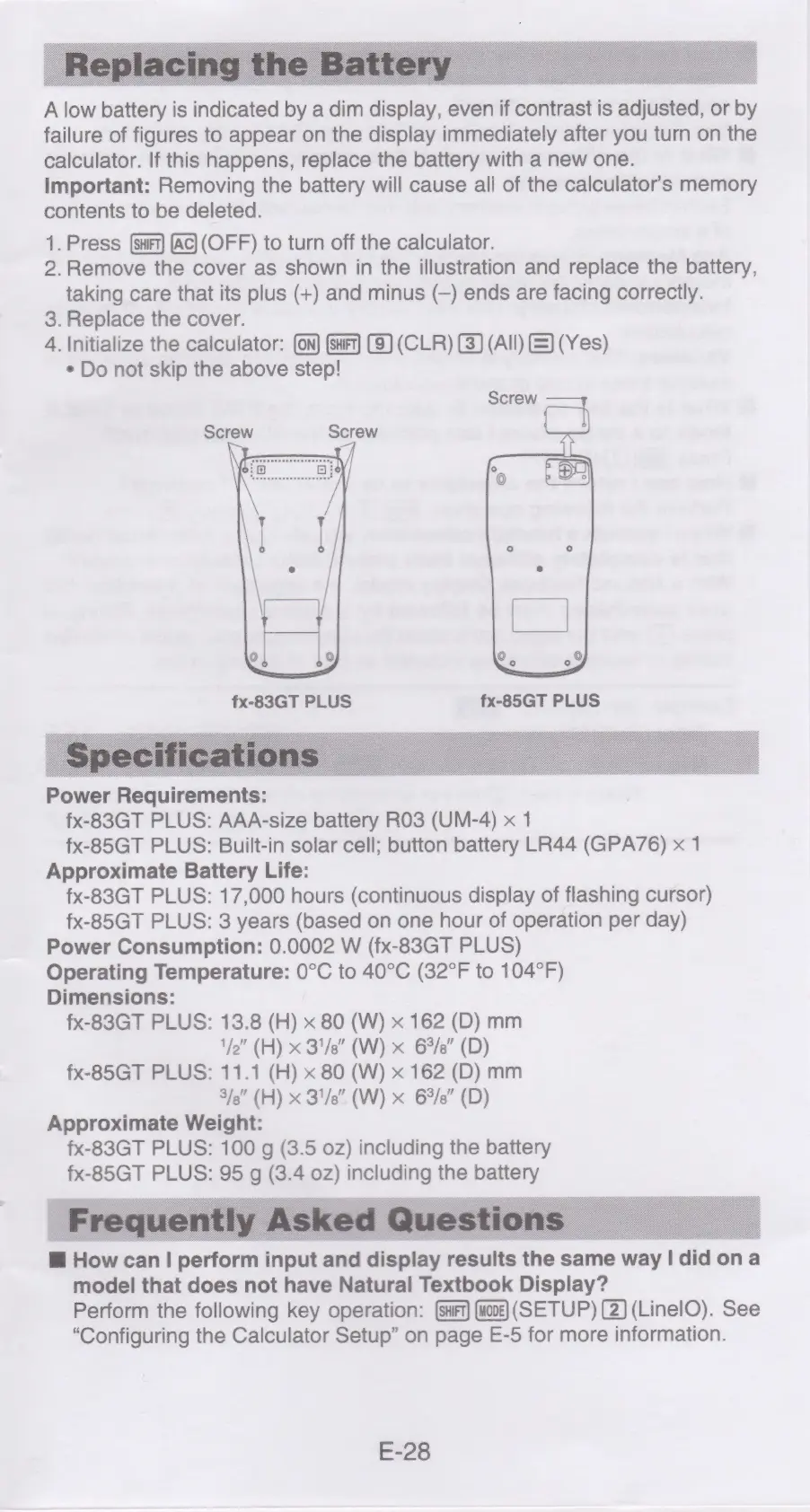
Remove
the
cover
as
shown
in
the
illustration
and
replace
the
battery,
taking
care
that
its
plus
(+)
and
minus
(—)
ends
are
facing
correctly.
3.
Replace
the
cover.
4.
Initialize
the
calculator:
(On)
(sft)
(9)
(CLR)
(3)
(All)
&)
(Yes)
*
Do
not
skip
the
above
step!
Screw
Screw
Screw
fx-83GT
PLUS
Power
Requirements:
fx-83GT
PLUS:
AAA-size
battery
RO3
(UM-4)
x
1
fx-85GT
PLUS:
Built-in
solar
cell;
button
battery
LR44
(GPA76)
x
1
Approximate
Battery
Life:
fx-83GT
PLUS:
17,000
hours
(continuous
display
of
flashing
cursor)
fx-85GT
PLUS:
3
years
(based
on
one
hour
of
operation
per
day)
Power
Consumption:
0.0002
W
(fx-83GT
PLUS)
Operating
Temperature:
0°C
to
40°C
(32°F
to
104°F)
Dimensions:
fx-83GT
PLUS:
13.8
(H)
x
80
(W)
x
162
(D)
mm
1/2"
(H)
x
31/8”
(W)
x
6%/s”
(D)
fx-85GT
PLUS:
11.1
(H)
x
80
(W)
x
162
(D)
mm
3/e"
(H)
x
31/8”
(W)
x
6%/e”
(D)
Approximate
Weight:
fx-83GT
PLUS:
100
g
(3.5
oz)
including
the
battery
fx-85GT
PLUS:
95
g
(3.4
02)
including
the
battery
@
How
can!
perform
input
and
display
results
the
same
way
|
did
on
a
model
that
does
not
have
Natural
Textbook
Display?
Perform
the
following
key
operation:
{saF1)
(toe)
(SETUP)
(2)
(LinelO).
See
“Configuring
the
Calculator
Setup”
on
page
E-5
for
more
information.
E-28

Related product manuals