EasyManua.ls Logo

Casio fx-83GT PLUS - Page 5

Casio fx-83GT PLUS
32 pages
Print Icon
To Next Page IconTo Next Page
To Previous Page IconTo Previous Page
Loading...
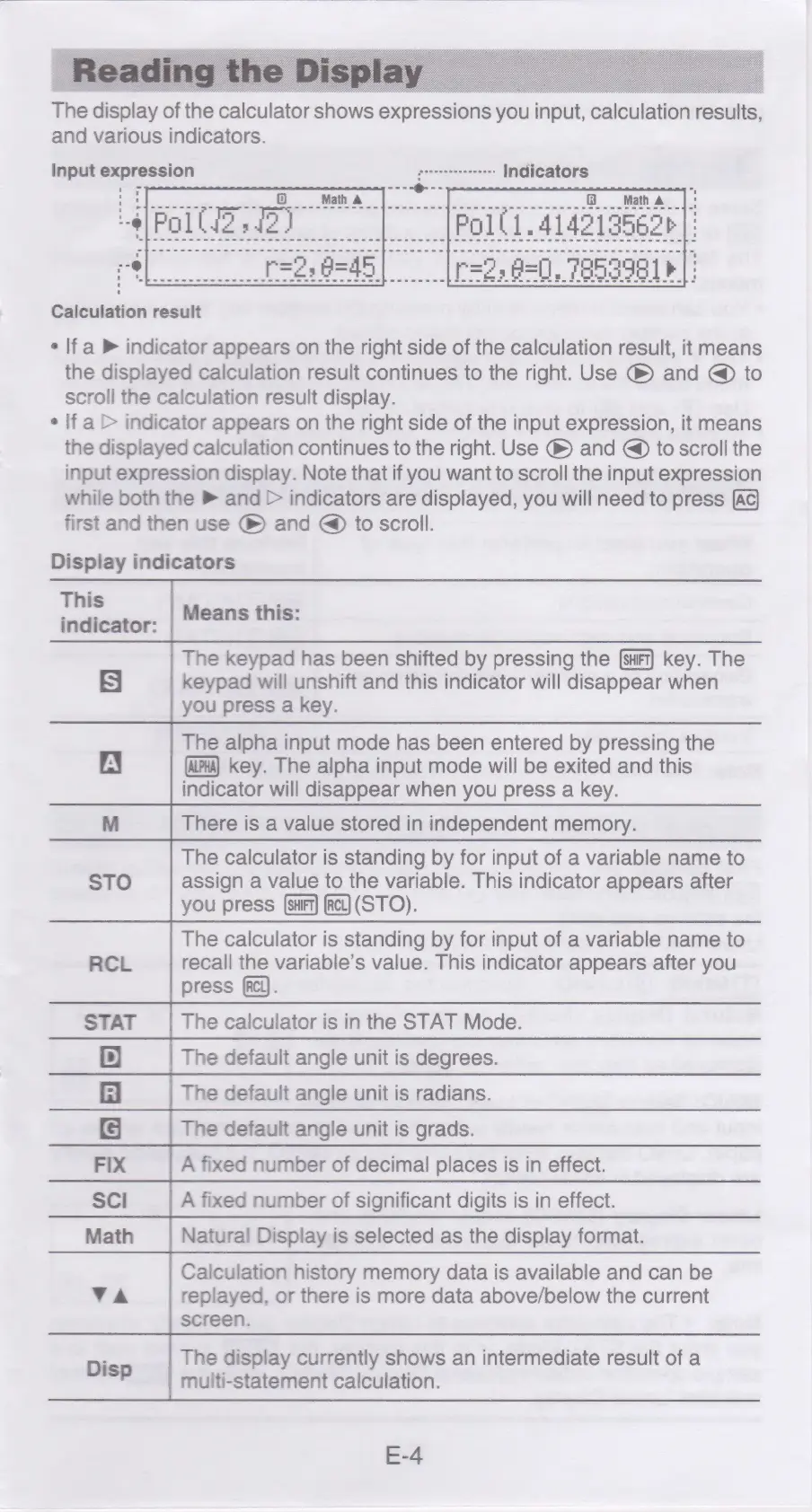
The
display
of
the
calculator
shows
expressions
you
input,
calculation
results,
and
various
indicators.
Input
expression
srrencensseneees
Indicators
ae
Math
a
Polli.414219562¢
Calculation
result
¢
lf
a
®
indicator
appears
on
the
right
side
of
the
calculation
result,
it
means
the
displayed
calculation
result
continues
to
the
right.
Use
and
@
to
scroll
the
calculation
result
display.
¢
If
a>
indicator
appears
on
the
right
side
of
the
input
expression,
it
means
the
displayed
calculation
continues
to
the
right.
Use
@
and
@
to
scroll
the
input
expression
display.
Note
that
if
you
want
to
scroll
the
input
expression
while
both
the
®
and
>
indicators
are
displayed,
you
will
need
to
press
first
and
then
use
®
and
@
to
scroll.
Display
indicators
This
=
wuiiestor-
Means
this:
The
keypad
has
been
shifted
by
pressing
the
{surt]
key.
The
S|
keypad
will
unshift
and
this
indicator
will
disappear
when
you
press
a
key.
The
alpha
input
mode
has
been
entered
by
pressing
the
A
key.
The
alpha
input
mode
will
be
exited
and
this
indicator
will
disappear
when
you
press
a
key.
M
There
is
a
value
stored
in
independent
memory.
The
calculator
is
standing
by
for
input
of
a
variable
name
to
STO
assign
a
value
to
the
variable.
This
indicator
appears
after
you
press
act]
(STO).
The
calculator
is
standing
by
for
input
of
a
variable
name
to
RCL
recall
the
variable’s
value.
This
indicator
appears
after
you
press
[Rel).
STAT
The
calculator
is
in
the
STAT
Mode.
'D}
The
default
angle
unit
is
degrees.
fi
The
default
angle
unit
is
radians.
The
default
angle
unit
is
grads.
FIX
A
fixed
number
of
decimal
places
is
in
effect.
Sci
A
fixed
number
of
significant
digits
is
in
effect.
Math
Natural
Display
is
selected
as
the
display
format.
Calculation
history
memory
data
is
available
and
can
be
VA
replayed,
or
there
is
more
data
above/below
the
current
screen.
The
display
currently
shows
an
intermediate
result
of
a
Disp
multi-statement
calculation.
E-4

Related product manuals