E-4
2
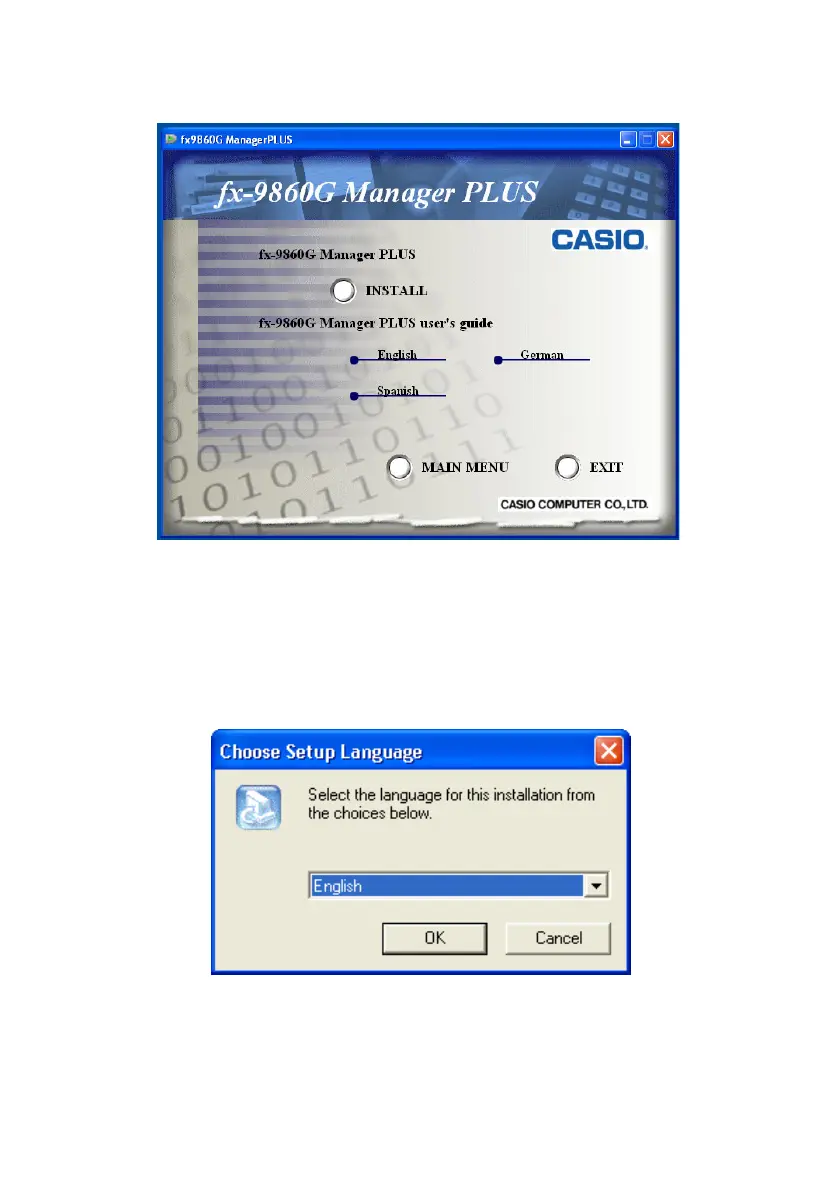
. Click “fx-9860G Manager PLUS”.
• This displays the screen shown below.
The following describes what each item on this screen does.
INSTALL ... Starts installation of fx-9860G Manager PLUS.
fx-9860G Manager PLUS user’s guide ... Click a language to open the corresponding
user’s guide.
3
. Click “INSTALL”.
• This displays a language selection menu.
• The option you select here specifies the language of the screen text that appears during
installation. The screen text language of the fx-9860G Manager PLUS application itself is
English, regardless of what you select here.
• Selecting English, Spanish, or German here will cause the corresponding language’s
fx-9860G Manager PLUS application user’s guide to be installed. Selecting any other
language will cause the application’s English user’s guide to be installed.
• The fx-9860G calculator user’s guide that is installed will be the language that you select here.







 To Next Page