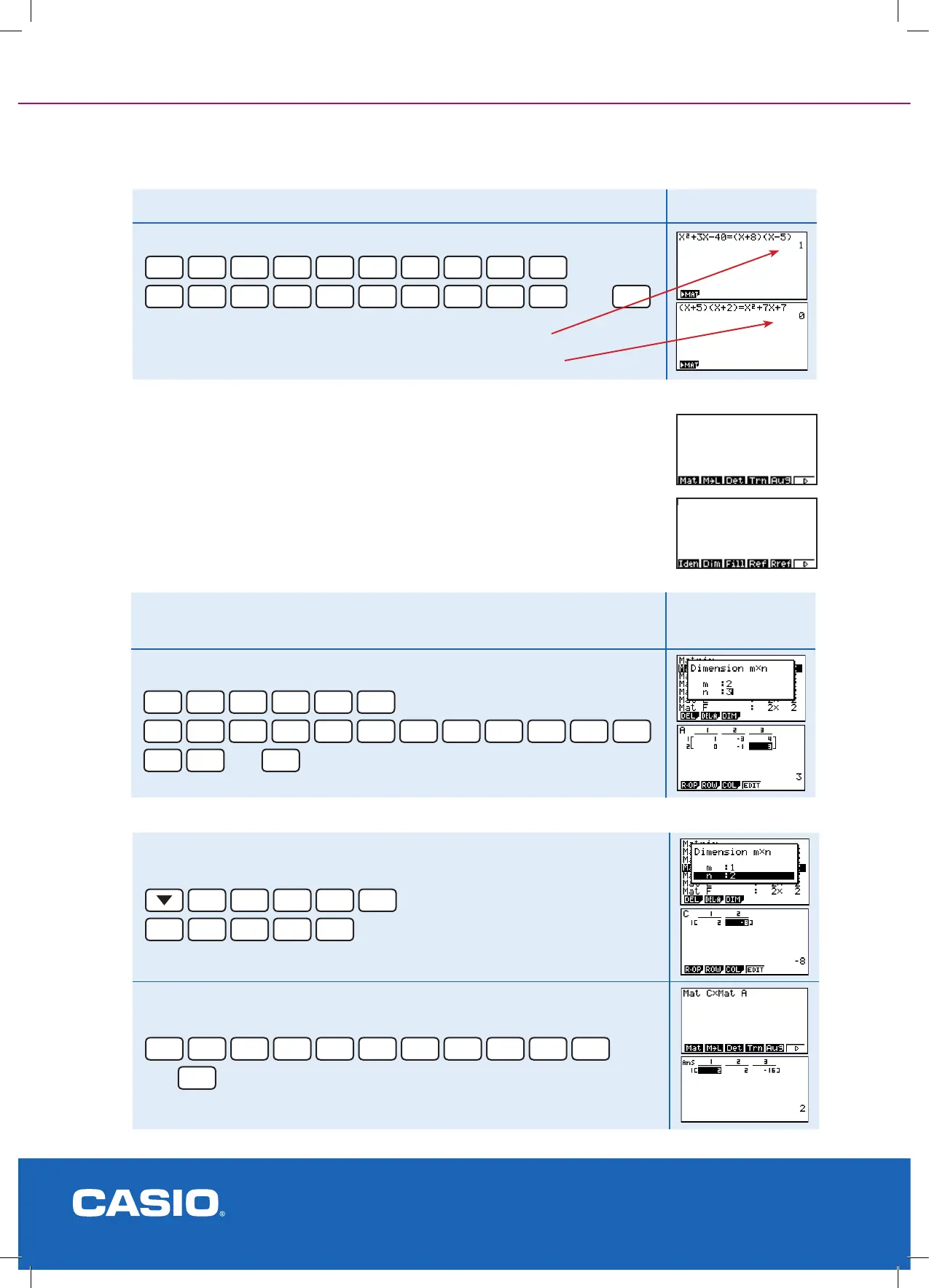
Example 2
Factorise x
2
+ 3x - 40 Result
Enter in the equation in bracketed and the expanded form
X,
θ
,T
x
2
+
3
X,
θ
,T
-
4
0
SHIFT
.
(
X,
θ
,T
+
8
)
(
X,
θ
,T
-
5
)
then
EXE
Matrix/Matrices [in RUN-MAT]
This area of the calculator utilises all of Matrix addition, subtraction and multiplication properties.
Transformation Geometry can be investigated or linear programming, up to 8 variables i.e. A
matrix size of order 8 x 8. You can edit up to 26 different matrices of differing order and there is
an automatic space for the answer matrix.
Dene the matrices in the usual way, rstly its order rows x columns. Then enter the matrix
values. You ‘do’ the operations in RUN-MAT mode. Via [F1] dene the matrix dimensions, enter
in the values of each matrix then to +, - or × open OPTN then [F2] for the Matrix operations.
Factorisation checking [in RUN-MAT] cont.
The result 1 indicates correct factorisation.
The result 0 indicates incorrect factorisation.
Example
Calculate [2 - 8] x
[
1 -3 4
]
Result
0 -1 3
Enter the dimensions into Mat A and then the rst values
F1
EXE
2
EXE
3
EXE
Dimensions entered
1
EXE
-
3
EXE
4
EXE
0
EXE
-
1
EXE
3
EXE
then
EXIT
Example cont.
Enter the second dimensions into Mat C and then the second values
EXE
1
EXE
2
EXE
Dimensions entered
2
EXE
-
8
EXE
Complete the calculation
EXIT
EXIT
OPTN
F2
F1
ALPHA
In
x
F1
ALPHA
X,
θ
,T
then
EXE



 To Next Page