
 Need help?
Do you have a question about the Casio G-SHOCK GA-2200 and is the answer not in the manual?
Explains water resistance levels and usage precautions for different water exposure scenarios.
Covers temperature, impact, magnetism, static charge, chemicals, and storage.
Focuses on band hygiene, material maintenance, and preventing skin irritation.
Recommends professional battery replacement and water resistance checks.
Information on initial test batteries and signs of low battery power.
Introduces World Time, Alarm, Stopwatch, and Timer functions.
Explains the watch face layout and various display indicators.
Guides on cycling through and returning to different watch modes.
Steps to set the Home City, current time, and date.
Instructions for switching time formats and configuring summer time.
Procedure to select and view World Time cities.
How to swap Home City Time with World Time.
Steps to set up to five distinct alarms.
How to enable, disable, and stop the hourly time signal.
Instructions for measuring elapsed time and recording split times.
How to time finishers and reset the stopwatch.
Steps to set the countdown start time for the timer.
How to perform timer operations like start, pause, resume, and stop.
How to realign analog hands if they differ from the digital display.
Enabling or disabling the tone that sounds when buttons are pressed.
Detailed technical specifications of the watch's functions.
Answers to common questions about mode, time, and hand alignment.
Resolves issues with World Time, Alarms, and finding further information.
This document outlines the operation and maintenance of a Casio watch, model 5674, focusing on its various functions and user care.
The Casio 5674 watch offers a range of timekeeping and utility functions. Its primary function is Timekeeping, displaying the current time in both analog (hour and minute hands) and digital formats (hour, minute, second, month, day, and day of the week). It features a full auto-calendar from 2000 to 2099 and supports both 12-hour and 24-hour timekeeping. The watch also includes a World Time function, allowing users to view the current time in 48 cities across 31 time zones, including Coordinated Universal Time (UTC). This feature is particularly useful for travelers or those who frequently interact with different time zones.
An Alarm function is integrated, providing up to five independent alarms that sound at a specified time. Additionally, an hourly time signal can be enabled, causing the watch to beep every hour on the hour. For precise time measurement, the watch is equipped with a Stopwatch. This function can measure elapsed time in 1/100-second units for the first hour, and then in one-second units for up to 24 hours. It supports various measurement functions, including elapsed time, cumulative time, split times, and the ability to record first and second place finisher times. A Timer function is also available, allowing users to set a countdown from a specified start time (up to 24 hours in 1-second units). A beeper sounds when the countdown reaches zero.
For visibility in low-light conditions, the watch features a Double LED light. This includes a Super Illuminator for the face and an LED backlight for the digital display, both with selectable illumination durations of approximately 1.5 or 3 seconds. The watch also has a Hand Shift feature, which moves the analog hands out of the way to provide an unobstructed view of the digital display.
Navigating the watch's modes is straightforward, typically involving pressing the (C) button to cycle through Timekeeping, World Time, Alarm, Stopwatch, and Timer modes. Holding down (C) for at least three seconds returns the watch to Timekeeping Mode.
Setting the Home City is a crucial initial step, as it determines the primary time zone. This involves holding down (A) in Timekeeping Mode to enter the setting screen, then using (B) and (D) to select the desired city. The watch also allows for the configuration of summer time (Daylight Saving Time) settings for the Home City. Adjusting the current time and date follows a similar process, involving entering the setting mode and using (C) to cycle through settings like seconds, hours, minutes, year, month, and day, with (B) and (D) used to change the values.
The World Time function allows users to easily check the time in different cities by pressing (B) or (D) in World Time Mode. The watch also offers a convenient feature to Swap Home Time and World Time, which can be activated by holding down (B) for three seconds in World Time Mode.
Configuring Alarms involves selecting an alarm number, entering the setting mode, and using (B) and (D) to set the desired hour and minute. The hourly time signal can be enabled or disabled through a similar process in the Alarm Mode. Stopping an alarm or the hourly time signal from sounding is done by pressing any button.
Operating the Stopwatch is intuitive: (B) starts and stops the measurement, and (B) can also be used to record split times or reset the stopwatch to zero. The Timer function is managed by setting a countdown start time (hours, minutes, seconds) in the Timer Mode, then using (B) to start, pause, or reset the countdown.
The Illumination feature is activated by pressing (L). Pressing (L) twice in succession engages the Hand Shift function. The duration of the illumination can be customized in the Timekeeping Mode settings. The Button Operation Tone can also be enabled or disabled, allowing users to choose whether a tone sounds when buttons are pressed.
Proper maintenance is essential for the longevity and performance of the Casio 5674 watch. Water Resistance is a key feature, but specific precautions must be observed. Watches marked "WATER RESIST" or "WATER RESISTANT" are suitable for daily use, including hand washing and rain. Models with 5, 10, or 20 BAR markings offer enhanced resistance, allowing for swimming, windsurfing, and skin diving, respectively. However, it is crucial not to operate the crown or buttons while the watch is submerged or wet, and to avoid wearing it in baths, heated swimming pools, saunas, or environments with high temperatures/humidity. After submersion in seawater, the watch should be rinsed with plain water to remove salt and dirt. To maintain water resistance, gaskets should be replaced periodically (every two to three years), and battery replacement should be performed by an authorized service center, which will also inspect water resistance.
Temperature extremes should be avoided, as prolonged exposure to very high or very low temperatures can cause timekeeping inaccuracies or malfunctions. The watch should not be left on a car dashboard or near heaters. Impact resistance is designed for normal daily use and light activity, but strong impacts should be avoided to prevent malfunction.
The watch's hands can be affected by Magnetism. Strong magnetic fields from devices like speakers or medical equipment can cause timekeeping to slow down, speed up, or stop. Electrostatic Charge can also cause display errors or damage electronic components.
For general care, the watch should be kept clean by wiping it with a soft cloth to remove dirt, sweat, and moisture. If exposed to seawater or mud, it should be rinsed with clean fresh water. Resin components should be dried thoroughly after getting wet to prevent color transfer or discoloration. Prolonged exposure to direct sunlight can also cause discoloration. Leather bands should be wiped clean with a soft cloth and kept dry to prevent color transfer, discoloration, and premature wear. Metal components should be cleaned regularly to prevent rust, especially after exposure to sweat or water. A soft toothbrush with a weak solution of water and mild detergent can be used for cleaning, followed by thorough rinsing and drying.
Hand Alignment Adjustment is a maintenance feature that allows users to correct the alignment of the analog hands if they become misaligned due to strong magnetism or impact. This involves entering a specific setting mode and adjusting the mode, hour, and minute hands to their correct positions.
Finally, Battery Replacement should be handled by an original retailer or authorized CASIO service center, using only the specified battery type. Test batteries that come with the watch may have a shorter life, and replacement costs may apply. Low battery power is indicated by large timekeeping error, dim display, or a blank display, and batteries should be replaced as soon as possible to prevent malfunction.
 General
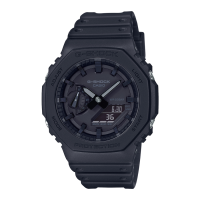
| Model | GA-2200 |
|---|---|
| Series | G-SHOCK |
| Brand | Casio |
| Case Material | Resin |
| Band Material | Resin |
| Water Resistance | 200 meters |
| Movement | Quartz |
| Display Type | Analog-Digital |
| Case Thickness | 12.8 mm |
| Glass Material | Mineral Glass |
| World Time | Yes |
| Calendar | Full auto-calendar (to year 2099) |
| Mute Feature | Yes |
| Accuracy | ±15 seconds per month |
| Battery Life | 3 years |
| Stopwatch | 1/100 second (00'00"00~59'59"99) / 1 second (1:00'00~23:59'59) |
| Timer | Countdown timer |
| Alarm/Hourly Time Signal | 5 daily alarms Hourly time signal |
| Light | LED backlight |
| Light Color | White |
| Other Features | 12/24-hour format |
| Construction | Shock Resistant |


 To Next Page