Auto-rhythms
The HT-6000's auto-rhythm
function features a total
of
20
PRESET
rhythms,
10
INTERNAL rhythms and
30
corresponding fill-in patterns.
10
additional CARD rhythms
and fill-ins ,canf'be utilized
through the
use
of
an
optional RAM card (RA-100).
What's
more, you can add
spice
to
auto-rhythm
performances by using the
rhythm variation function
as
well
as
fill-ins,
or
totally alter
patterns through rhythm
editing
1
.
see
"Pattern
Memory",
page 42).
1,
)l!lf.
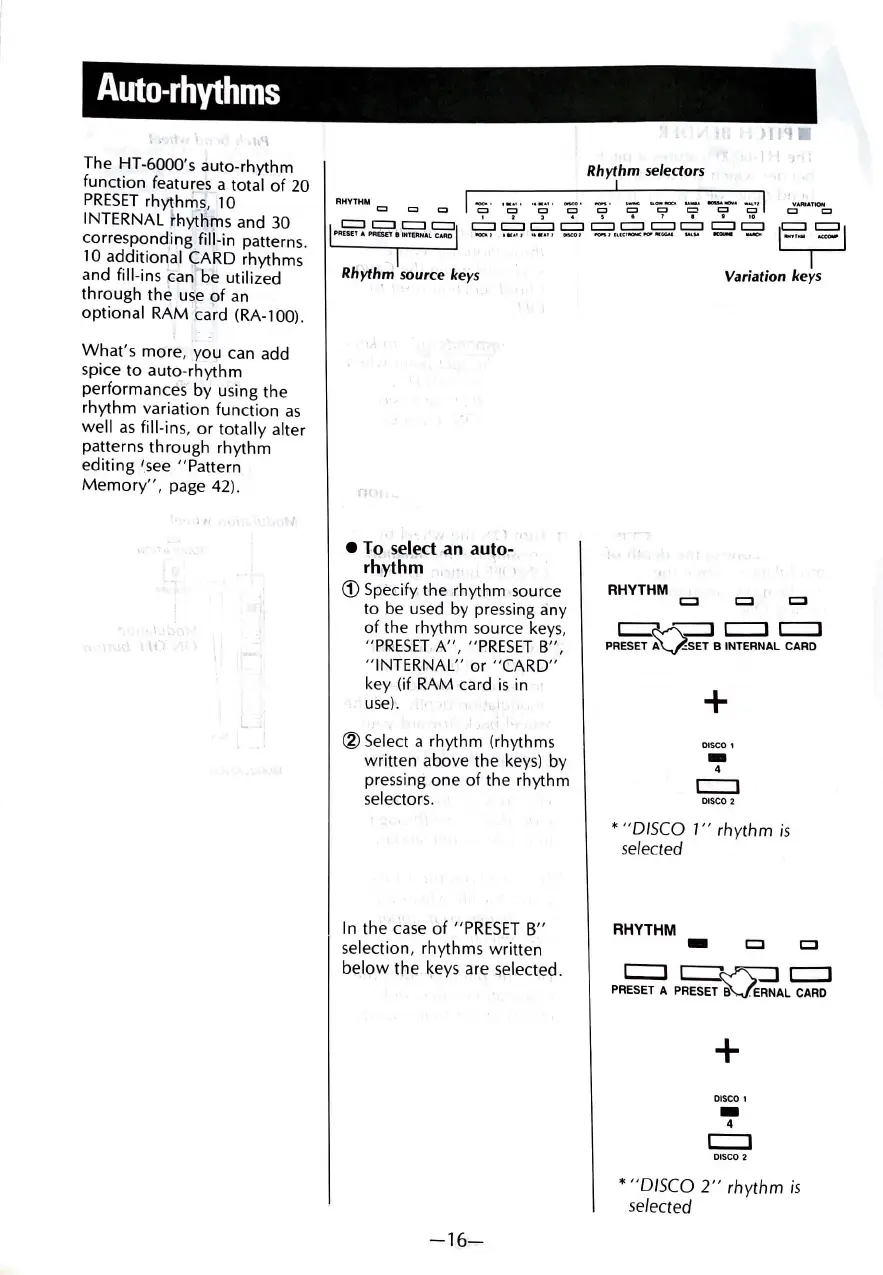
Rhythm selectors
RHYTHM
c::J
O
0
I~·
0 0
~·
~•
..
':;;;
-c-•
-~,,
I
VARIATION
c:, c:,
1 2 l , $ I 7 I t
10
c:::::Jc:::::Jc:::::Jc:::::J ==c:::::ic:::::ic:::::i=====
PAESEfAPA£$ETtlNT$tNALCAAO
_,.,
11<•••
•••••1
Cl1COI
..,..,,uc,oo,c..,..•CG.O<
_._.
•-
_,.,.
1=1S21
)
Rliyth
_m source keys
n
• To select-an auto-
rh
'
ythm
.
(1)
Spe€ify the rhythm source
to
be
used
by pressing any
of
the rhythm source
keys,
"PRIESET
A",
"PRESET
B",
"INTERNAL"
or
"CARD"
key (if RAM card
is
in
use)
.
® Select a rhythm (rhythms
written above the
keys)
by
pressing one
of
the rhythm
selectors.
In
the
case
of
"PRESET
B"
selection, rhythms written
below
the keys are selected.
-16-
Variation
keys
RHYTHM
c::::J
~--::::Jc::::JC=::J
PRESET
AVSET
B INTERNAL CARD
+
DISCO 1
-
4
c::::J
DISCO 2
• "DISCO
1"
rhythm
is
selected
RHYTHM
-
CJ
+
DISCO 1
-
4
c::::::J
DISCO 2
CJ
•
"DISCO
2"
rhythm
is
selected


 To Next Page