22
E
Part-2 CONVENIENT OPERATION
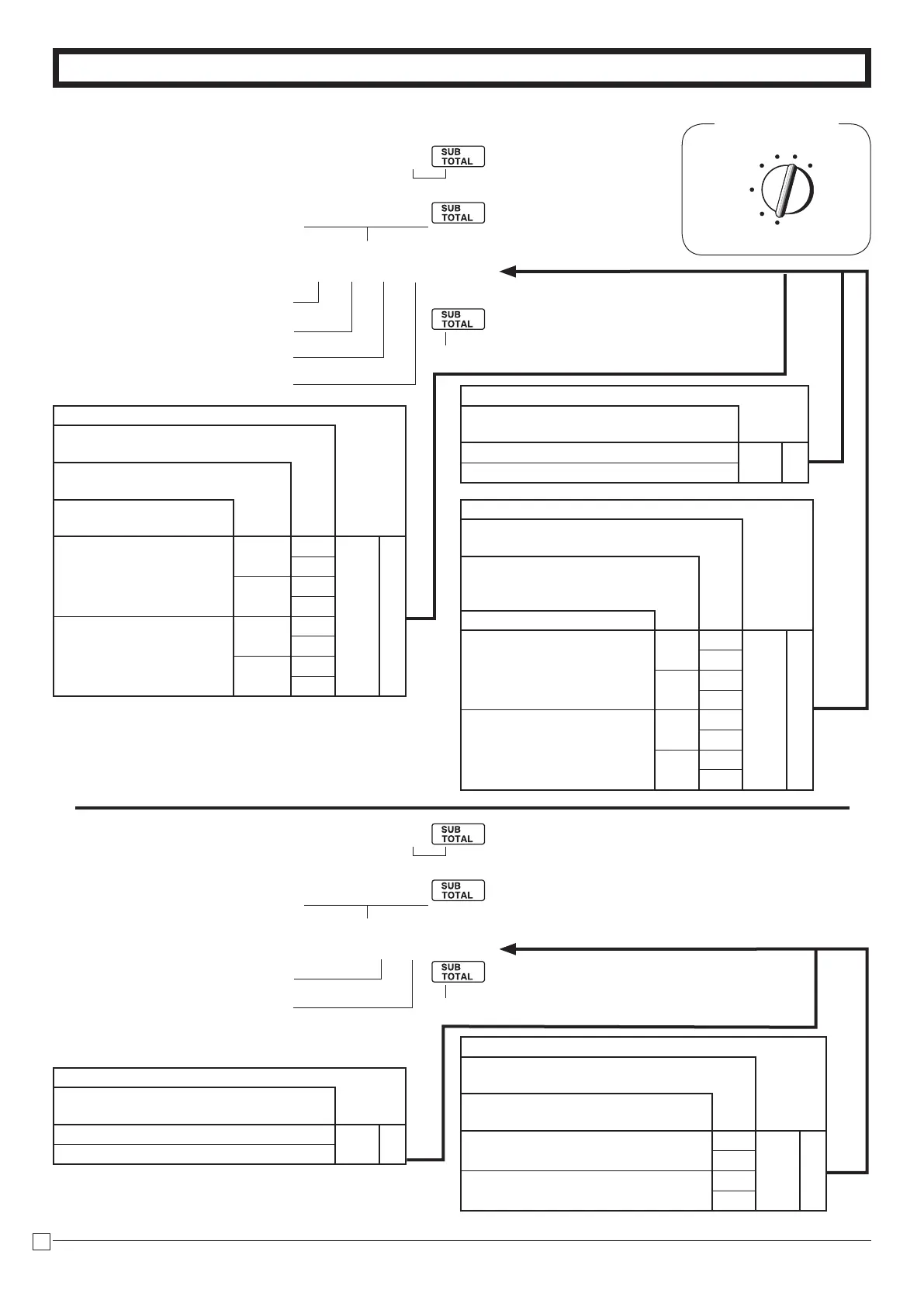
1-7-2 To set printing
controls
REG
OFF
RF
PGM
CAL X
Z
Mode Switch
C
?BXX
???? p
P3appearsinmodedisplay
(Toendthesetting)
ProgramcodeNo.
SelectanumberfromlistA
Always“0”
SelectanumberfromlistB
SelectanumberfromlistC
Selections
Printthetimeonthereceiptandjour-
nal.
Yes
?
B
No
V
Selections
Printtheconsecutivenumberonthe
receipt/journal.
Printthesubtotalonthereceipt/
journalwhentheSubtotalKeyis
pressed.
Skipitemprintonjournal.
No
No
Yes
?
C
No
Z
Yes
Yes
X
No
C
Yes
No
Yes
V
No
B
Yes
Yes
N
No
M
Selections
Usetheprintertoprintreceipts=R
Usetheprintertoprintajournal=J
Printreceiptbysingle/double
heightcharacters.
PrintTotallineatnaliza-
tion
No
Single
R
?
A
J
Z
Double
R
X
J
C
Yes
Single
R
V
J
B
Double
R
N
J
M
C
?<XX
?? p
P3appearsinmodedisplay
(Toendthesetting)
ProgramcodeNo.
SelectanumberfromlistA
SelectanumberfromlistB
Selections
PrintRFswitchmoderefundcount/
amountontheRead/ResetReports.
Yes
?
A
No
Z
Selections
Printzero-totallineontheDailyRead/
ResetReports
Printthegrandsalestotalonthe
DailyResetReports.
Yes
No
?
B
Yes
Z
No
No
X
Yes
C
1-7-3 To set report
printing controls







 To Next Page