EasyManua.ls Logo

Casio PF-8000 - Page 20

Casio PF-8000
29 pages
Print Icon
To Next Page IconTo Next Page
To Previous Page IconTo Previous Page
Loading...
(Input
r
•ft!
Im
.bsmii
;
US
"H
•'date
When
Examp
Contin
node)
.81
1 t
(r/geicS)
b.;
;
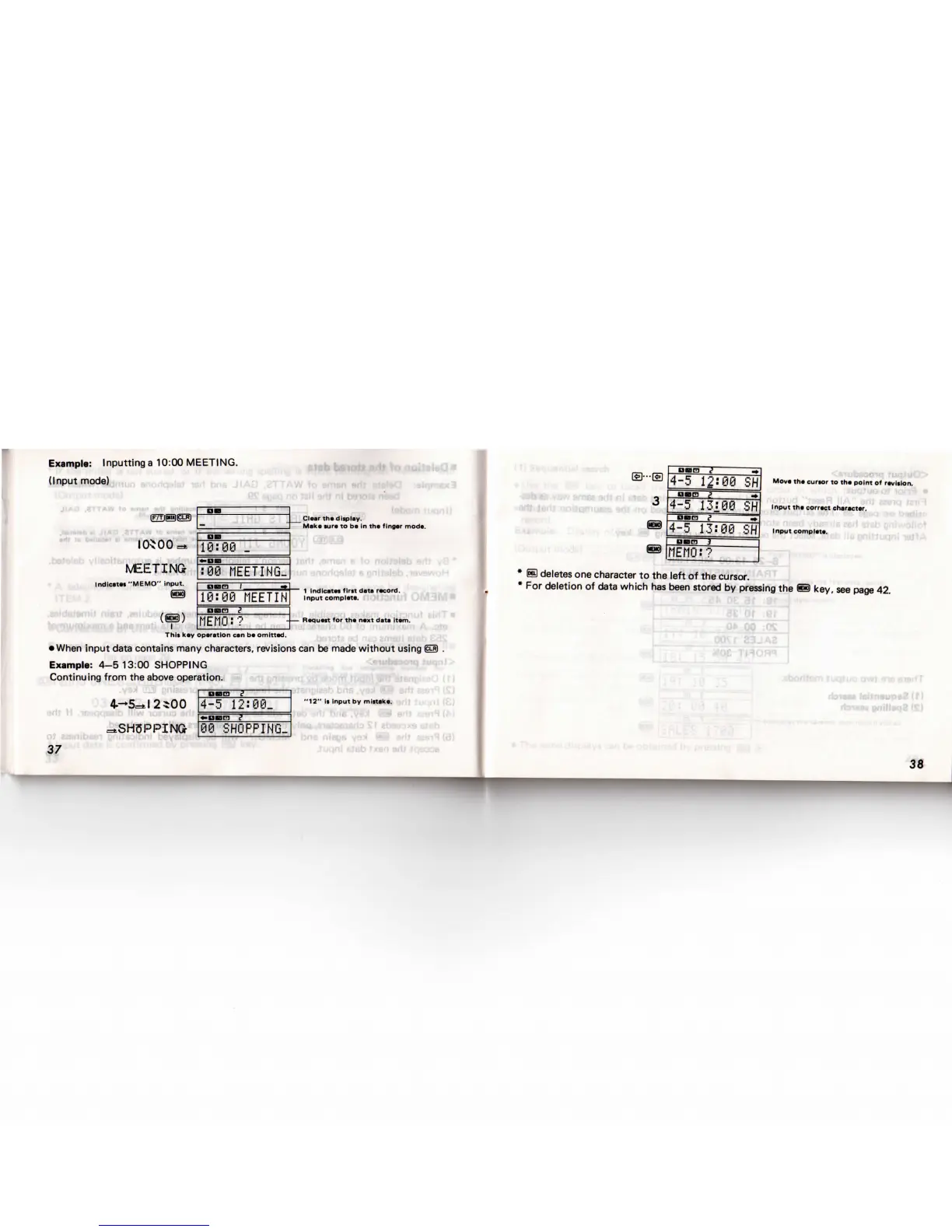
I0*00=»
MEETING
Indicate!
"MEMO" input.
@
(@)
This
key
input
data contains
man
e:
4-5
13:00
SHOPPIN
jing
from
the
above oper
4--*5=tl
2^00
=tSH3PPIN(*
DB
10:09
_
:00
MEETING-
neam
I
-»
10:00
MEETIH
ano
t?
MEMO:?
operetion
can be
omitted.
/
characters,
revisior
G
ation.
OBCQ
S
4-5
12:00_
•Dnra
l
60
SHOPPING-
D
D
UU9i
:
B"'
1
inl)
1
Cleer
the
display.
1
Make
sure
to be in the
finger
mode.
.'f!
'
>.H
1
npot
complete.
\l
*
Request
for the
next
data
item.
ro
S
s
can be
made
without
using
(CLR)
.
1
v>
1
.,
-.J(r)
1
t
eesit
)
I
"12"
Is
Input
by
mistake.
?Uqnl(£)
M
aasiq
(fc)
1
9
StBb
1
,-,«,a
/s\
|
-""U»«ll,
OelCD
^
,^
^
lai-ia
|4-5
12-00
SH|
Mov*
»•«"•»'
»
the
point
of
revltion.
YBwomnrortiiii
^
|
°"m
i
~
1
nan
?
=T
^/j,1
4-5
13:00
SH
inputcomp,.,..
.
"',
m
MEMO:?
* S
deletes
one
character
to the
left
of the
cursor.
* For
deletion
of
data which
has
been stored
by
pressing
the
©
key,
see
page
42.
•'ii_
A3
*r
1
'am
ti.
owt
SMS
swr*
r
d;
!«i»n»up»aifi
37
38

Related product manuals