
 Need help?
Do you have a question about the Casio Pro Trek PRW-1500-1VER and is the answer not in the manual?
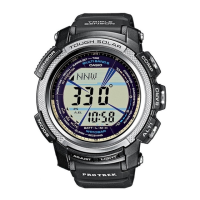
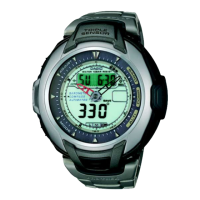
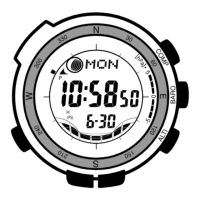
This document describes the operation and features of a CASIO watch, specifically modules 3134 and 3205. The watch is designed for outdoor activities like hiking and mountain climbing, offering various sensor-based measurements and timekeeping functionalities.
The CASIO watch is equipped with a range of functions to assist users in outdoor environments and daily life.
Radio-controlled Atomic Timekeeping: The watch automatically receives time calibration signals to update its time settings. It supports signals from Germany (Mainflingen), England (Anthorn), the United States (Fort Collins), and Japan. This ensures highly accurate timekeeping. Users can specify their "Home City" to ensure the correct time zone is applied. The watch performs auto-receive operations up to six times a day, typically at night, and also allows for manual reception. A receiving indicator shows signal strength during reception, helping users find optimal locations. The watch also features a "settings updated" indicator to confirm successful time and date reception.
Digital Compass: A built-in bearing sensor detects magnetic north and displays one of 16 directions, along with an angle value in degrees. This function is useful for navigation and orientation. The compass can be calibrated to correct for magnetic declination (the difference between magnetic north and true north), and offers bidirectional and northerly calibration options to improve accuracy, especially in environments with magnetic interference.
Barometer/Thermometer: The watch includes a pressure sensor to measure air pressure (barometric pressure) and a temperature sensor to measure ambient temperature. These readings can be used to predict weather changes. The watch automatically takes barometric pressure measurements every two hours and displays a barometric pressure graph showing trends over the past 20 hours. A barometric pressure differential pointer indicates the relative difference between recent and current pressure. Both sensors can be calibrated if readings are suspected to be inaccurate.
Altimeter: The altimeter uses the pressure sensor to estimate current altitude based on ISA (International Standard Atmosphere) preset values. Users can also specify a reference altitude to improve accuracy, particularly during climbs. The watch automatically tracks and stores the highest altitude achieved and allows users to save individual altitude readings. Altitude data can be recalled and viewed in the Data Recall Mode, which also displays the measurement date and time.
Tide/Moon Data: This mode displays the current tide level and Moon phase for the user's Home City. Users can view data for specific dates and times. The Tide Graph visually represents current tide conditions, distinguishing between spring, intermediate, and neap tides. The Moon phase indicator shows the current phase, and the display can be reversed to match the actual appearance of the Moon from different hemispheres. The watch also provides Moon age information.
Countdown Timer: The countdown timer can be set for durations from one minute to 60 minutes. It features an alarm that sounds when the timer reaches zero, and a "progress beeper" that provides audible cues during the countdown, including a reset time beeper and a reset period beeper, making it suitable for activities like yacht racing.
Stopwatch: A 1/100-second stopwatch measures elapsed time, split times, and two finishes. It has a measurement capacity of 23 hours, 59 minutes, 59.99 seconds and continues to run in the background even if the user exits the Stopwatch Mode.
Alarms: The watch offers five independent daily alarms and an Hourly Time Signal. When an alarm is turned on, it sounds for about 10 seconds at the preset time. Alarms and the Hourly Time Signal can be easily turned on or off.
Illumination: An EL (electro-luminescent) panel illuminates the display for easy reading in the dark. The watch features an Auto Light Switch, which automatically turns on illumination when the watch is angled towards the user's face, provided ambient light is below a certain level. Illumination can also be activated manually.
World Time: This mode displays the current time in 33 cities across 29 time zones. Users can easily scroll through city codes and toggle between Standard Time and Daylight Saving Time (DST) settings for each city.
Navigation and Mode Switching: The watch features dedicated buttons (A, B, C, D) for navigating between different modes and functions. Pressing 'D' cycles through Timekeeping, Stopwatch, Countdown Timer, Tide/Moon Data, World Time, Alarm, Data Recall, and Receive Modes. Sensor modes (Digital Compass, Barometer/Thermometer, Altimeter) can be accessed directly from the Timekeeping Mode or other sensor modes using buttons A, B, and C.
Setting Configuration: Most settings, such as Home City, DST, alarm times, countdown timer settings, and unit preferences (temperature, pressure, altitude), are configured by holding down a specific button (usually 'E') to enter a flashing setting screen, then using other buttons (A, C) to adjust values.
Data Recall: The Data Recall Mode allows users to view stored altitude records, including the highest altitude achieved, along with the date and time of measurement. All altitude data in memory can be deleted.
Scrolling: Buttons 'A' and 'C' are used to scroll through data on setting screens, with holding them down enabling high-speed scrolling.
Auto Return Features: The watch automatically returns to the Timekeeping Mode after a period of inactivity in certain modes (2-3 minutes for Tide/Moon Data, Alarm, Data Recall, Receive, Digital Compass, Barometer/Thermometer; 9-10 hours for Altimeter). Setting screens with flashing digits also auto-exit after 2-3 minutes of inactivity.
Button Operation Tone: The watch emits an audible tone with each button press. This tone can be turned on or off as desired, though alarms and timer beepers will still operate normally.
Power Saving: When enabled, the Power Saving function automatically enters a "sleep state" in dark environments to conserve battery power. In "display sleep," the display turns blank but all functions remain enabled. In "function sleep," the display is blank, and most functions are disabled, but timekeeping is maintained. The watch will not enter sleep state between 6:00 AM and 9:59 PM, or while in sensor, Countdown Timer, or Stopwatch Modes.
Battery Charging: The watch is equipped with a solar cell and a rechargeable battery. To maintain optimal power, the watch should be exposed to bright light as much as possible. When not worn, positioning the watch face towards a light source is recommended. Charging efficiency is reduced if the solar cell is partially covered. The battery power indicator on the display shows the current charge level, with Level 3 indicating low power and requiring charging, and Level 5 indicating all functions are disabled.
Storage: To prevent magnetization of the bearing sensor, the watch should be stored away from strong magnetic sources like permanent magnets or household appliances. If magnetization is suspected, calibration should be performed.
Power Saving for Long-term Storage: Turning on the Power Saving function and storing the watch in a bright area helps prevent the rechargeable battery from going completely dead during long periods of non-use.
Troubleshooting: The manual provides guidance for common issues such as incorrect signal reception, inaccurate sensor readings, and display problems, often suggesting re-calibration, checking Home City settings, or moving away from sources of interference.
Precautions: The manual emphasizes several precautions:
 General
| Brand | Casio |
|---|---|
| Model | PRW-1500-1VER |
| Category | Watch |
| Display Type | Digital |
| Solar Powered | Yes |
| Altimeter | Yes |
| Altimeter Measuring Range | -700 to 10, 000 meters |
| Barometer | Yes |
| Barometer Display Range | 260 to 1, 100 hPa |
| Compass | Yes |
| Compass Directions | 16 |
| Thermometer | Yes |
| Thermometer Display Range | -10 to 60 °C |
| World Time | Yes |
| Stopwatch | Yes |
| Stopwatch Accuracy | 1/100 second |
| Countdown Timer | Yes |
| Countdown Timer Measuring Unit | 1 second |
| Alarm | Yes |
| Daily Alarms | 5 |
| LED Backlight | Yes |
| Case Material | Resin |
| Band Material | Resin |
| Moon data | Yes |
| Tide graph | Yes |
| Radio wave reception | Yes |
| Water Resistance | 200 meters |
| Radio frequency | 77.5 kHz (DCF77, Germany) |
| World Time Zones | 48 cities |
| Battery Life | Approx. 6 months on full charge (without further exposure to light) |


 To Next Page