EasyManua.ls Logo

Casio WS1300H - User Manual

Casio WS1300H
6 pages
Print Icon
To Next Page IconTo Next Page
Loading...
Operation Guide 3507
EN-9
You can also find
information about
operational procedures
at the CASIO website.
https://support.casio.
com/global/en/wat/
model/3507/
Timer Mode Alarm Mode
C
C
Dual Time Mode
C
EN-8
Selecting a Mode
x Press C to change from mode to mode.
x In any mode (except when a setting screen is on the display), press B to illuminate
the face of the watch.
Moon/Tide Data Mode Timekeeping Mode Stopwatch Mode
C
C C
EN-7
Watch Features
You can also find information
about operational procedures
at the CASIO website.
https://support.casio.com/
global/en/wat/model/3507/
Moon/Tide Data
Moon/tide data lets you view the Moon
age and Moon phase for a particular date,
and tidal movements for a particular date
and time at your Home Site.
Stopwatch
Timer
Alarm
Dual Time
EN-6
Illumination .................................................................................................... EN-40
To illuminate the display .............................................................................EN-40
To specify the illumination duration ............................................................EN-41
Reference ...................................................................................................... EN-42
To turn the button operation tone on and off ..............................................EN-46
Specifications ................................................................................................ EN-49
EN-5
Stopwatch ...................................................................................................... EN-24
To measure times with the stopwatch ........................................................EN-25
Timer .............................................................................................................. EN-26
To use the timer ..........................................................................................EN-27
To set up the timer .....................................................................................EN-28
Alarm .............................................................................................................. EN-30
To set an alarm time ...................................................................................EN-32
To test the alarm .........................................................................................EN-34
To turn Alarms 2 and 3, and the Hourly Time Signal on and off..................EN-35
To select the operation of Alarm 1 ..............................................................EN-36
Dual Time ....................................................................................................... EN-37
To set the Dual Time ...................................................................................EN-38
EN-4
Contents
About This Manual .......................................................................................... EN-3
Watch Features ............................................................................................... EN-7
Selecting a Mode ............................................................................................ EN-8
Timekeeping .................................................................................................. EN-10
To set the time and date .............................................................................EN-11
To toggle the Timekeeping Mode time between DST and Standard Time
....EN-14
To configure Home Site data ......................................................................EN-17
To toggle between 12-hour and 24-hour timekeeping ................................EN-19
Moon/Tide Data ............................................................................................. EN-20
To view the current Moon/Tide Data Mode data ........................................EN-21
To specify a date ........................................................................................EN-23
EN-3
About This Manual
x Button operations are indicated using the letters shown
in the illustration.
x Note that the product illustrations in this manual are
intended for reference only, and so the actual product
may appear somewhat different than depicted by an
illustration.
x Each section of this manual provides you with the
information you need to perform operations in each
mode. Further details and technical information can be
found in the “Reference” section.
EN-2
Warning!
x The longitude, lunitidal interval, Moon phase indicator and tide graph data that
appear on the display of this watch are not intended for navigation purposes.
Always use proper instruments and resources to obtain data for navigation
purposes.
x This watch is not an instrument for calculating low tide and high tide times. The
tide graph of this watch is intended to provide a reasonable approximation of
tidal movements only.
x Note that CASIO COMPUTER CO., LTD. assumes no responsibility for any
damage or loss suffered by you or any third party arising through the use of
your watch or its malfunction.
EN-1
ENGLISH
You can also find information about
operational procedures at the CASIO website.
https://support.casio.com/global/en/wat/model/3507/
MA2107-EA
© 2021 CASIO COMPUTER CO., LTD.
Question and Answer IconNeed help?

Do you have a question about the Casio WS1300H and is the answer not in the manual?

Summary

Getting Started

About This Manual

Introduction to the operation guide, its structure, and content.

Watch Features Overview

Summary of the watch's main functions and capabilities.

Core Timekeeping and Data Functions

Timekeeping Settings and Operations

Set time, date, home site, format, and toggle DST.

Moon;Tide Data and Dual Time

View Moon/Tide data for specific dates and set Dual Time zone.

Measurement and Alert Functions

Stopwatch and Timer Operations

Using the stopwatch for elapsed time and the timer for countdowns.

Alarm and Illumination Operations

Setting alarms, managing signals, and operating the watch illumination.

Reference and Specifications

Key Feature Explanations

Details on Moon Phase, Tide Graph, and Lunitidal Interval.

Operational Notes and Specifications

Covers button tones, auto-return, scrolling, and technical specifications.

Overview

This document describes the operation and features of a CASIO watch, model 3507. It serves as an operation guide, providing detailed instructions and technical specifications.

Function Description

The CASIO watch, model 3507, is a multi-functional timepiece designed to provide timekeeping, Moon/Tide data, stopwatch, timer, alarm, and dual time capabilities.

  • Timekeeping Mode: This is the primary mode for setting and viewing the current time and date. It displays the day of the week, month, day, hour, minutes, and seconds. It also features a Moon phase indicator and a tide graph, which are automatically updated based on the current date and time settings. The watch supports both 12-hour and 24-hour timekeeping formats. Daylight Saving Time (DST) can be toggled on or off, advancing the time setting by one hour from Standard Time. The watch requires correct configuration of Home Site data (UTC differential, longitude, and lunitidal interval) for accurate Moon/Tide data display. The built-in full automatic calendar accounts for different month lengths and leap years from 2000 to 2099.

  • Moon/Tide Data Mode: This mode allows users to view Moon age, Moon phase, and tidal movements for a specified date and time at their Home Site. The tide graph shows the tide level for the currently displayed time, with an initial display for 6:00 a.m. The Moon data screen shows the Moon age and Moon phase for the current date. Users can advance the tide data screen by the hour or the Moon data screen by the day. A specific date can be entered to view its corresponding tide and Moon data, with a range from January 1, 2000, to December 31, 2099. The Moon phase indicator shows the Moon as viewed at noon from a position in the Northern Hemisphere looking south, with a note that the image may differ from the actual Moon in the user's area, and the left-right orientation is reversed when viewing from the Southern Hemisphere or near the equator. The tide graph has six graphic segments indicating different tide levels (low tide, rising tide, high tide, falling tide). Tidal movements are based on the Moon's transit over a meridian and the lunitidal interval.

  • Stopwatch Mode: The stopwatch measures elapsed time, split times, and two finishes. It has a display range of 23 hours, 59 minutes, 59.99 seconds. The stopwatch continues to run, restarting from zero after reaching its limit, until stopped. An ongoing elapsed time measurement continues internally even if the mode is changed. However, if a split time is displayed when exiting the Stopwatch Mode, it will not be displayed upon returning.

  • Timer Mode: The countdown timer can be set within a range of one minute to 24 hours. An alarm sounds for 10 seconds when the countdown reaches zero. An auto-repeat function is available, which automatically restarts the countdown from the original value without pausing when zero is reached. The countdown timer measurement continues even if the mode is exited. The timer can be paused and resumed, and completely stopped to reset it to its starting value.

  • Alarm Mode: The watch features three independent multi-function alarms with hour, minutes, month, and day settings, and an Hourly Time Signal. One of the alarms (Alarm 1) includes a snooze feature. The alarm tone sounds for 10 seconds at the preset time, regardless of the current mode. The snooze function repeats every five minutes up to seven times or until turned off. Alarm types include daily alarm (hour and minutes set), date alarm (month, day, hour, and minutes set), 1-month alarm (month, hour, and minutes set), and monthly alarm (day, hour, and minutes set). The Hourly Time Signal causes the watch to beep every hour on the hour. Alarm on (ALM) and hourly time signal on (SIG) indicators are displayed in all modes when these functions are active.

  • Dual Time Mode: This mode allows users to keep track of time in a different time zone. Standard Time or Daylight Saving Time can be selected for the Dual Time Mode time. The seconds count in Dual Time Mode is synchronized with the Timekeeping Mode.

  • Illumination: The watch is equipped with an LED light for display illumination in the dark. Users can select an illumination duration of either 1.5 seconds or 3 seconds. Illumination may be difficult to see under direct sunlight and turns off automatically when an alarm sounds. Frequent use of illumination shortens battery life.
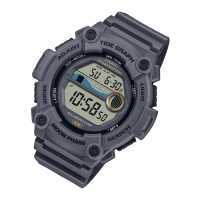
Important Technical Specifications

  • Accuracy: ±30 seconds a month at normal temperature.
  • Timekeeping:
    • Hour, minutes, seconds, a.m. (A)/p.m. (P), month, day, day of the week.
    • Time format: 12-hour and 24-hour.
    • Calendar system: Full Auto-calendar pre-programmed from the year 2000 to 2099.
    • Other: Daylight Saving Time (summer time)/Standard Time; Home Site data settings (UTC differential, longitude, lunitidal interval).
  • Moon/Tide Data:
    • Tide level for a specified date and time.
    • Moon phase indicator and Moon age for a specified date.
  • Stopwatch:
    • Measuring unit: 1/100 second.
    • Measuring capacity: 23:59'59.99".
    • Measuring modes: Elapsed time, split time, two finishes.
  • Timer:
    • Measuring unit: 1 second.
    • Input range: 1 minute to 24 hours (1-minute increments and 1-hour increments).
    • Time up alert duration: 10 seconds.
    • Other: Auto-repeat timing.
  • Alarm:
    • 3 Multi-function alarms (1 with snooze feature).
    • Hourly Time Signal.
    • Alarm type: Daily alarm, Date alarm, 1-month alarm, Monthly alarm.
    • Alert duration: 10 seconds.
  • Dual Time:
    • Hour, minutes, seconds, a.m. (A)/p.m. (P).
    • Other: Daylight Saving Time (summer time)/Standard Time.
  • Illumination:
    • LED (light-emitting diode).
    • Selectable illumination duration (approximately 1.5 seconds or 3 seconds).
  • Other: Button operation tone on/off.
  • Battery:
    • One lithium battery (Type: CR2025).
    • Approximately 10 years on type CR2025 (assuming alarm operation 10 sec./day and one illumination operation 1.5 sec./day).
    • Frequent illumination shortens the battery life.
    • Specifications are subject to change without notice.

Usage Features

  • Mode Selection: Pressing the 'C' button cycles through the different modes (Timekeeping, Moon/Tide Data, Stopwatch, Timer, Alarm, Dual Time).
  • Setting Screens: Holding down the 'A' button in Timekeeping Mode initiates the setting screen for time and date. Similar actions apply to other modes for their respective settings.
  • Navigation and Adjustment: Buttons 'B' and 'D' are used to scroll through data and change settings. 'B' typically decreases values or scrolls backward, while 'D' increases values or scrolls forward.
  • Button Operation Tone: The watch emits a tone when a button is pressed. This tone can be toggled on or off by holding down the 'D' button (except when a setting screen is active).
  • Auto Return Features: If a setting screen with flashing digits is left unattended for two or three minutes, the watch automatically exits the setting screen. Similarly, if the watch is left in Moon/Tide Data or Alarm Mode for two or three minutes without operation, it automatically returns to the Timekeeping Mode.
  • Scrolling Speed: Holding down the 'B' or 'D' buttons during a scroll operation will scroll through data at high speed.
  • Moon Phase Indicator: The Moon phase indicator shows the Moon's current phase based on the date. It is important to note that the displayed image may differ from the actual Moon in the user's area, and its orientation is dependent on the hemisphere.
  • Tide Graph: The tide graph provides an approximation of tidal movements based on the current Moon age and lunitidal interval. It is not intended for navigation.
  • Home Site Data Configuration: Accurate Moon/Tide data requires correct configuration of UTC differential, longitude, and lunitidal interval for the user's location. The manual provides a list of sites with their corresponding UTC differential, longitude, and lunitidal interval.

Maintenance Features

  • Battery Replacement: The watch uses one CR2025 lithium battery, with an approximate lifespan of 10 years under specific usage conditions (10 seconds alarm operation/day, 1.5 seconds illumination operation/day). Frequent illumination will shorten battery life. The manual advises that after battery replacement, the time and date settings, as well as Home Site data, should be reconfigured.
  • Warning on Data Accuracy: The manual explicitly states that the longitude, lunitidal interval, Moon phase indicator, and tide graph data are not intended for navigation purposes. Users should always use proper instruments and resources for navigation. The watch is not an instrument for calculating low tide and high tide times, and its tide graph provides only a reasonable approximation of tidal movements. CASIO COMPUTER CO., LTD. disclaims responsibility for any damage or loss resulting from the use or malfunction of the watch.
  • Calendar System: The full automatic calendar is pre-programmed from 2000 to 2099, eliminating the need for manual date adjustments except after battery replacement.

Casio WS1300H Specifications

General IconGeneral
BrandCasio
ModelWS1300H
CategoryWatch
LanguageEnglish

Related product manuals