2
SETU P OVERVI E W
RESET
RESET
TEST
TEST
OR
Use the Cavalier app to:
∙ CONNECT TO WI-FI
∙ SETUP ALEXA
∙ CUSTOMIZE CONTROLS
∙ AND MORE!
Use the Amazon Alexa app to:
∙ MANAGE AMAZON ACCOUNT
∙ LINK STREAMING SERVICES
∙ ACTIVATE ALEXA SKILLS
∙ AND MORE!
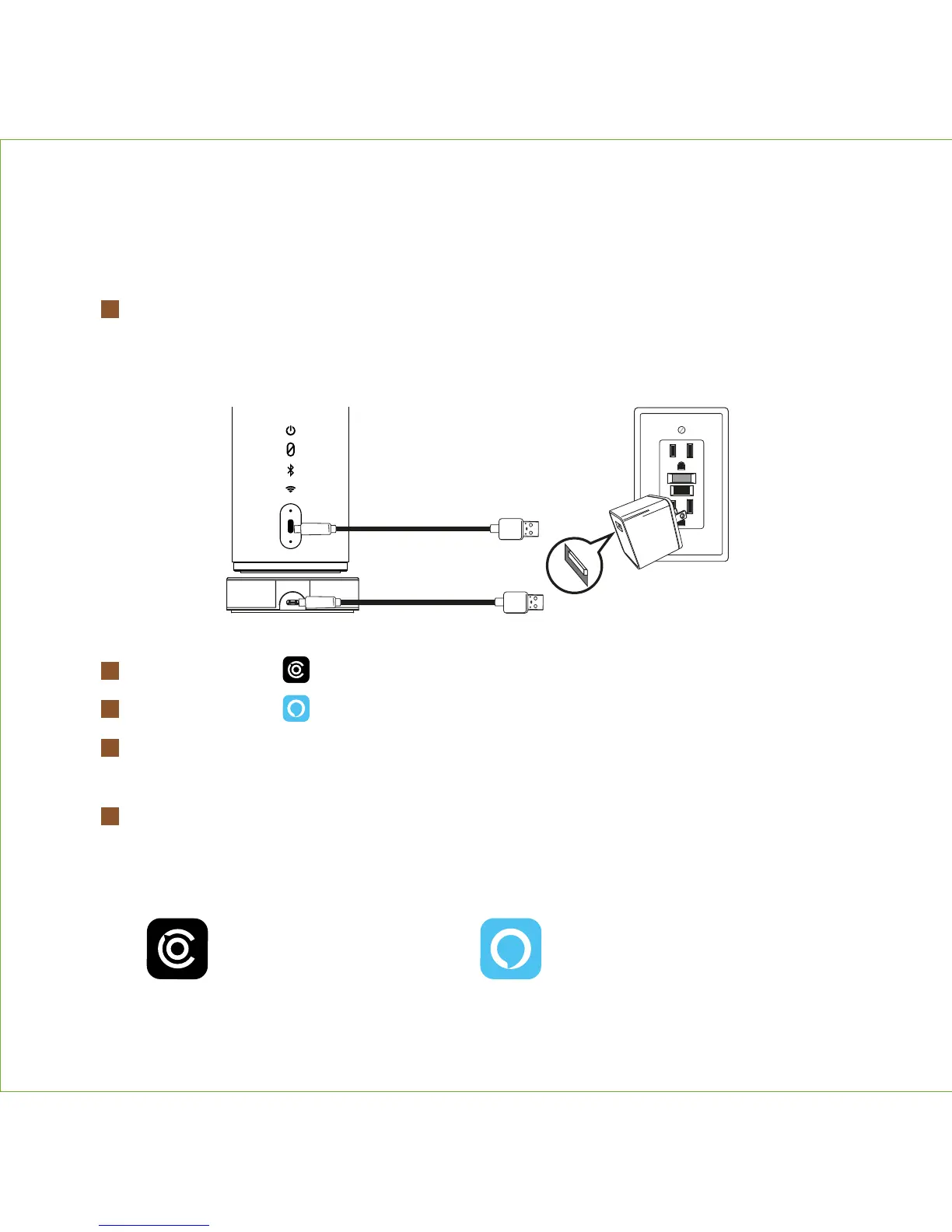
Plug included USB-C cable into USB charging port on back of unit OR on the
charging base. Connect other end of cable to included USB AC adapter and
plug into working wall outlet.
Download the Cavalier app from the App Store or Google Play.
Download the Amazon Alexa app from the App Store or Google Play.
Follow Cavalier in-app instructions for account setup and to establish
your speaker’s Wi-Fi connection.
Connect your Amazon account to enjoy the Alexa voice capability
of your CAV1.
1
2
3
4
5


 To Next Page