5
Description
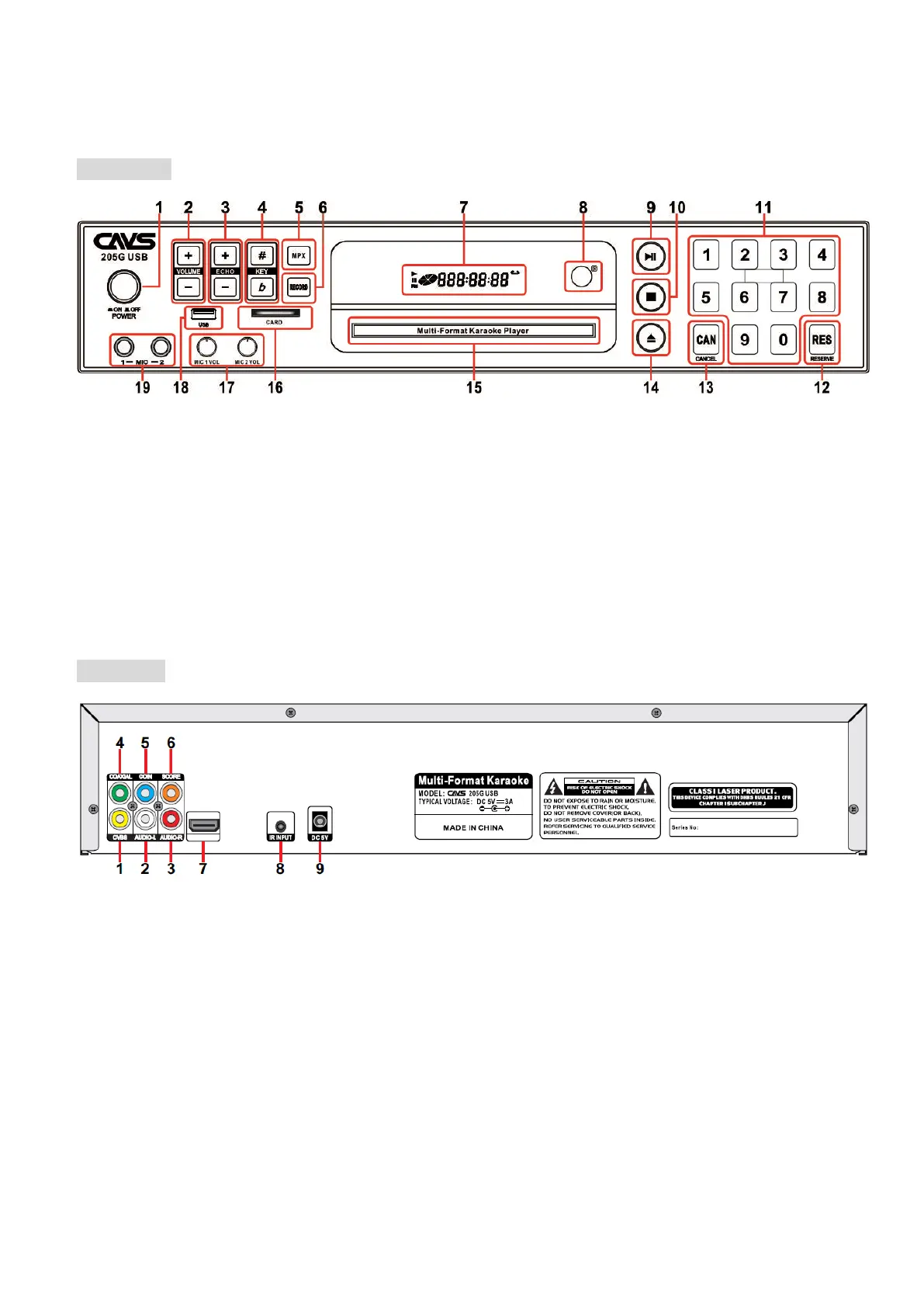
Front Panel
1. POWER SWITCH: Turn On/Off the Power
2. VOLUME -/+: Adjust the Audio Volume
3. ECHO -/+: Adjust Echo Level
4. KEY b/#: Adjust Key Level
5. MPX (MULTIPLEX): Vocal On/Off for multiplex
track.
6. RECORD: Record singing
7. LED DISPLAY
8. IR SENSOR
9. PLAY/PAUSE: Play or Pause a track
10. STOP: Stop playback
11. NUMBER (0-9): Input song or track number
12. RESERVE: Program song or track number
13. CANCEL: Delete wrong letter or number input
14. OPEN/ CLOSE: Open/Close the Disc Tray
15. DISC TRAY
16. CARD INPUT
17. MICROPHONE 1 & 2 VOLUME: Adjust the
volume of Microphone 1 & 2
18. USB INPUT
19. MICROPHONE 1 & 2 INPUT
Rear Panel
1. COMPOSITE (CVBS) VIDEO OUT
2. AUDIO LEFT OUT
3. AUDIO RIGHT OUT
4. COAXIAL OUT
5. COIN: For use with a Coin machine, connect a cable from Coin machine to this port.
6. SCORE: When microphones are connected to an external amplifier, connect a cable between MIC OUTPUT port on
the amplifier and SCORE port of the player to generate Score after singing.
7. HDMI VIDEO AUDIO OUT
8. IR EXTENTION: To extend the IR reception performance, connect an extra IR Sensor to this port.
9. DC 5V ADAPTER INPUT



 To Next Page