8
Connections
Connecting your System to the Power Supply
1. Plug the AC lead of the Power Adapter to a wall outlet and the DC lead to the player
2. Press the POWER button on the front of the player to turn it on.
3. The present product can be used under the AC 100~240V~. 50/60Hz
<NOTE>
Check the voltage of the wall outlet before plugging in.
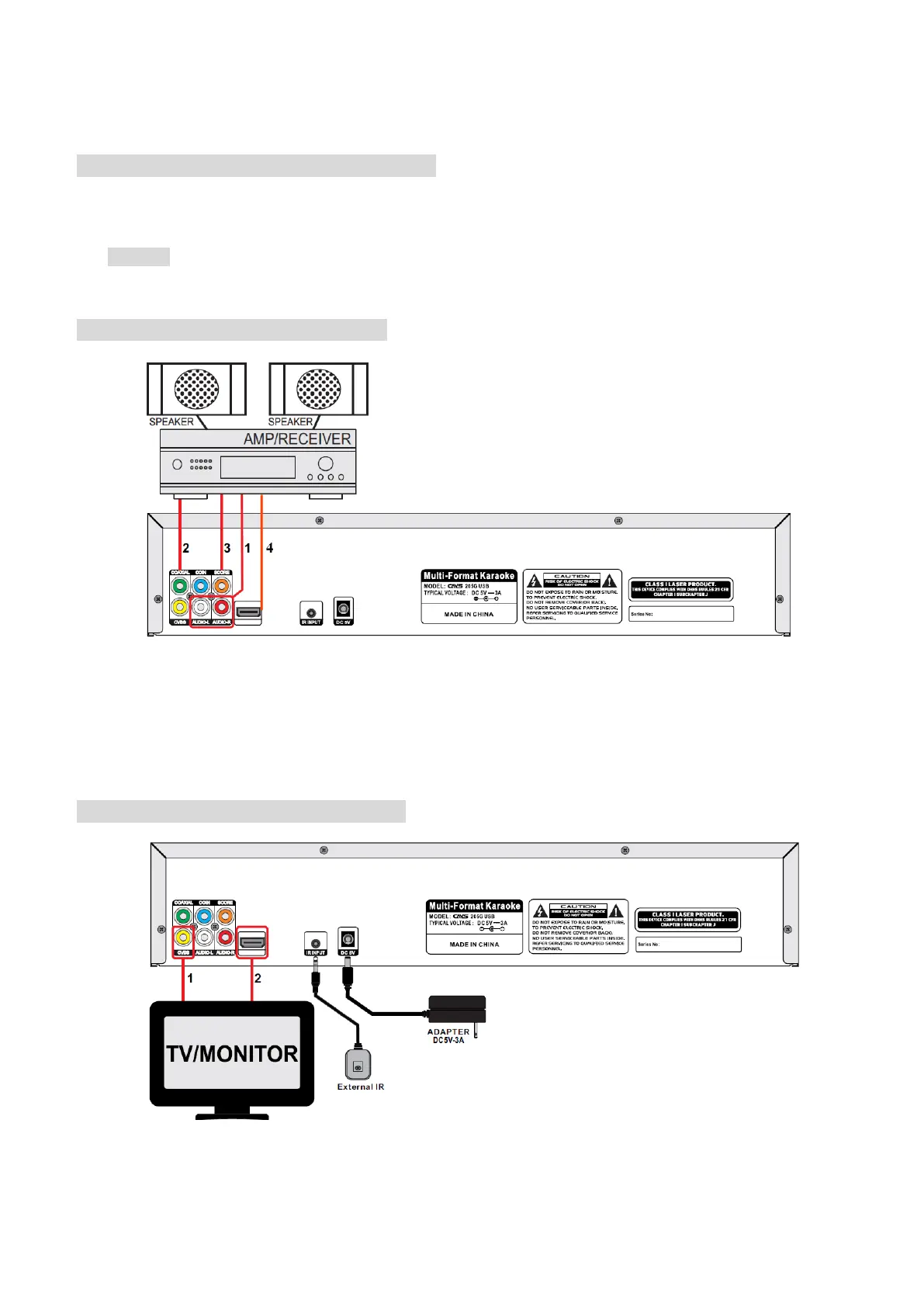
Connecting the Audio Out to Amplifier
1. Connect Audio L/R to the amplifier. When the player is connected with microphone, the audio output contains
both the music and singing for Karaoke.
2. Connect Coaxial (Digital) to the amplifier. The audio output does not contain the microphone singing.
3. SCORE INPUT: When microphone is connected to the amplifier, connect a cable between MIC OUTPUT of the
amplifier and SCORE of the Player to generate the Score after singing.
4. For digital amplifier, connect HDMI to the amplifier. When the player is connected with microphone, the audio
output contains both the music and singing for Karaoke.
Connecting the Video Out to TV/Monitor
1. Connect Composite to the TV/Monitor.
2. Connect HDMI to the TV/Monitor. The output contains both video and audio from the Player. When the Player is
connected to microphone, the audio output contains both the music and singing for Karaoke.



 To Next Page