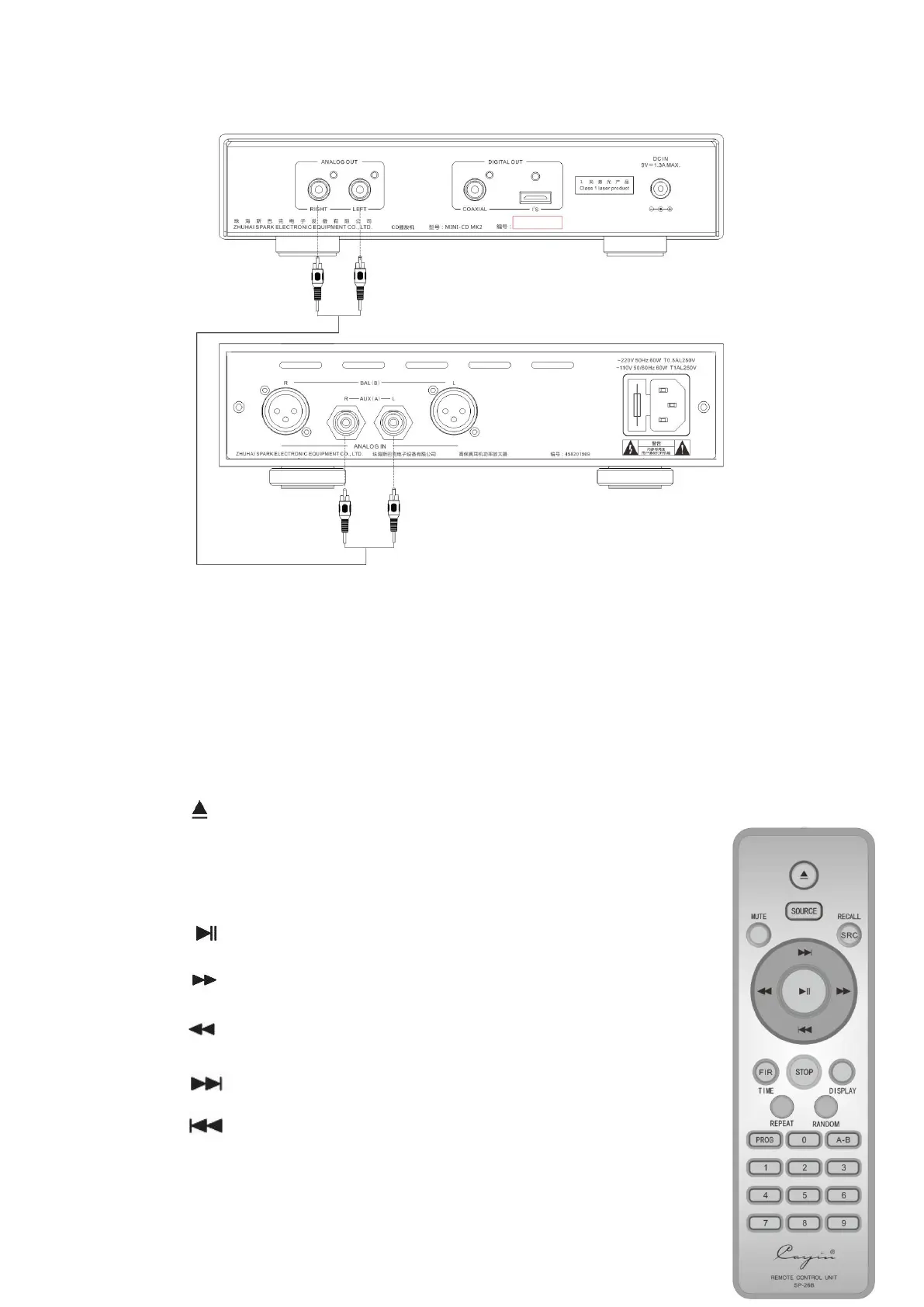
3. Connect to D/A converter
Connect the coaxial digital output terminal to the coaxial digital input terminal of the
DAC with a standard 75Ω coaxial digital cable. After D/A conversion, connect it to the
power amplifier with an analog audio signal cable, as shown in the figure below.
You can also connect the HDMI interface to the HDMI port of the DAC with HDMI
cable. After D/A conversion, connect it to the power amplifier with the analog audio
signal cable, as shown in the figure below.
Remote Control Unit
1. “ ”:Insert/eject disc
2. “SOURCE”: Nonfunctional
3. “MUTE”: Mute button
4. “SRC”: Sample Rate Converter option, “RECALL” is unavailable
5. “ ”: Play/Pause button
6. “ ”: Fast-Forward button
7. “ ”: Fast-Reverse button
8. “ ”: Refer to "5. Track search" in "Basic Operation"
9. “ ”: Refer to "5. Track search" in "Basic Operation"
10. “FIR”: Filter option, “TIME” is unavailable


 To Next Page