1716
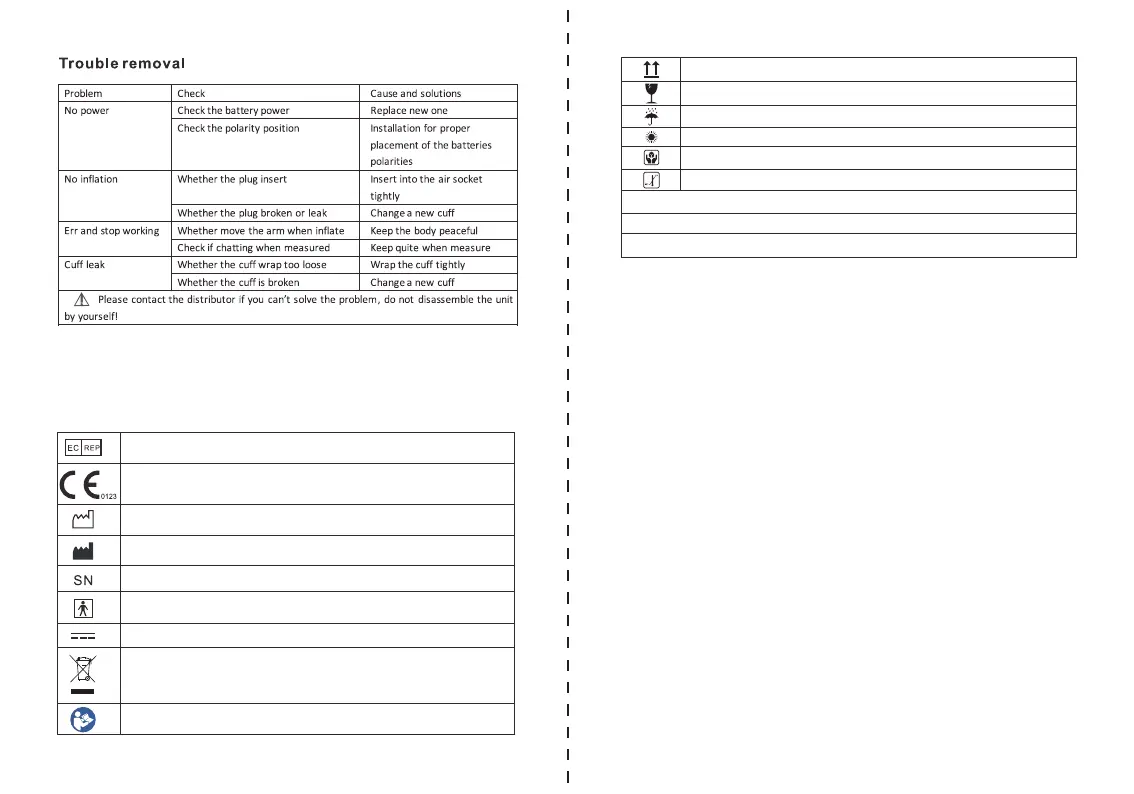
The following symbols may appear in this manual, on the Digital Blood
Pressure Monitor B26, or on it's accessories. Some of the symbols represent
standards and compliances associated with the Digital Blood Pressure
Monitor B26 and its use.
SYMBOL DESCRIPTIONS
Authorized Representative in the European Community
CE Mark: conforms to essential requirements of the Medical
Device Directive 93/42/EEC.
Date of manufacture.
Manufacturer
Specifies serial number
Type BF applied part
Direct current
DISPOSAL: Do not dispose this product as unsorted municipal
waste. Collection of such waste separately for special treatment
is necessary.
Follow instructions for use
At the end of a measurement, this monitor automatically stores each result
with date and time. Each device stores 120 sets measurements for 2 users,
totally 240 sets(User A and B).
5.7. Memory
With the device off, press the MEM button. The display first shows "A", then
shows an average of all measurements stored in the device. Please note:
Measurements for each user are averaged and stored separately. Be certain
that you are viewing the measurements for the correct user. Pressing the
MEM button again displays the previous value. To view a particular stored
memory, press and hold the MEM button to scroll to that stored reading.
Viewing the stored values
If it is necessary to interrupt a blood pressure measurement for any reason
(e.g the patient feels unwell), the Start/Stop button can be pressed at any
time. The device then immediately lowers the cuff pressure automatically.
5.8. Discontinuing a Measurement
Batteries discharged– replacements required
When the batteries are discharged, the battery symbol will flash as soon as
the device is switched on. You cannot take any further measurements and
must replace the batteries.
5.9. Battery Change Indicator
Put up
Fragile
Keep dry
Avoid the sun
Handle gently
Temperature range
No Sterilize requirement
Not category AP / APG equipment
Mode of operation: continuous


 To Next Page