1918
5.10. Using the AC Adapter
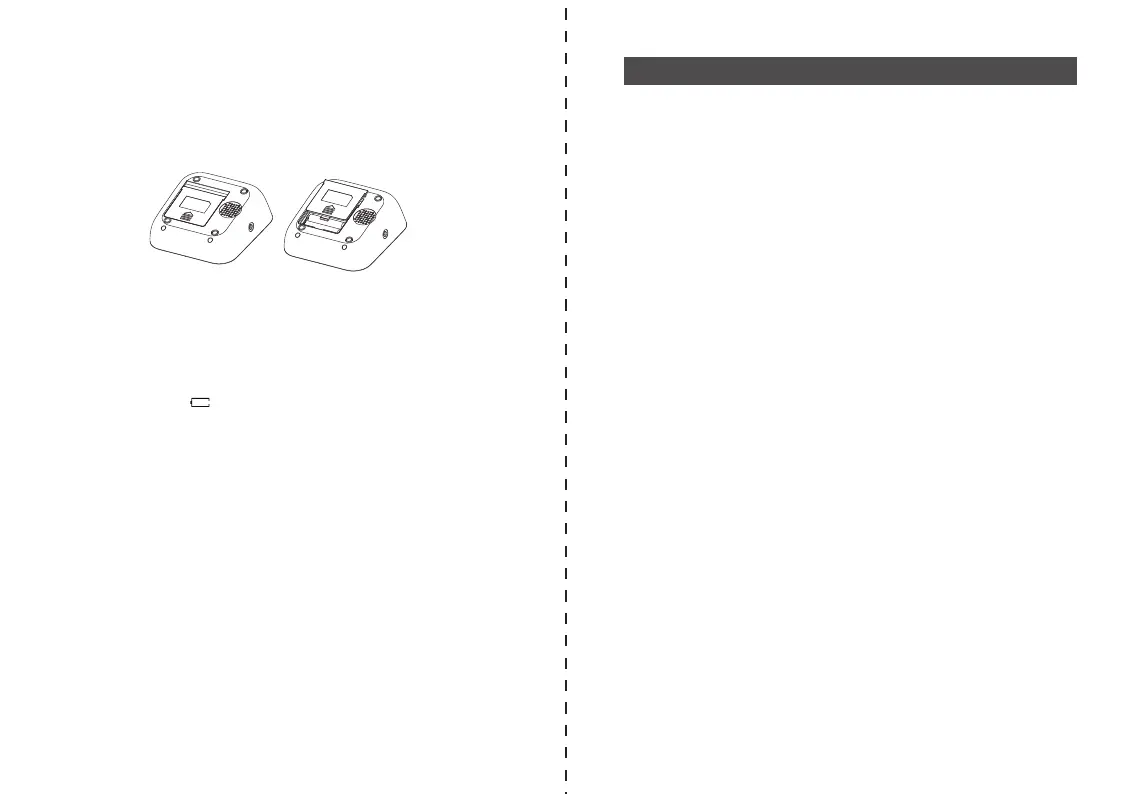
The battery compartment is located on the back side of the device
a) Remove cover from the bottom plate, as illustrated below picture-08
b) Insert the batteries (4 x size AAA ). Always use AAA long life batteries or
alkaline 1.5v batteries.
c) The memory retains all values although date and time must be reset - the
year number therefore flashes automatically after the batteries are replaced.
d) To set date and time, follow the procedure described in Section 4.2.
Battery Type and Battery Life?
Use four new, long life 1.5V AAA batteries. Do not use batteries beyond their
expiration date. If the monitor is not going to be used for a prolonged period the
batteries should be removed.
Using rechargeable batteries
You can also operate this device by using using rechargeable batteries.
•Only use "NiMH" reusable batteries!
• If the battery symbol appears , the batteries must be removed and
recharged! They must not remain inside the instrument, as they may become
damaged through total discharge even when switched off. The batteries must
NOT be discharged in the blood pressure monitor! If you do not intend to use
the instrument for a week or more, always remove the rechargeable batteries!
• Recharge these batteries using an external charger and follow manufacturer’s
instructions carefully.
You may also operate this monitor using the AC adapter (output 5V DC/1A
with Micro USB plug).
Use only the approved AC adapter to avoid damaging the charged.
a) Ensure that the AC adapter and cable are not damaged.
b) Plug the adapter cable into the AC adapter port on the right side of the
blood pressure monitor.
c) Plug the adapter into your electrical outlet. When the AC adapter is
connected, no battery current is consumed.
Picture-08
6.Care and Maintenance
Note: No power is taken from the batteries while the AC adapter is connected
to the monitor. If electrical power is interrupted,(e.g., by accidental removal of
the AC adapter from the outlet) the monitor must be reset by removing the
plug from the socket and reinserting the AC adapter connection.
Wash hands after each time measurement.
If one device is used by different patients, wash hands before and after each
use.
a) Do not expose the device to either extreme temperatures, humidity, dust or
direct sunlight.
b) The cuff contains a sensitive air-tight bubble. Handle this cuff carefully and
avoid all types of stress through twisting or buckling.
c) Clean the device with a soft, dry cloth. Do not use gas, thinners or similar
solvents. Spots on the cuff can be removed carefully with a damp cloth and
soapsuds. The cuff with bladder must not be washed in a dishwasher, clothes
washer, or submerged in water.
d) Handle the tube carefully. Do not pull on it. Do not allow the tubing to kink
and keep it away from sharp edges.
e) Do not drop the monitor or treat it roughly in any way. Avoid strong
vibrations.
f) Never open the monitor! This invalidates the manufacturer’s warranty.
g) Batteries and electronic instruments must be disposed of in accordance
with the locally applicable regulations, not with domestic waste.
6.1. Accuracy test
Sensitive measuring devices must be checked for accuracy from time to time.
We recommend a periodical inspection of your device by an authorized
dealer every 1 year. Please turn to local distributor or the manufacturer.


 To Next Page