EasyManua.ls Logo

CB2 Helix - User Manual

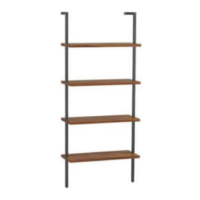
CB2 Helix
2 pages
Print Icon
To Next Page IconTo Next Page
Loading...
4 - shelves
2 - side
supports
(1 left, 1 right)
1
16 - bolts
phillips head screwdriver
2 - screws
2 - plastic
anchors
2 - adjustable
feet
1/4” drill bit
allen wrench (included)
hardware
components
tools required
Thank you for purchasing the Helix Bookcase. This
page
lists all the contents included in the box. Please
take the time
to identify the hardware as well as the
individual components
to this product. As you unpack
and prepare for assembly, place the contents on a
carpeted or padded area to protect them from
damage.
Note: 2 people are required to safely assemble this product.
Missing hardware?
Please call 800.606.6387 for replacements.
Attach 4 shelves to left side support with 2 bolts
per shelf as shown. Secure bolts with an allen
wrench.
Made in Taiwan - r06 Page 1 of 2Customer Service 800.606.6252 | Latest instructions available at www.cb2.com
helix BOOKCASE
Question and Answer IconNeed help?

Do you have a question about the CB2 Helix and is the answer not in the manual?

Summary

Hardware and Tools

Hardware Identification

Lists all included hardware: bolts, screws, adjustable feet, and plastic anchors.

Tools Required for Assembly

Specifies necessary tools: phillips head screwdriver, 1/4" drill bit, and allen wrench.

Bookcase Components

Main Parts Identification

Identifies the primary components: two side supports and four shelves.

Assembly Instructions

Step 1: Attach Shelves to Left Support

Secures four shelves to the left side support using bolts and an allen wrench.

Step 2: Attach Right Support and Feet

Connects the right side support to shelves and attaches adjustable feet to the bottom.

Step 3: Position and Mark for Wall Mounting

Places the unit against the wall, levels supports, and marks hole locations.

Step 4: Secure to Wall

Drills holes, inserts anchors, and screws the unit to the wall.

Cleaning and Care

CB2 Helix Specifications

General IconGeneral
BrandCB2
StyleModern
TypeSide Table
NameHelix
MaterialWood

Related product manuals