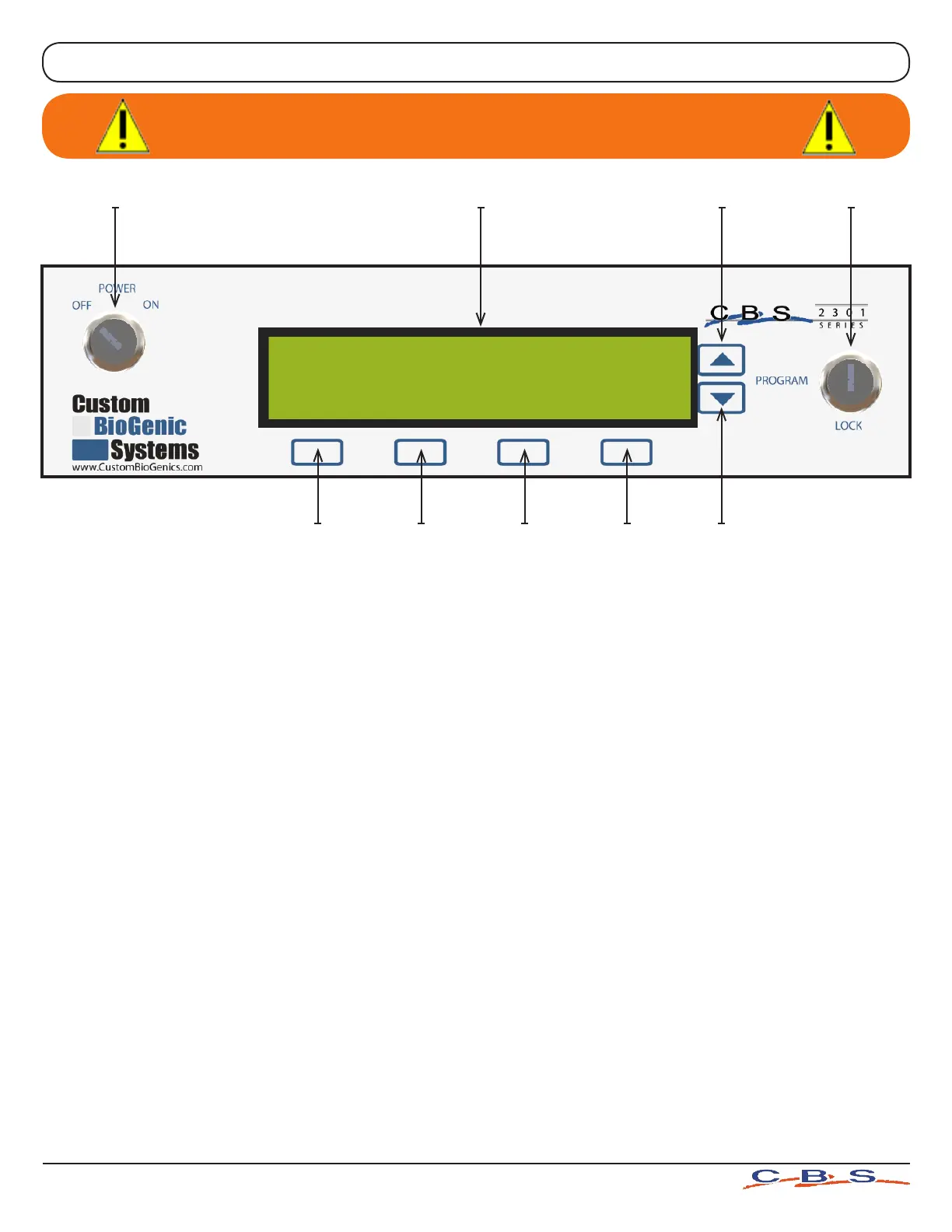
1. Key - Switch Power Control - Main power control for the unit.
2. LCD Display Window - Text interface for the storage unit electronic settings. See page 13
for complete listing of all display menus and functions.
3. First Menu Select Button - This is used to select various control menus and to make
changes in programming as shown by the text which appears above the button.
4. Second Menu Select Button - This is used to select various control menus and to make
changes in programming as shown by the text which appears above the button.
5. Third Menu Select Button - This is used to select various control menus and to make
changes in programming as shown by the text which appears above the button.
6. Fourth Menu Select Button - This is used to select various control menus and to make
changes in programming as shown by the text which appears above the button.
7. Scroll “Down” Button - Scrolls to lower numbers when programming electronics.
8. Scroll “Up” Button - Scrolls to higher numbers when programming electronics.
9. “Program / Lock” Key Switch - Switches the controller between the Standard Operat-
ing Mode and the Program Mode. Also protects electronic programming from being
changed by unauthorized personnel.
1
2 8 9
7
6
5
4
3
www.custombiogenics.com
6
Warning: Depressing buttons with pointed objects
(Pen, Pencil, etc.) will damage buttons
FRONT PANEL CONTROLS



 To Next Page