3.5 Screen adjustment
Mode 1:
a) Apply a gray scale pattern.
b) Adjust the controls to:
ü Brightness - 50%
ü Contrast - 70%
c) Measure DC voltage on the three cathodes (CRT) (one at a time) and select the highest
one.
d) Connect a X100 test tip to the selected cathode (highest voltage DC).
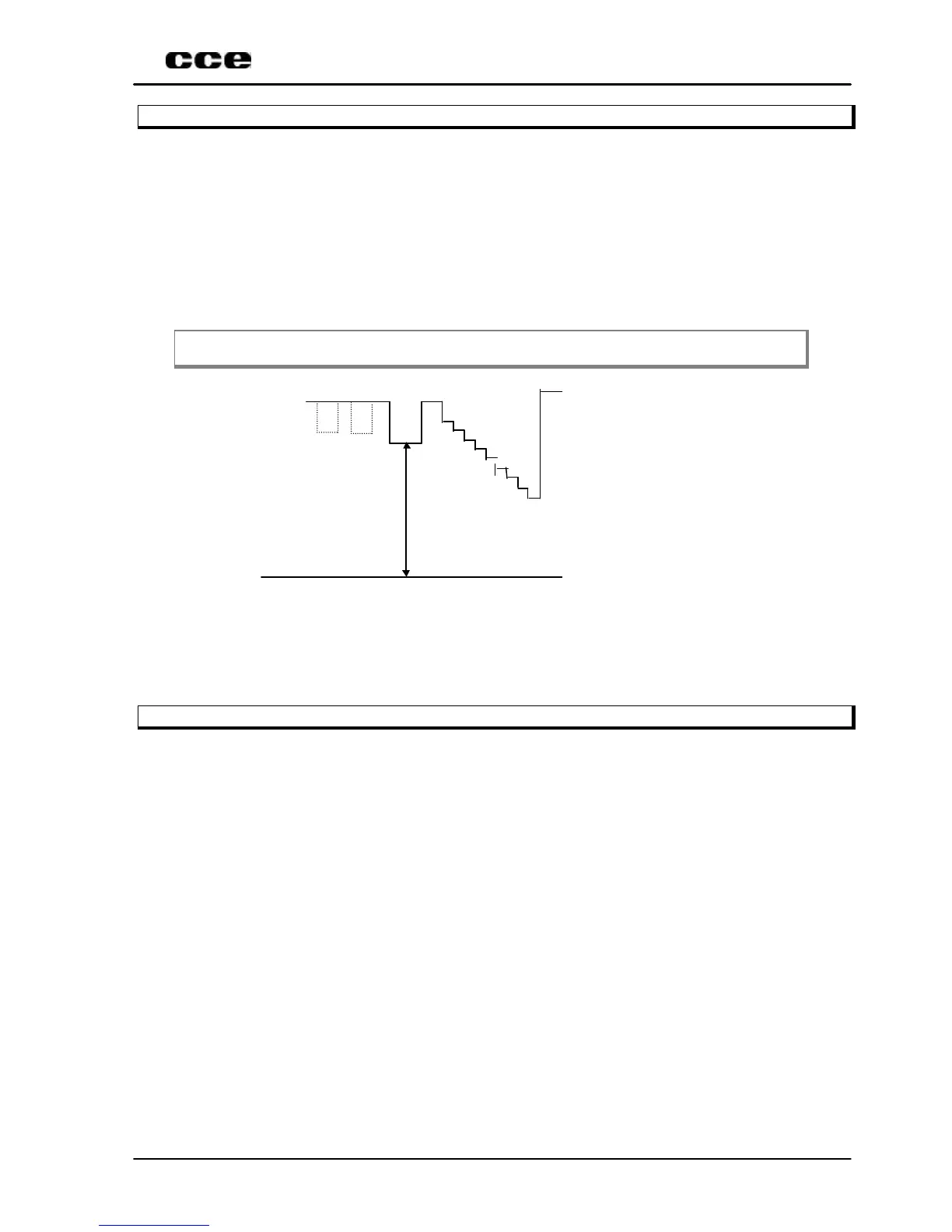
e) Adjust the screen potentiometer to obtain 130V, according to the illustration bellow:
Note. The oscilloscope should be positioned in the vertical mode.
150 Volts
GND
Mode 2:
a) Select the register 99 (VSD).
b) Press VOLØ or ×VOL to select and adjust the screen control localized on the FBT, until
the horizontal line be slightly visible on the screen center.
3.6 AGC adjustment
Mode 1:
ü Apply a PHILIPS pattern with 60dBµV of intensity and adjust the delay until obtain 3.5V
in AGC pin of tuner.


 To Next Page