Technical instructions Mini Brio X15CA v1.0EN
www.ccei.ca
5
4. Use - Autonomous mode
In the absence of a control unit, the projectors operate autonomously and the user can choose between
18 modes: 11 set colours and 7 programmes;
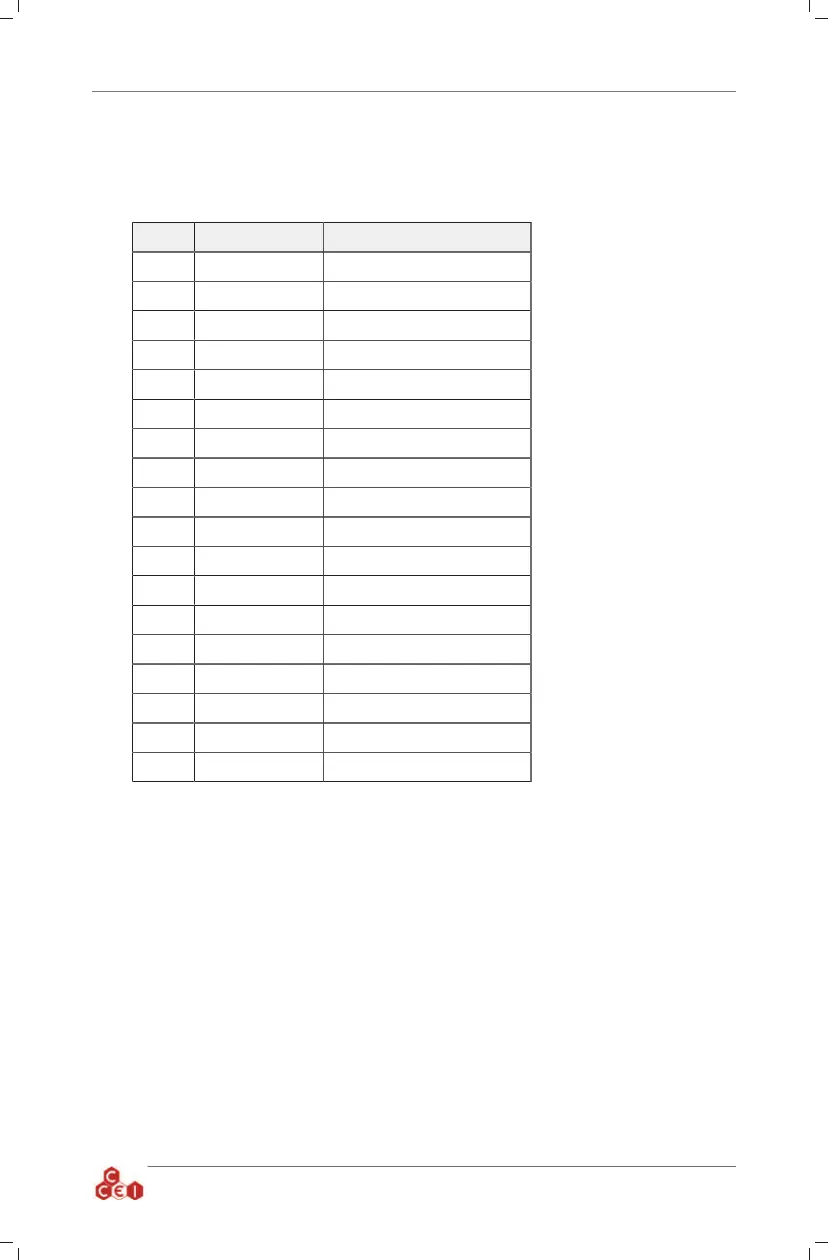
Mode Type Description
1 Set colour Pure white
2 Set colour Blue
3 Set colour Blue lagoon
4 Set colour Cyan
5 Set colour Violet
6 Set colour Magenta
7 Set colour Pink
8 Set colour Red
9 Set colour Orange
10 Set colour Green
11 Set colour Sea green
12 Sequence Quick "Rainbow"
13 Sequence Slow "Rainbow"
14 Sequence Procession of 11 set colours
15 Sequence Colourful psychedelic flashes
16 Sequence Blue/White/ Cyan
17 Sequence Random sequence 1
18 Sequence Random sequence 2
Change of mode
The mode can be changed by cut-
ting the power supply of the pro-
jectors for a very short space of
time (less than 1s).
By successive interruptions, it is
possible to display the 18 oper-
ating modes. After mode 18, the
Mini Brio X15 return to the first
colour (mode 1)
Reset
To reset the projectors and take
them to mode 2 at the same time,
the power supply should be cut
for approximately 2s.
When the projector is started up
after a cut of several seconds
(more than 4s), the Mini Brio
X15 loads back up in the mode
displayed at the time it was last
shut down.
5. Safety
If the temperature inside the Mini Brio X15 is abnormaly high, a safety device shuts off the lighting
and produces a red flashing light. As soon as the normal temperature returns, the projectors return to
normal working order.



 To Next Page