3
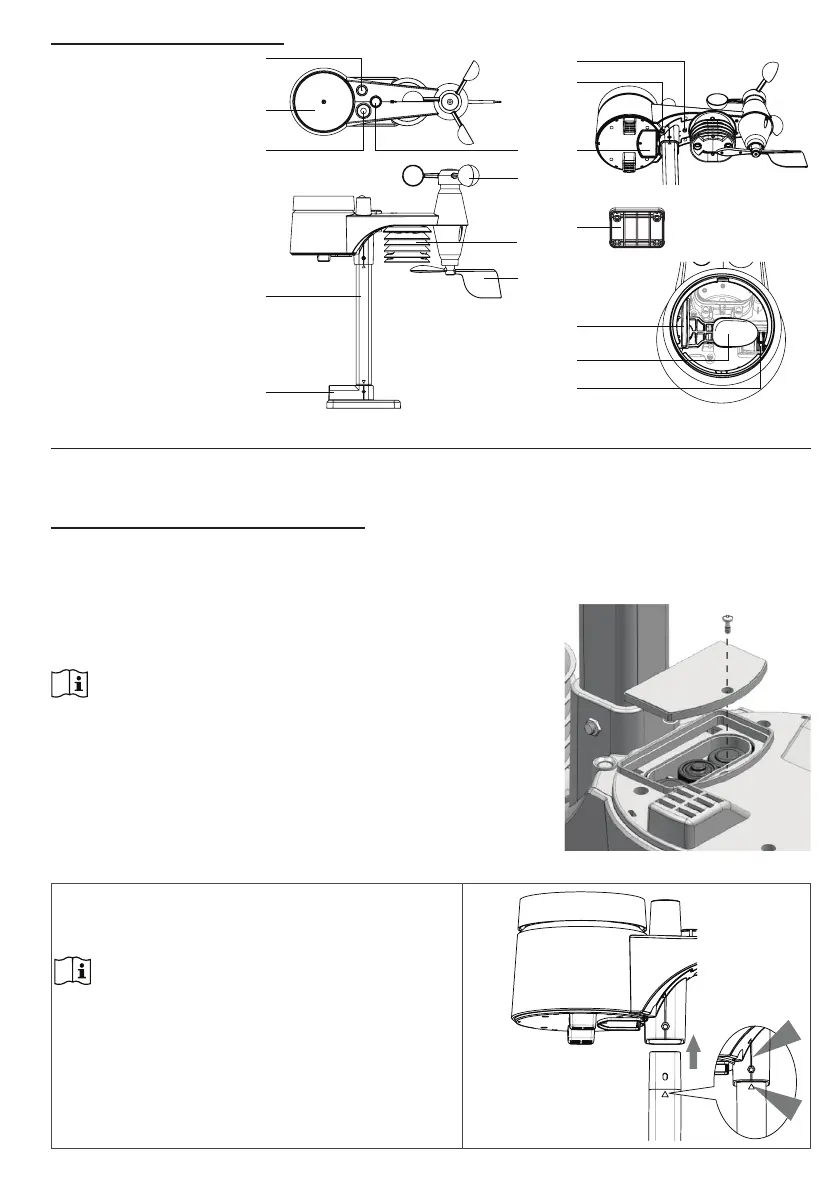
WIRELESS 7-IN-1 SENSOR
1. Antenna
2. Rain collector
3. UVI / light sensor
4. Mounting pole
5. Mounting base
6. Balance indicator
7. Wind vane
8. Radiation shield
9. Mounting clamp
10. Red LED indicator
11. [ RESET ] key
12. Battery door
13. Mounting clamp
14. Rain sensor
15. Tipping bucket
16. Drain holes
2
3 6
1
4
5
7
9
8
12
13
14
11
15
16
10
INSTALLATION AND SETUP
Your console can pair up with one wireless 7-in-1 wireless sensor and up to 7 wireless indoor sensors.
(Optional)
INSTALL WIRELESS 7-IN-1 SENSOR
Your wireless 7-IN-1 sensor measures wind speed, wind direction, rainfall, UV index, light intensity,
temperature and humidity for you. It’s fully assembled and calibrated for your easy installation.
BATTERY AND INSTALLATION
Unscrew the battery door at bottom of unit and insert the
batteries according to the +/- polarity indicated.
Screw the battery door compartment on tightly.
NOTE:
- Ensure the water tight O-ring is properly aligned in place to
ensure water resistant.
- The red LED will begin ashing every 12 seconds.
ASSEMBLY THE STAND AND POLE
Step 1
Insert the top side of the pole to the square hole of the
weather sensor.
NOTE:
Ensure the pole and sensor's indicator align.


 To Next Page