Perfect For
•Non-contactsurfacetemperatures
Easy To Use
•1-secondresponse
•8-beamlasertargetillumination
•Backlit
•Data-hold
•One-buttonoperation
Features
•Shatterproof
•Memory
•Maximum,minimum,difference,averagewithlockfor
continuousscanning
•Highandlowalerts
•Distance:spot=12:1
•Batterystatusindication
•ABSplastic
•Auto-off
•Batteriesandinstructionsincluded
Get Professional Results
Every Time!
Monitoringtemperatureisessentialtokeepingfood
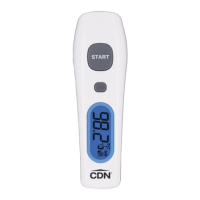
safe.TheversatileIN1022isperfectforanyapplication.
Simplypointtheinfraredsensorlenstowardthetarget
andpressthetriggertogetaquickreadingofsurface
temperatures.
Maximum, Minimum, Difference
and Average Modes
TheIN1022alsooffersMaximum,Minimum,Difference
andAveragemodes.Maximummodedisplaysthehighest
temperatureamongmultipletargets.Minimummode
displaysthelowesttemperatureamongmultipletargets.
Differencemodedisplaysthedifferencebetweenthe
maximumandminimumtemperaturemeasurements
ofmultipletargets.WhileAveragemodedisplaysthe
averagetemperaturemeasurementsofmultipletargets.
Lock Mode
Lockmodecontinuouslymeasuresthetemperature
forupto60minutes.Thisisparticularlyusefulfor
continuoustemperaturemonitoring.
High and Low Alerts
TheIN1022providesaprogrammablehighandlowalert
formeasurementsthatareoutofthedesiredrange.
Note:Removestickerfromdisplaybeforeuse.
Note:Inthefollowinginstructions,namesofthecontrol
buttonsareshowninCAPS.Functioninformationthatappears
onthedisplayisshowninBOLD CAPS.
Battery Installation
ReplacebatterywhenLCDbecomesdimoralarm
leveldeclines.Powerofftheunitbeforeinstallingthe
batteries.Amalfunctionmayoccurifthepowerison
whenthebatteryisinstalled.Ifamalfunctionoccurs,
restartthedevice.
1.Removebatterycoverbyslidingitinthedirectionof
thearrow.
2.Installtwo1.5VAAAbatteriesobservingpolarity
shownincompartment.
3.Replacethebatterycoveruntilitclicksshut.
Model: IN1022
Infrared Gun
-76to+1022°F/-60to+550°C

 Need help?
 General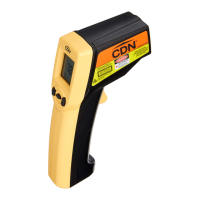

 To Next Page