EasyManua.ls Logo

CDN THD2FE - User Manual

CDN THD2FE
16 pages
Print Icon
To Next Page IconTo Next Page
Loading...
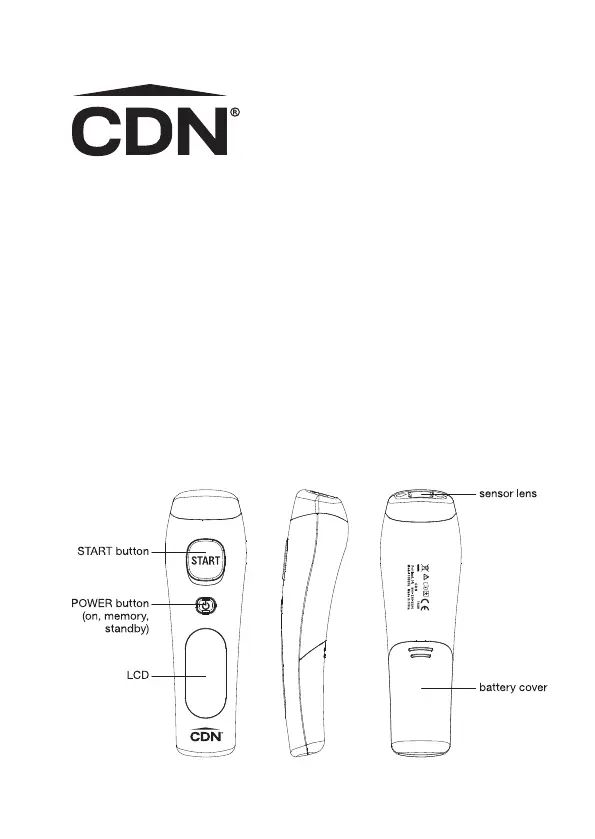
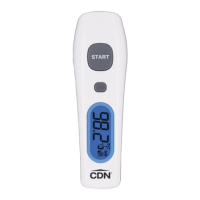
NON-CONTACT FOREHEAD
THERMOMETER
Forehead mode: 93.2 to 108°F/34 to 42.2°C
Surface mode: -7.6 to +176°F/-22 to +80°C
Model THD2FE

Other manuals for CDN THD2FE

Questions and Answers

  • M
    Mr. Mario GarciaAug 12, 2025
    What to do if ambient temperature is out of range for CDN THD2FE Thermometer?
    • L
      lawrenceballAug 13, 2025
      If the ambient temperature is outside the range of 50 to 104°F (10 to 40°C), allow the CDN thermometer to sit in a room with a temperature within this range for at least 15 minutes.
  • R
    Ricky KingAug 16, 2025
    How to fix a CDN THD2FE that won't turn on?
    • S
      Stuart NguyenAug 16, 2025
      If your CDN Thermometer won't power on, try replacing the old batteries with a fresh set of new batteries.
  • V
    Vanessa HendersonAug 20, 2025
    What to do if my CDN THD2FE shows Error 5-9?
    • C
      Casey MarshallAug 21, 2025
      If your CDN Thermometer displays Error 5-9, unload the battery, wait one minute, and then repower the device. If the message continues to appear, no further troubleshooting is available.
  • C
    Cynthia MorrisonAug 25, 2025
    What to do if my CDN Thermometer displays 'Er1'?
    • R
      rogergarzaAug 25, 2025
      If you see “Er1” on your CDN Thermometer, wait for “Er1” to disappear before taking a measurement. This indicates that the device is still stabilizing.
  • J
    James HensonAug 27, 2025
    What to do if my CDN THD2FE Thermometer won't turn on?
    • S
      Sara EllisonAug 28, 2025
      If your CDN Thermometer is not powering on, try replacing the old batteries with a set of new ones.
  • A
    Alexandria GarciaAug 31, 2025
    What to do if I get Error 5-9 on my CDN THD2FE?
    • D
      David NelsonAug 31, 2025
      If you receive Error 5-9 on your CDN Thermometer, unload the battery, wait one minute, and then repower the device. If the error message reappears after doing this, no answer.
  • K
    Kelly PageSep 4, 2025
    Why does my CDN THD2FE give a temperature outside the specified range?
    • J
      Juan JosephSep 4, 2025
      If your CDN Thermometer displays an error related to ambient temperature, allow the thermometer to rest in a room for at least 15 minutes where the temperature is between 50 to 104°F (10 to 40°C).
  • B
    Brian JenkinsSep 8, 2025
    What does 'Er1' mean on my CDN THD2FE Thermometer and how to fix it?
    • K
      Kelly Vega PhDSep 8, 2025
      If you see “Er1” on your CDN Thermometer, it means the device is still stabilizing. Wait for “Er1” to disappear before taking a measurement.

Summary

Non-Contact Forehead Thermometer

Usage

Indications for Use

Defines the intended purpose and user group of the thermometer.

Intended Operator

Specifies the minimum age and experience required for the operator.

Ambient Temperature

Advises on acclimatizing the device to room temperature before use.

Points of Attention

Highlights crucial operational considerations and measurement equivalencies.

Before We Begin

Battery Installation

Operating Instructions

On;Off

Instructions for powering the thermometer on and off, and auto shut-off.

Temperature Scale

How to switch between Fahrenheit and Celsius measurement scales.

LCD Backlight

Explains the automatic activation of the LCD backlight during readings.

Forehead Mode

Details how to use the thermometer for forehead temperature measurements.

Surface Mode

Instructions for using the thermometer to measure surface temperatures of objects.

Trouble Shooting

Battery Status

Care of Your Product

Precautions

Specifications

Symbol Descriptions

Manufacturers Declaration Electromagnetic Emissions

Manufacturers Declaration Electromagnetic Immunity

Recommended Separation Distances

1-Year Limited Warranty

CDN THD2FE Specifications

General IconGeneral
Accuracy+/- 1°F between 32-212°F, +/- 2°F elsewhere / +/- 0.5°C between 0-100°C, +/- 1°C elsewhere
PowerBattery
Battery TypeAAA (1.5V)
Display TypeLCD
TypeDigital
Resolution0.1°F/°C
DisplayDigital
MaterialStainless Steel
FeaturesAuto Power Off
Response TimeApprox. 5 seconds
Auto Power OffYes

Related product manuals