7
F. Trouble Shooting
Error Message Problem Solution
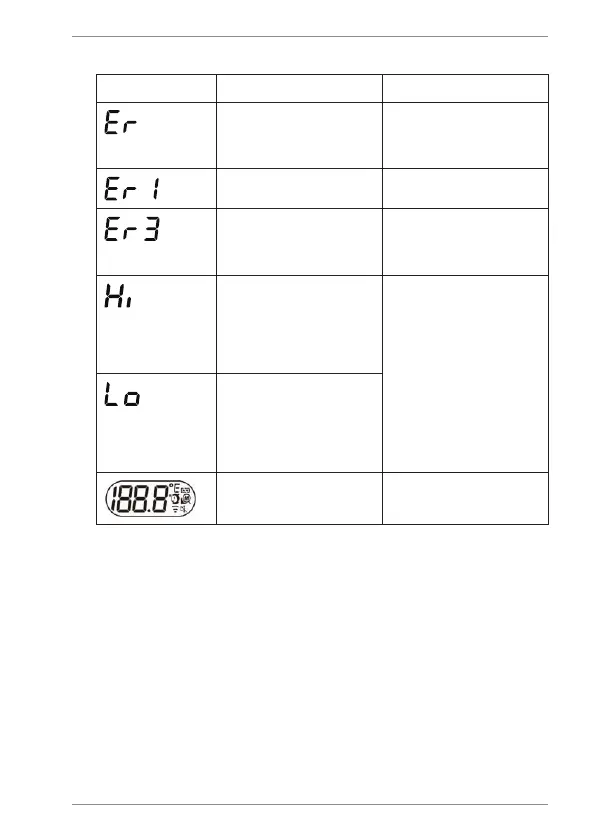
Error 5-9, the system is not
functioning properly.
Unload the battery, wait for 1
minute and repower it. If the
message reappears, contact
CDN for further assistance.
Measurement before device
stabilization.
Wait for “Er1” to disappear.
The ambient temperature is not
within the range between 50 to
104°F (10 to 40°C).
Allow the thermometer to rest in
a room for at least 15 minutes at
room temperature: 50 to 104°F
(10 to 40°C).
Forehead mode: Temperature
taken is higher than 108°F
(+42.2°C)
Surface mode: Temperature
taken is higher than 176°F
(+80°C)
Select the target within
specications. If a malfunction
still exists, contact CDN for
further assistance.
Forehead mode: Temperature
taken is lower than 93.2°F
(+34°C)
Surface mode: Temperature
taken is lower than -7.6°F
(-22°C)
Device cannot be powered on to
the ready stage.
Replace batteries with new
batteries.


 To Next Page