EasyManua.ls Logo

CDVI CDV-DDP - Door Station Configurations

CDVI CDV-DDP
24 pages
Print Icon
To Next Page IconTo Next Page
To Previous Page IconTo Previous Page
Loading...
6. Door Station Congurations
1. About room code(address):
RoomCode(alsocalledroomaddress)isacodeassignedtoeachmonitor,toidentifydifferent
monitors;eachmonitorhaveauniqueroomcodeinonebuildingroomCodeisstoredineach
Monitor’sinnerEEPROMmemory,anddoesnotloseeventhemonitorispoweroff.
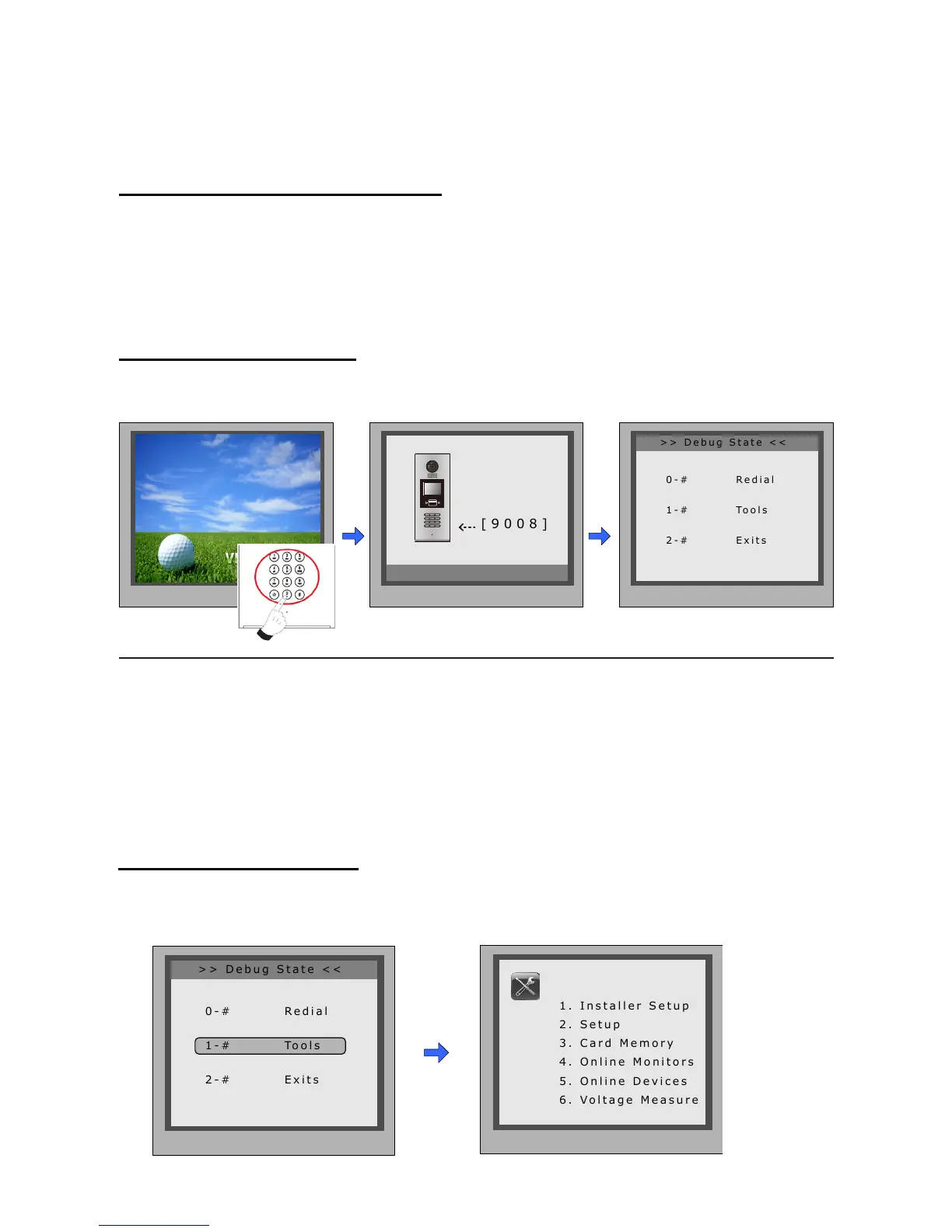
2. About Debug State:
TheDebugStateisyourstartingpointforusingalltheapplicationsonCDV-DDP.
WhenDoorStationisin
standby,press'#'key
Press"2#"keytoexitoutthedebugstate.
input'9008',theninputthe
AdminCode.(66666666by
default)
DebugStatemenuislaunched
[ 9 0 0 8 ]
Please Input Password
1 2 3
654
7 8 9
#0
*
RF CARD
> > D e b u g S t a t e < <
1 - # To o l s
0 - # R e d i a l
2 - # E x i t s
3. About Debug Tools:
DuringworkingatDebugState,press"1#"toentertoolspage,DebugToolsoverviewsisshown
asbelow:
1 . I n s t a l l e r S e t u p
2 . S e t u p
4 . O n l i n e M o n i t o r s
5 . O n l i n e D e v i c e s
6 . V o l t a g e M e a s u r e
Pres NO.
to select
*Back
Tools
> > D e b u g S t a t e < <
0 - # R e d i a l
2 - # E x i t s
1 - # To o l s
-8-

Related product manuals