Pres NO.
to select
*Back
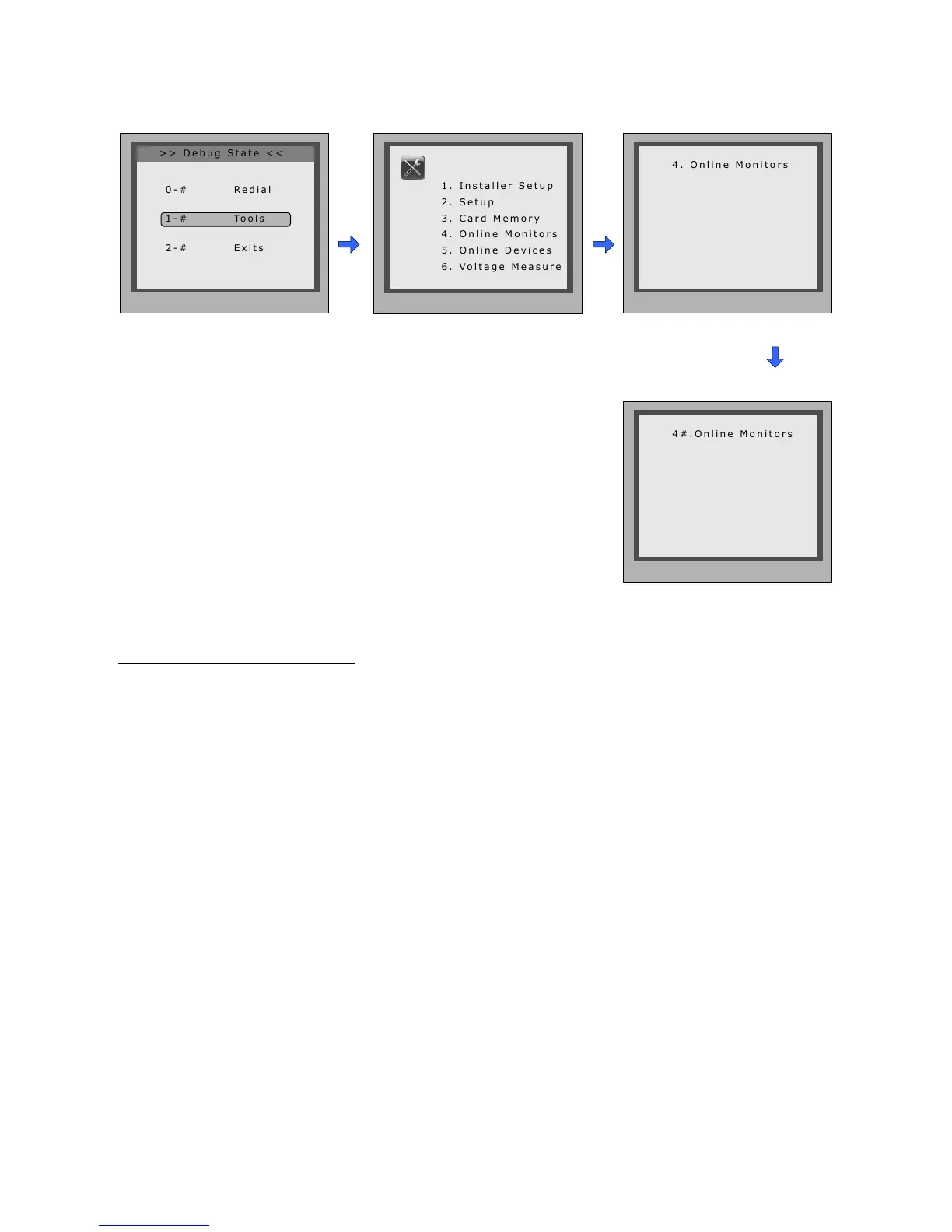
Tools
InDebugState,press'1#'
key
Press'4'key Input2digits
monitorcode
SearchRange:inputthemonitoraddress.Forexample,
inputtherangefrom01to05.Youwillseetheconnection
statusoftheselectedmonitors.
13. Namelist function:
ThedoorstationisdesignedtohavedigitalkeypadandbigTFTscreen.Itsnamelistwasshown
onthescreenandcustomercandothecallingoperationthroughthedigitalkeypadguidedby
Namelistonthescreen.2typesofnamelistcanbeshownonthescreen:DT-Congnamelist
andSimulatenamelist.
Enter namelist page:
Check online monitors:
Send namelist to monitors
Press'9#'instandbymodetodisplaytheusernamelist.Press"#"keytoscrollnext/lastpage.
andusekey1to8keyoneachpagetocalltheatyouwant.PleaserefertotheDT-Cong
softwareuserinstructionsforcongurethenamelist.
Thenamelistcanbesenttomonitorsbydoorstationdirectly.Connectthedoorstationandmon-
tiorscorrectlytothesystem.Thenpress#8012instandbymode,andinputpassword(66666666
bydefault)tosendnamelisttoallthemonitors.
-20-



 To Next Page