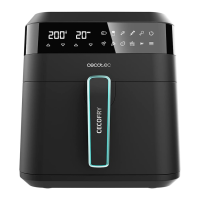
BAKE&FRY 2500 TOUCH/WHITE
41
ENGLISH
(2) Power On/Off
Press the On/Off icon to turn the appliance on and off.
(4) Display: Time
Here, the appliance will show the programme’s cooking time set or the one set previously.
Once it starts cooking, it will show the countdown.
(5) Display: Temperature
Here, the appliance will show the temperature of the set programme, or the temperature set
during the cooking process.
(7) Start/Pause
Touch the Start/Pause icon to start or cancel a program.
Note: Remember that the cooking process can be paused by opening the oven’s door, and when
closed again, the programme will be resumed.
(8) Preheat
programme, press the Reheat icon for the appliance to star working automatically. It is not
necessary to tap the Start/Pause icon to start the Preheat function. Once the preheating cycle
be cooked. Tao the Start/Pause icon for the programme to start.
(9) Light switch
Tap the light icon to turn the appliance’s light on and off. Once it is turned on, it will automatically
turn off after 5 minutes.
(10) Temperature
The icon allows modifying the cooking temperature. Press the temperature icon and then icons
(11) Time




 To Next Page